

Skald — Multi-Cam Recording
TOLAR AS Photo & Video iPhoneiPadiPod touch
Skald — Multi-Cam Recording is a free Photo & Video app for iPhone and iPad by TOLAR AS. Requires iOS 17.6. Updated October 24, 2026.
- Price
- Free
- on the App Store
- Size
- 20 MB
- Age 4+
- Updated
- Oct 24
- 2026 · v1.3
Screenshots



About Skald — Multi-Cam Recording
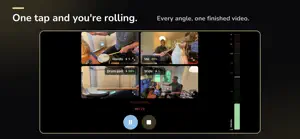
Skald turns the iPhones and iPads you already own into a synchronized multi-camera recording rig. Set up in minutes, press record, play your set — and walk away with one finished multi-cam video. No timeline editing, no syncing clips by hand, no cloud. Built for musicians recording themselves: rehearsals, live gigs, music videos, recitals. Solo artists to full bands. HOW IT WORKS • Skald runs on your iPad (or iPhone) as the controller • The free companion app Skald Cam runs on up to four other iPhones or iPads — each one a camera angle • Everything connects over your own Wi-Fi or an iPhone hotspot. Each camera pairs in seconds — Skald Cam finds Skald automatically • Skald mixes the angles live and records one synchronized 1080p video LIVE MIX MODES • Split — all cameras in a grid • Democratic — switches automatically between cameras in a predefined pattern • Spotlight — keeps the focus on one performer, with the others rotating in • Manual — you direct the mix Real-time clock sync keeps every angle locked together. AUDIO THAT TAKES CARE OF ITSELF • Plug in a USB audio interface for professional stereo sound, or record from any camera's mic • Rank your sources in a priority list — Skald records from the one you want and fails over automatically if it drops out mid-take • Optional loudness normalization with YouTube, Apple Music, and broadcast presets — off by default so your raw levels stay untouched MADE FOR SETS, NOT CLIPS • Plan a setlist and roll through it song by song • Start recording with a tap — or let Skald start when the music does • Drop markers at the moments worth finding again • Automatic intro titles rendered into each recording — if you want them WANT TO EDIT IT YOURSELF? • Turn on multi-file recording and every camera is also saved as its own full-frame 1080p file — frame-aligned with the mix, no manual syncing • Editor import files (OpenTimelineIO + Final Cut Pro 7 XML) land next to the videos: open in DaVinci Resolve or Premiere Pro and every angle sits on its own track, master audio included • Share a whole recording — all angles plus import files — in one go YOUR RECORDINGS STAY YOURS No accounts. No analytics. No cloud. Video never leaves your devices — recordings land on the controller, organized per project, fully accessible in the Files app for backup and export. WHAT YOU NEED • One iPad (recommended) or iPhone for Skald • One iPhone or iPad per camera angle running Skald Cam (free) • A shared Wi-Fi network or iPhone hotspot • iOS 17.6 or later SUBSCRIPTION Skald is a subscription, purchased on the controller — Skald Cam is always free. • Skald 2 Cam: $4.99/month or $49.99/year — up to two cameras • Skald 4 Cam: $6.99/month or $69.99/year — up to four cameras, with a 14-day free trial for new subscribers Prices in USD; your local price is shown in the App Store. Payment is charged to your Apple Account; subscriptions renew automatically unless cancelled at least 24 hours before the period ends. Manage or cancel anytime in your Apple Account settings. Skald is a hobbyist tool that makes multi-cam recording accessible — it doesn't aim to replace professional broadcast systems. It's for the band in the basement, the songwriter filming at home, the teacher recording a recital. Questions? [email protected] — or see skald.cam for guides. Actively maintained — security fixes ship as free App Store updates. Privacy policy: https://skald.cam/privacy.html Security policy: https://skald.cam/security.html Terms of use (EULA): https://www.apple.com/legal/internet-services/itunes/dev/stdeula/
What’s new
Version 1.3 · Updated October 24, 2026
Skald 1.3 — sharper cameras on iOS 27, an easier first run, and a lighter app. • Sharper video from cameras on iOS 27: a camera on iOS 27 could get stuck at low quality and look blurry and blocky. Update Skald Cam to 1.3 on those cameras and they reach full quality. • Network check now warns when one camera sends far less video than the others, so a blocky camera shows up before the gig. • Quickstart is simpler: no setlists or songs, just record. A Marker button marks the moments worth finding again. • Recordings: tap Select, pick recordings, then Share, Save to Photos or Delete. Swipe left to delete, or long-press a recording. Inside a recording, the same actions are in the … menu. • Add a camera: a tile next to your own camera, and a row in Settings → Cameras, shows how to get the free Skald Cam app onto your other devices. • New projects start with this device's camera on, and Long press to stop / delete is off by default (Settings → Device). • Lighter on the controller: Skald uses a fraction of the processor while it isn't recording, and the VU meters and blinking indicators take far less work to draw. • Smaller fixes: the Song Library tab reads "Songs" on narrow iPhones, and Skald recognises the iPhone 17 models.
App privacy
The developer, TOLAR AS, reported these privacy practices to Apple.
Data Not Collected
The developer does not collect any data from this app.
Alternatives to Skald — Multi-Cam Recording
Looking for apps like Skald — Multi-Cam Recording? Here are 6 similar apps on the App Store. The highest rated is Director Board – Multi-Camera (5.0/5), and all 6 are free to download.
-
 Director Board – Multi-Camera
5.0
-
 Meddly
5.0
-
 Multi Camera Recorder: Unison
-
 MultiCam. Multi-device capture
-
 TallyCut
5.0
-
 Videk Director
| App | Rating | Price | Last updated | Compare |
|---|---|---|---|---|
| Skald — Multi-Cam Recording | – | Free | October 24, 2026 | |
| Director Board – Multi-Camera | 5.0 / 5 (1) | Free | Jul 8, 2026 | Compare |
| Meddly | 5.0 / 5 (2) | Free | Aug 14, 2026 | Compare |
| Multi Camera Recorder: Unison | – | Free | Sep 23, 2026 | Compare |
| MultiCam. Multi-device capture | – | Free | Oct 2, 2026 | Compare |
| TallyCut | 5.0 / 5 (1) | Free | Aug 16, 2026 | Compare |
| Videk Director | – | Free | Oct 21, 2026 | Compare |