

MultiCam. Multi-device capture
Amoura LLC Photo & Video iPhoneiPadiPod touch
MultiCam. Multi-device capture is a free Photo & Video app for iPhone and iPad by Amoura LLC. Requires iOS 17.0. Updated October 2, 2026.
- Price
- Free
- on the App Store
- Size
- 24 MB
- Age 4+
- Updated
- Oct 2
- 2026 · v1.1.1
Screenshots
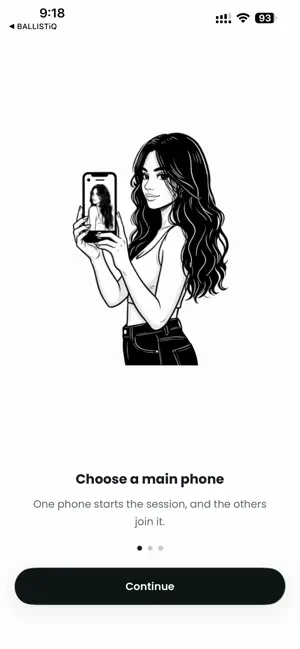

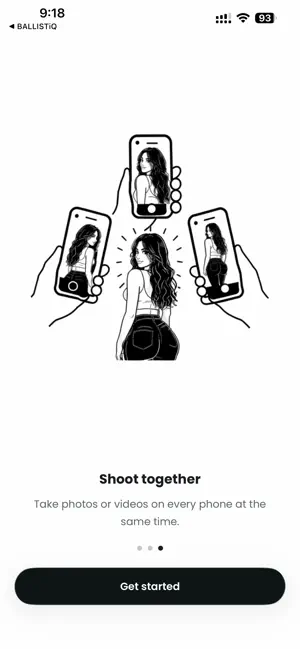
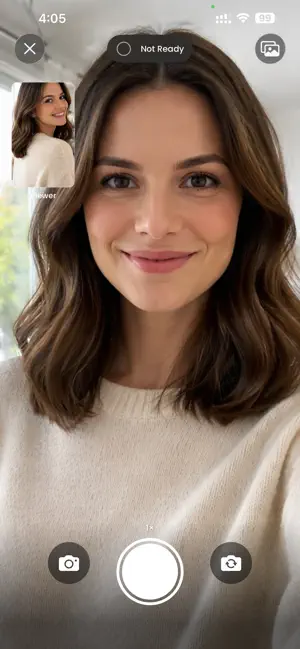
About MultiCam. Multi-device capture
Shoot from every angle at the same moment - using only iPhones. MultiCam turns a group of iPhones into one synchronized camera rig. One phone leads the session, the others join over the local network, and a single tap captures a photo or starts a video on every connected device at the same time. No cables. No external rigs. No cloud uploads to wait on. Made for the moments where one camera isn’t enough: • Weddings and family events from multiple angles • Sports, dance, and martial arts captured side-by-side • Music videos, BTS, and short films without a film crew • Real estate and product shoots with synced views • Creator multi-cam content with built-in editing What you get • Synchronized capture - clock-aligned shutter so the frames line up • Photo and video modes - switch on the lead phone, all phones follow • Live status from joined phones - see who’s connected and ready • Session gallery - every shot from every device, grouped automatically • Photo editor - pro LUT filters, brightness, contrast, saturation, color mix, highlights, shadows, sharpen, vignette, blur, and more • Video editor - trim, filters, and adjustments • AI multi-cam merge - combine clips with automatic angle switching • Collage maker - 2 to 5 photos, many layouts (grid, side-by-side, big-left, 4 corners, cross, and more) • One-tap share to Instagram, Facebook, and TikTok • Save anything to your Photos library Why people choose MultiCam. • Local network only - your sessions don’t leave your phones • No accounts to create • No rigs, mounts, or extra hardware • Works with any modern iPhone you already own How it works 1) Open MultiCam. on the main phone and start a session. 2) Open MultiCam. on the other phones and tap to join. 3) Frame your shot, pick photo or video, then tap once. Every phone fires together. 4) Review the session, edit your favorites, and share. Permissions MultiCam. uses your camera, local network, and Photos library to capture, sync, and save. Sharing to Instagram Stories, Facebook, and TikTok requires those apps to be installed. Set up your first multi-phone session in under a minute. Download MultiCam. and shoot anything from every angle, together. Terms of Use (EULA): https://www.apple.com/legal/internet-services/itunes/dev/stdeula/ Privacy Policy: https://www.syncam.pro/privacy
What’s new
Version 1.1.1 · Updated October 2, 2026
New in MultiCam. : shoot with front and back cameras at the same time, and remove watermarks in one tap. Capture every angle of the moment!
App privacy
The developer, Amoura LLC, reported these privacy practices to Apple.
Data Not Collected
The developer does not collect any data from this app.
Alternatives to MultiCam. Multi-device capture
Looking for apps like MultiCam. Multi-device capture? Here are 6 similar apps on the App Store. The highest rated is MultiCameraSync (1.0/5), and all 6 are free to download.
-
 SynCam
-
 HiveSync Camera
-
 Videk Director
-
 Multi Camera Recorder: Unison
-
 Videk Camera
-
 MultiCameraSync
1.0
MultiCameraSync
1.0
| App | Rating | Price | Last updated | Compare |
|---|---|---|---|---|
| MultiCam. Multi-device capture | – | Free | October 2, 2026 | |
| SynCam | – | Free | Dec 12, 2024 | Compare |
| HiveSync Camera | – | Free | Jun 16, 2026 | Compare |
| Videk Director | – | Free | Oct 21, 2026 | Compare |
| Multi Camera Recorder: Unison | – | Free | Sep 23, 2026 | Compare |
| Videk Camera | – | Free | Oct 21, 2026 | Compare |
| MultiCameraSync | 1.0 / 5 (1) | Free | Aug 15, 2026 | Compare |