

PennyWise AI Expense Tracker
sarim ahmad Finance iPhoneiPadiPod touch
PennyWise AI Expense Tracker is a free Finance app for iPhone and iPad by sarim ahmad. Requires iOS 16.0. Updated August 9, 2026.
- Price
- Free
- on the App Store
- Size
- 8 MB
- Age 4+
- Updated
- Aug 9
- 2026 · v1.1
Screenshots

About PennyWise AI Expense Tracker
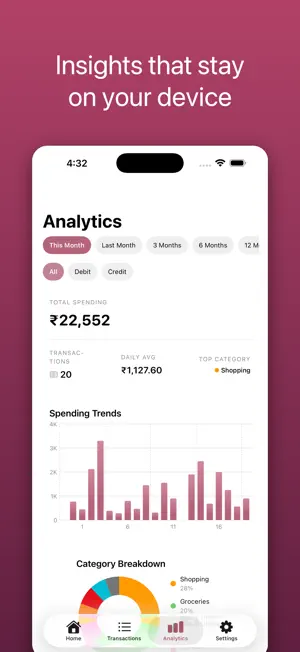
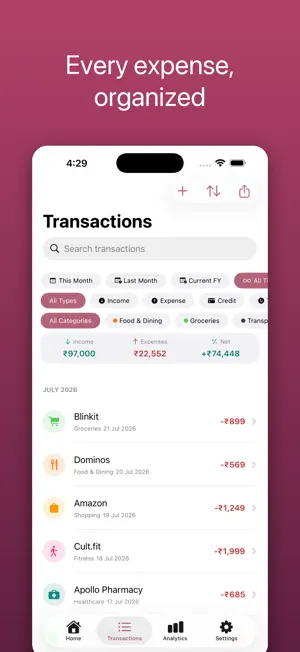
PennyWise is a private expense tracker and budget app that keeps your money — and your data — entirely on your device. No accounts. No cloud. No tracking. No ads. Add expenses in seconds, import your bank statements, and watch a clean, categorized timeline of where your money goes — with budgets, trends, and insights that never leave your iPhone. Why PennyWise • 100% on-device & private — your data never leaves your phone • No sign-up, no accounts — open the app and start • Import statements — bring in Google Pay & PhonePe PDF statements • Smart analytics — spending trends, category breakdowns, top merchants • Budgets — set limits per category, with custom monthly cycles • Subscription tracking — keep an eye on recurring payments • Smart rules — auto-categorize your transactions • Multi-currency support • Beautiful dark mode • Open source (AGPL-3.0) Expense tracking, your way Add income and expenses fast, or import a statement to backfill your history. Every transaction lands in a searchable, categorized timeline — a spending tracker that's always up to date. Budgets that fit real life Set category budgets and track progress at a glance. Custom cycle start days mean your "month" can begin on payday, not the 1st. Private by design All processing happens on your device — no servers, no API calls, nothing leaving your phone. There are no accounts to create, and the full source is open (AGPL-3.0) so anyone can verify exactly what the app does. Free & open source PennyWise is completely free, with no ads and no in-app purchases. The full source is open (AGPL-3.0). Download PennyWise for private, effortless expense tracking and budgeting.
What’s new
Version 1.1 · Updated August 9, 2026
What's new in 1.1: • Import slice small finance bank statement PDFs — including multi-page statements, with pot transfers and round-ups tracked as transfers, not spending • Open any statement PDF with PennyWise straight from Files, Mail, or a share sheet • New quick-action button on Home: add a transaction or import a statement in one tap • Choose your display currency in Settings (plus new currencies: ARS, CLP, UYU) • Smarter Analytics: income vs expenses with a trend against the previous period, and tap any category or merchant to see its transactions • Cleaner transaction filters — one compact row of dropdown chips • Accuracy fixes: transfers no longer count as spending in totals or budgets, and Smart Rules now auto-categorize statement imports
App privacy
The developer, sarim ahmad, reported these privacy practices to Apple.
Data Not Collected
The developer does not collect any data from this app.
Alternatives to PennyWise AI Expense Tracker
Looking for apps like PennyWise AI Expense Tracker? Here are 6 similar apps on the App Store. The highest rated is Expense Pro Manager (5.0/5), and all 6 are free to download.
-
 Pennywise: AI Expense Tracker
-
 Pennywise: Budget & Expense
-
 Expense Pro Manager
5.0
Expense Pro Manager
5.0
-
 Pennywise - Budget App
-
 Masareef: Auto Expense Tracker
-
 Capture Spend: Snap & Track
| App | Rating | Price | Last updated | Compare |
|---|---|---|---|---|
| PennyWise AI Expense Tracker | – | Free | August 9, 2026 | |
| Pennywise: AI Expense Tracker | – | Free | May 18, 2026 | Compare |
| Pennywise: Budget & Expense | – | Free | Jun 4, 2026 | Compare |
| Expense Pro Manager | 5.0 / 5 (1) | Free | Sep 26, 2026 | Compare |
| Pennywise - Budget App | – | Free | Feb 25, 2026 | Compare |
| Masareef: Auto Expense Tracker | – | Free | Oct 15, 2026 | Compare |
| Capture Spend: Snap & Track | – | Free | Sep 1, 2026 | Compare |