

Pennywise: Budget & Expense
Rey Rahadian Finance iPhoneiPadiPod touch
Pennywise: Budget & Expense is a free Finance app for iPhone and iPad by Rey Rahadian. Requires iOS 15.1. Updated June 4, 2026.
- Price
- Free
- on the App Store
- Size
- 56 MB
- Age 4+
- Updated
- Jun 4
- 2026 · v1.5.0
Screenshots



About Pennywise: Budget & Expense
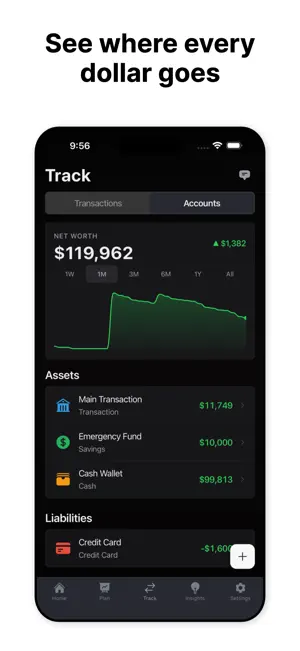
Know where your money goes. Know what you can spend. Know you're on track. Pennywise makes budgeting feel simple - not like a chore. Track your spending, hit your savings goals, and actually understand your money. No spreadsheets, no bank linking, no complicated setup. Just open the app and start. And your financial data? It never leaves your device. No account required. No cloud. No compromises. FEEL IN CONTROL EVERY DAY Set a monthly budget and Pennywise tells you exactly how much you can spend per day. See at a glance if you're on track or need to ease up - right from your home screen with iOS widgets. SAVE FOR WHAT MATTERS Set savings goals for a trip, emergency fund, or big purchase. Watch your progress grow and stay motivated with clear visual tracking. UNDERSTAND YOUR SPENDING See where your money actually goes with cashflow trends, category breakdowns, and period comparisons. Spot patterns you didn't know you had - daily, weekly, monthly, or yearly. STAY ON TOP OF BILLS Track recurring bills with due dates and reminders so nothing slips through the cracks. Know exactly what's coming before it hits. YOUR MONEY, YOUR DEVICE • All financial data stored on your device - never sent anywhere • Works completely offline - no internet required • No account or sign-up needed • Zero permissions required (no camera, location, or contacts) BUILT TO BE ENJOYED • 5 home screen widgets to check your finances at a glance • Customizable dashboard - show what matters to you • Beautiful dark mode • Available in 11 languages and 150+ currencies • Try everything free in demo mode before you commit • One-time purchase option - pay once, own it forever Pennywise was built with a simple belief: budgeting should feel rewarding, not like homework. Your financial data is nobody's business but yours. Terms of Use (EULA): https://www.apple.com/legal/internet-services/itunes/dev/stdeula/
What’s new
Version 1.5.0 · Updated June 4, 2026
What's new in 1.5.0: • New small Daily Budget home screen widget — see how much you can spend per day at a glance • Categories you've renamed now show your custom names everywhere they appear • Color changes for built-in categories now update reliably across the app Thanks for using Pennywise!
App privacy
The developer, Rey Rahadian, reported these privacy practices to Apple.
Data Not Linked to You
The following data, which may be collected but is not linked to your identity, may be used for the following purposes:
- Usage Data: Product Interaction
- Diagnostics: Crash Data
Used for: Analytics, App Functionality
Alternatives to Pennywise: Budget & Expense
Looking for apps like Pennywise: Budget & Expense? Here are 6 similar apps on the App Store.
-
 PennyWise AI Expense Tracker
-
 Billy Expenses & Subscriptions
-
 Pennywise - Budget App
-
 Kedil: Expense & Debt Tracker
-
 Cashout: Tip & Shift Tracker
-
 WealthTrack: Net Worth Tracker
| App | Rating | Price | Last updated | Compare |
|---|---|---|---|---|
| Pennywise: Budget & Expense | – | Free | June 4, 2026 | |
| PennyWise AI Expense Tracker | – | Free | Aug 9, 2026 | Compare |
| Billy Expenses & Subscriptions | – | Free | May 20, 2026 | Compare |
| Pennywise - Budget App | – | Free | Feb 25, 2026 | Compare |
| Kedil: Expense & Debt Tracker | – | Free | Oct 10, 2026 | Compare |
| Cashout: Tip & Shift Tracker | – | Free | Oct 10, 2026 | Compare |
| WealthTrack: Net Worth Tracker | – | Free | Jul 6, 2026 | Compare |