

Capture Spend: Snap & Track
RADHE RAMYA CORPORATION LLP Finance iPhoneiPadiPod touch
Capture Spend: Snap & Track is a free Finance app for iPhone and iPad by RADHE RAMYA CORPORATION LLP. Requires iOS 16.4. Updated September 1, 2026.
- Price
- Free
- on the App Store
- Size
- 33 MB
- Age 4+
- Updated
- Sep 1
- 2026 · v1.0.1
Screenshots
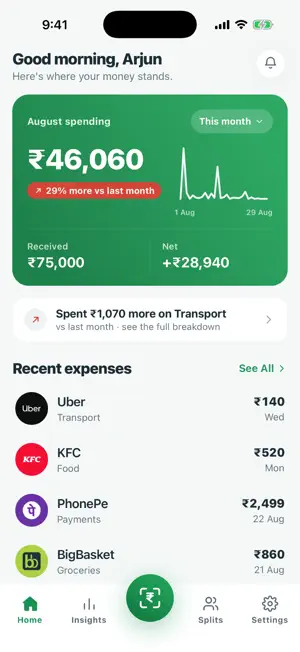


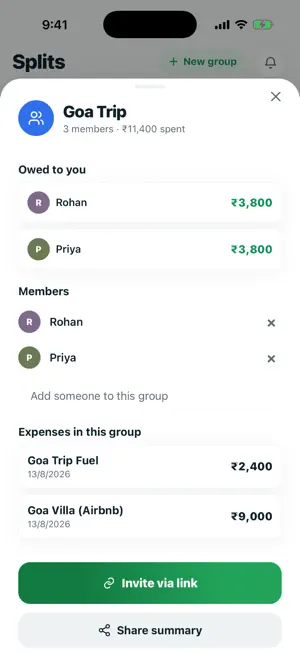
About Capture Spend: Snap & Track
Capture Spend turns a payment screenshot into a tracked expense — automatically. No manual entry. No bank logins. No linking your accounts. Pay however you already pay, screenshot the confirmation, and Capture Spend reads the amount, the merchant, the category and whether money went out or came in, then files it for you. WHY IT'S DIFFERENT Most expense tracker apps make you type in every transaction, or ask for risky access to your bank. Capture Spend just reads the screenshot you already took. HOW IT WORKS 1. Pay with any UPI app, card or wallet. 2. Screenshot the payment confirmation. 3. Share it to Capture Spend — or double-tap the back of your iPhone. ONE-TAP CAPTURE ON IPHONE Install the Track Expense shortcut and assign it to Back Tap. Double-tap the back of your phone on any payment screen and the expense is captured and tracked, with no app switching. You can also share any screenshot into Capture Spend straight from the share sheet. FEATURES • Automatic expense tracking from payment screenshots • Reads amount, merchant, category, date and direction for you • Tracks money out and money in — expenses and income • Clean dashboards and spending analytics by category • Split expenses with friends and groups, and settle up • Duplicate detection, so the same payment is never counted twice • Fix anything read wrong, in a tap • Back Tap and share sheet capture • Dark and light themes • Sign in with just your mobile number PRIVACY FIRST Your payment screenshots are never stored on our servers. Each image is read once to pull out the payment details, then discarded. We never ask for your bank credentials, and we don't sell your data. You can delete your account and everything in it from inside the app, at any time. An everyday expense manager, spending tracker, budget helper and money manager in one — whether you are keeping up with daily UPI payments, watching a monthly budget, or splitting bills with flatmates. Questions? [email protected] Privacy Policy: https://capturespend.in/privacy
What’s new
Version 1.0.1 · Updated September 1, 2026
Camera capture — snap paper bills and receipts, not just screenshots Home screen widget for at-a-glance spending Smarter, faster capture notifications Cleaner splits — quick payer changes, more accurate totals Add friends by phone — we'll find their account or send an invite Performance and stability improvements
App privacy
The developer, RADHE RAMYA CORPORATION LLP, reported these privacy practices to Apple.
Data Linked to You
The following data, which may be collected and linked to your identity, may be used for the following purposes:
- Purchases: Purchase History
- Financial Info: Other Financial Info
- Contact Info: Name, Phone Number
- Contacts: Contacts
- User Content: Emails or Text Messages, Other User Content
- Identifiers: User ID, Device ID
Used for: App Functionality
Alternatives to Capture Spend: Snap & Track
Looking for apps like Capture Spend: Snap & Track? Here are 6 similar apps on the App Store.
-
 Spendo: Expense & GST Tracker
-
 EnExpense: AI Money Manager
-
 DueDash: Expense & EMI Tracker
-
 Vitmora: Expense Tracker
-
 Klera: AI Money Manager
-
 PennyWise AI Expense Tracker
| App | Rating | Price | Last updated | Compare |
|---|---|---|---|---|
| Capture Spend: Snap & Track | – | Free | September 1, 2026 | |
| Spendo: Expense & GST Tracker | – | Free | Oct 20, 2026 | Compare |
| EnExpense: AI Money Manager | – | Free | Sep 9, 2026 | Compare |
| DueDash: Expense & EMI Tracker | – | Free | Oct 7, 2026 | Compare |
| Vitmora: Expense Tracker | – | Free | Sep 22, 2026 | Compare |
| Klera: AI Money Manager | – | Free | Sep 18, 2026 | Compare |
| PennyWise AI Expense Tracker | – | Free | Aug 9, 2026 | Compare |