

Spenti - Receipt & Expense AI
Zaw Lin Tun Finance iPhoneiPadiPod touch
Spenti - Receipt & Expense AI is a free Finance app for iPhone and iPad by Zaw Lin Tun. Requires iOS 16.0. Updated October 30, 2026.
- Price
- Free
- on the App Store
- Size
- 119 MB
- Age 4+
- Updated
- Oct 30
- 2026 · v1.0.8
Screenshots



About Spenti - Receipt & Expense AI
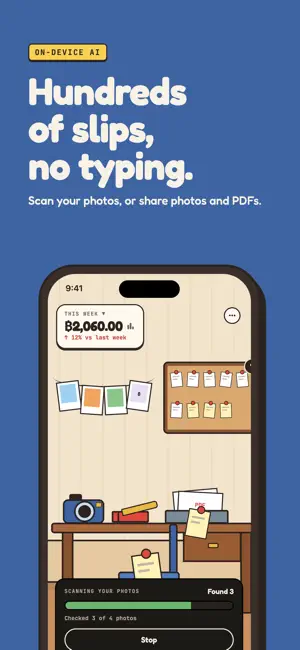
Spenti reads your receipts on your phone. No account, no ads, and nothing is uploaded unless you choose to. Point it at a paper receipt, a card slip, a bank-transfer screenshot or a PDF and Spenti pulls out the shop, the items, the amount, the date and a category. Scan one, or a thousand from your photo library. Then ask: "How much did I spend on food this month?" YOUR ROOM Spenti is a room you live in. Receipts land on the corkboard, the total hangs on the wall, and a family member keeps you company: Brother, Dad, Mom, Uncle, Aunt or Sister. Their face shows how your budget is going. MAKE YOUR OWN SCENE Live anywhere: a beach, a mountain cabin, a café. Spenti writes the request, your AI makes the place, and Spenti brings it to life. • Draw it: an image AI paints the place, and what it paints becomes buttons • Code it: any AI chat draws the place and its furniture as code Add fire, rain, snow or fireflies, place the mascot, then share a picture or send the scene to a friend so they can move in. Free for everyone. YOUR OWN AI (PRO) Pro lets ChatGPT, Claude, Gemini, OpenRouter or another AI you use read your receipts and answer chat in your language, on your account. Spenti asks first and shows what goes: the text read from each receipt and your chat questions, never the photos. It goes straight from your phone; Spenti's servers are not involved. Switch back any time. NINE LANGUAGES English, Thai, Burmese, Indonesian, Malay, Filipino, Chinese, Korean and Japanese. Spenti follows your phone, and the first screen asks where you live to set your currency. WHAT YOU CAN DO • Scan receipts, card slips, transfer screenshots and PDFs • Share a photo or PDF from any app into Spenti • Import your photo library, or only what is new since your last scan • 31 currencies; a foreign receipt keeps its own and converts for your totals • Chat on the phone in English or Thai, or in your language with your own AI • Charts, a weekly or monthly recap, and budgets with alerts • This month's total on your Home Screen and Lock Screen • Search receipts; edit the items on any receipt • File expenses from bank SMS and app alerts with a Shortcuts automation • Light, dark or by the clock, on iPhone and iPad PRIVACY, EXACTLY Spenti's AI runs on your iPhone. Unless you turn on Your own AI, your receipts, photos, amounts and chat questions never leave it. Try it: turn on airplane mode and scan. • No account, no sign-in, no email • No analytics, advertising or tracking • Lock the app with Face ID, Touch ID or your passcode • Settings → Privacy shows where your data is and what uses the internet • Delete everything, or your cloud backups, any time Spenti uses the internet for six things, three of them off until you switch them on: exchange rates (opt-in), update checks, AI model downloads, App Store purchases, cloud backup (opt-in) and Your own AI (opt-in, Pro). Only Your own AI carries receipt text, and only after you agree. FREE, BASIC AND PRO Free: 30 AI scans and 15 chat questions a month, unlimited manual entry, the Boy's and Girl's rooms, your own scenes, and Brother. Basic: 100 scans and 100 chat questions a month, export to CSV and Excel, and backup to your own iCloud, with optional passphrase encryption so not even Apple can read it. Pro: no limits, Riverside, Chiang Mai, Flower meadow and Seaside summer, the whole family of six, and Your own AI. Basic and Pro are monthly or yearly subscriptions; Pro is also a one-time Lifetime purchase, all through the App Store. Subscriptions renew unless cancelled in your Apple ID settings at least 24 hours before the period ends. REQUIREMENTS The receipt reader (about 208 MB) downloads on your first scan; the chat model (about 850 MB) only if you choose it. Works best on iPhone 12 or newer. Support: https://spenti.app/support Privacy Policy: https://spenti.app/privacy Terms of Use: https://spenti.app/terms
What’s new
Version 1.0.8 · Updated October 30, 2026
- Spenti is a room: receipts pin to a board, the mascot says what's left. - Pro: Your own AI (ChatGPT, Claude, Gemini, OpenRouter) reads receipts and chats with you. - Make your own scene: Draw it as a picture or Code it with any AI chat. Send the scene to friends. - 9 languages: English, Thai, Burmese, Indonesian, Malay, Filipino, Chinese, Korean, Japanese. - Expenses from bank alerts; 31 currencies. - Mascot family; Basic: 100 scans + chats/month; share photos, PDFs; widgets; iPad, iPhone duo.
App privacy
The developer, Zaw Lin Tun, reported these privacy practices to Apple.
Data Not Collected
The developer does not collect any data from this app.
Alternatives to Spenti - Receipt & Expense AI
Looking for apps like Spenti - Receipt & Expense AI? Here are 6 similar apps on the App Store. The highest rated is Reign: Budget & Expense Log (5.0/5), and all 6 are free to download.
-
 Purrso
-
 Spent. — Spending Tracker
3.0
Spent. — Spending Tracker
3.0
-
 DayTwo
-
 Oweize
-
 Harubi: Receipt Budget Tracker
-
 Reign: Budget & Expense Log
5.0
Reign: Budget & Expense Log
5.0
| App | Rating | Price | Last updated | Compare |
|---|---|---|---|---|
| Spenti - Receipt & Expense AI | – | Free | October 30, 2026 | |
| Purrso | – | Free | Mar 5, 2026 | Compare |
| Spent. — Spending Tracker | 3.0 / 5 (2) | Free | Oct 30, 2026 | Compare |
| DayTwo | – | Free | Oct 29, 2026 | Compare |
| Oweize | – | Free | Oct 20, 2026 | Compare |
| Harubi: Receipt Budget Tracker | – | Free | Oct 27, 2026 | Compare |
| Reign: Budget & Expense Log | 5.0 / 5 (7) | Free | Jun 6, 2026 | Compare |