

Spent. — Spending Tracker
Chee Leong CHONG Finance iPhoneiPadiPod touch
Spent. — Spending Tracker is a free Finance app for iPhone and iPad by Chee Leong CHONG. Rated 1.0/5 from 1 ratings. Requires iOS 18.6.
- Rating
- 1.0
- 1 ratings
- Price
- Free
- on the App Store
- Size
- 32 MB
- Age 4+
- Updated
- Sep 29
- 2026 · v1.7
Screenshots


About Spent. — Spending Tracker
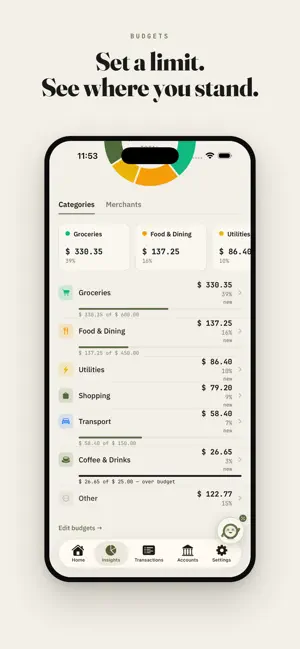
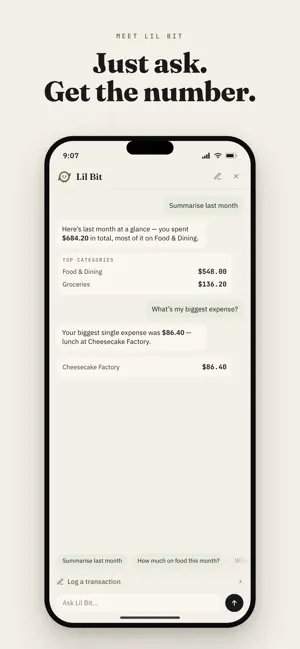
A private AI expense tracker — receipt scanning, natural-language logging, monthly budgets, and instant answers about your spending, all running entirely on your iPhone. No account. No cloud. No tracking. Meet Lil Bit, the little on-device bookkeeper inside Spent. Snap a receipt and Lil Bit reads the merchant, amount, and date. Jot "lunch 12" and it's logged. Ask "how much on food this month?" and get an answer in seconds. Everything happens on your device — nothing is ever uploaded. BANK NOTIFICATIONS — NEW Your bank already tells you when you've paid. Spent can turn that notification into a transaction waiting for your OK. Add the ready-made shortcut, choose the app your bank's alerts come from, and show Spent one real notification by tapping the amount and the merchant. Every payment after that lands in a review list, to approve one at a time or all at once. No bank login, no connection to your bank, no server. Requires iOS 27. BUDGETS Set a monthly limit for any category and Insights draws a quiet bar under it: under, near, or over, you see where you stand at a glance. No guilt — just the number, the limit, and the bar. Per-currency, and included in your backups. ASK LIL BIT Tap the Lil Bit coin and ask about your money in plain English: • "Summarise last month" — totals plus your top categories and merchants • "How much on food this month?" — any category, any period • "Am I over budget?" — your budgets, checked in a tap • "What's my biggest expense?" — your largest single spend, instantly • "What's my balance across accounts?" — every account, at a glance Every answer is computed on-device. Your questions never leave your phone. WHY SPENT. • 100% on-device AI — works offline, on a plane, anywhere. Your finances never leave your phone. • No account, no sign-up, no ads, no trackers. Open it and start. • You stay in control — every AI entry is yours to confirm before it saves. WHAT YOU CAN DO • Log transactions from your bank's notifications (iOS 27) • Set monthly budgets per category • Ask Lil Bit — get instant, on-device answers about your spending • Scan receipts — AI fills in the details; view or share the original anytime • Type naturally — "coffee 5", "groceries 80", and Spent. gets it • Track expenses, income, and transfers across multiple accounts • Multi-currency — each account in its own currency, no surprise conversions • Insights — see where your money goes by category and merchant, month over month • Home Screen widget — log, scan, or ask in one tap; shows no data by design • Recurring transactions, duplicate detection, and smart merchant memory • Privacy mask — hide every balance with one tap • Siri & Shortcuts — log spending hands-free • Your data stays yours — export a full backup anytime PRIVACY BY DESIGN Spent. has no server. There's no account to create and no data to leak, because nothing is collected in the first place. The AI runs locally on your iPhone — your receipts, balances, and habits stay with you. Free for manual tracking, bank notifications, receipt-OCR scanning, budgets, and insights. Unlock on-device AI extraction and Lil Bit's chat with a single one-time purchase — no subscription, ever. Your expenses, tracked privately.
What’s new
Version 1.7 · Updated September 29, 2026
A pumpkin look for Halloween. From October 24 to November 1, Spent. dresses up for the season. The colors turn to ember and dusk, Lil Bit wears a pumpkin with two bats for company, cobwebs settle into a few corners, and the eye that hides your amounts becomes a small lantern. On November 2 it all goes back to normal by itself. You can also pick Halloween any day, or keep Standard all year, in Settings > Appearance > Palette. A Halloween app icon is there too, under App Icon. • Fewer missed rows from bank screenshots. Spent. now checks what it read against the text on the screen and adds any transaction it skipped, marked "Found on screen" so you can look it over before you save. • Notifications that arrive empty. Now and then iOS hands over a bank notification with no text. It now waits in your review list instead of being dropped, so you can fill it in. • Clearer rule warnings. If you mark a card name or number as the reference, the rule editor explains why that part should stay unmarked. • Lil Bit tells you when it stopped. If you leave Spent. while Lil Bit is answering, you'll see a short note instead of a reply that never arrives. • Dates that keep up. The Today and Yesterday headings, and how long ago a capture came in, update past midnight without reopening the app. Plus polish and fixes throughout. Your expenses, tracked privately.
App privacy
The developer, Chee Leong CHONG, reported these privacy practices to Apple.
Data Not Collected
The developer does not collect any data from this app.
Alternatives to Spent. — Spending Tracker
Looking for apps like Spent. — Spending Tracker? Here are 6 similar apps on the App Store. The highest rated is Spent: Expense Tracker (1.0/5), and all 6 are free to download.
-
 Spent - Speak it. It's saved.
-
 Spent: Expense Tracker
1.0
Spent: Expense Tracker
1.0
-
 Spent: AI Expense Tracker
-
 Orbit Spending
-
 Plut: Track, Budget, Plan
-
 KeepTabs
| App | Rating | Price | Last updated | Compare |
|---|---|---|---|---|
| Spent. — Spending Tracker | 1.0 / 5 (1 rating) | Free | September 29, 2026 | |
| Spent - Speak it. It's saved. | – | Free | Oct 5, 2026 | Compare |
| Spent: Expense Tracker | 1.0 / 5 (1) | Free | Apr 20, 2026 | Compare |
| Spent: AI Expense Tracker | – | Free | Oct 15, 2026 | Compare |
| Orbit Spending | – | Free | Jun 10, 2026 | Compare |
| Plut: Track, Budget, Plan | – | Free | Sep 14, 2026 | Compare |
| KeepTabs | – | Free | Aug 6, 2026 | Compare |