

Harubi: Receipt Budget Tracker
MJ KONG Finance iPhoneiPadiPod touch
Harubi: Receipt Budget Tracker is a free Finance app for iPhone and iPad by MJ KONG. Requires iOS 17.0. Updated October 9, 2026.
- Price
- Free
- on the App Store
- Size
- 7 MB
- Age 4+
- Updated
- Oct 9
- 2026 · v1.3.21
Screenshots

About Harubi: Receipt Budget Tracker
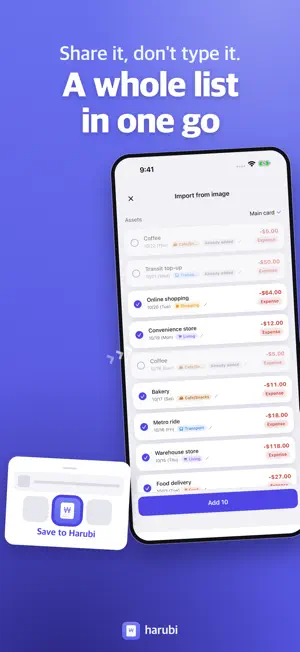
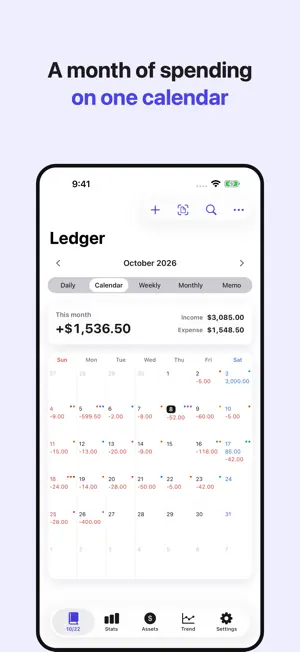
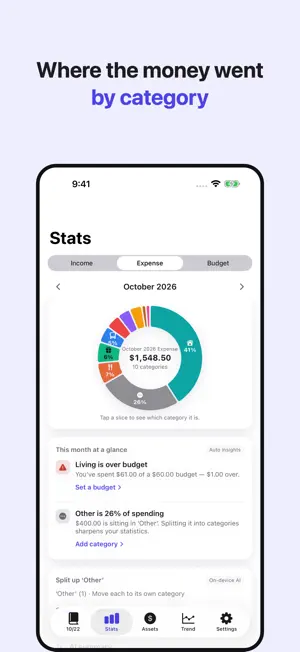
Snap it, and it fills itself in. You just check. Receipts, payment text alerts, the transaction list inside your banking app — photograph or screenshot them, and Harubi reads the date, amount and merchant and fills the entry in for you. No ads, no account, no bank login. ■ Why photos instead of a bank connection? Harubi never asks for your bank credentials. · Cash never shows up in a bank feed. A photo of the receipt catches it. · You never hand your bank login to a third party — there is nobody to hand it to. · Nothing to sign up for. Open the app and start. ■ Three kinds of images, sorted out automatically · Paper receipts — merchant, total and date, read straight off the slip. · Payment and card alert messages — screenshot the alert and it becomes one transaction. · Bank and card statement lists — screenshot the transaction list in your banking app and every row is read at once. Whatever you send, a review screen comes first. Correct a misread figure, untick a row you don't want, then save. ■ Several screenshots, stitched into one list A statement never fits on one screen. Scroll, take as many screenshots as you need, and hand them over together. · Overlapping stretches are matched up by running balance, so nothing is imported twice. · If a date header was cut off at the top of a shot, the date is carried across from the neighboring shots. · Transactions you have already saved come back pre-unticked. ■ Share now, sort it out later Send images to Harubi from Photos or Messages with the share sheet. iOS won't let an app launch itself, so nothing happens at that moment — but the next time you open Harubi, everything you shared is waiting and gets sorted in one go. ■ Private by construction · Text recognition runs on your iPhone, through Apple's Vision framework. Photos are not uploaded for processing. · Your transaction records stay on this device. · No account, no login, no bank connection. · No ads, no tracking. The App Store privacy label reads "Data Not Collected". · Not a single analytics or advertising SDK, and no third-party libraries at all. ■ The budgeting part · Income, expense and transfer entries with a large number keypad · Daily, calendar, weekly, monthly, summary and memo views · Transaction search — by details, category or asset, narrowed to a period, with your recent searches kept · Category statistics (pie chart) with period and account filters · Per-category budgets with remaining amount and spending pace · Event budgets — keep a trip, a holiday or a move on its own named budget, apart from your monthly one · Trend tab — your daily balance, and the transactions behind any day · Balance trend graph per account · Double-entry asset tracking — cash, bank and card balances kept in step · Recurring expenses — rent, subscriptions, anything that leaves on the same day each month · Automatic insights — budgets nearly spent, too much in Other, month-over-month jumps · Backup and restore to a JSON file (photos and videos attached to memos, and recurring-expense rules, are not included in the backup) · On-device AI — a summary of your month and category suggestions for Other (iOS 26 on Apple Intelligence devices) · Light / dark mode and theme colors ■ Receipts we read Korea, Japan, the United States, Germany and the Philippines. Budgeting is all about consistency. Start light — just today's spending. iPhone only. Requires iOS 17 or later.
What’s new
Version 1.3.21 · Updated October 9, 2026
New: Event budgets Give a trip, a holiday or a move its own named budget. Add the transactions you spent on it, and that money comes out of your monthly budget and shows up separately. Start from the Budget screen in the Stats tab. · Those transactions still appear in your ledger and statistics. · Deleting an event budget doesn't delete its transactions. Also in this update · Larger date rows in the Daily list make each day easier to scan. · Income and expense colors have higher contrast in light and dark mode. · Fixed the area below the amount keypad. · On iOS 27, "Frequently used" in the category picker no longer comes up empty.
App privacy
The developer, MJ KONG, reported these privacy practices to Apple.
Data Not Collected
The developer does not collect any data from this app.
Alternatives to Harubi: Receipt Budget Tracker
Looking for apps like Harubi: Receipt Budget Tracker? Here are 6 similar apps on the App Store.
-
 프로요 영수증
-
 돈꽃 자산관리
-
 SnapSpend: Spending Tracker
-
 SpendLit
-
 Buddinote - Budget Tracker
-
 Receipto: Receipt Scanner
| App | Rating | Price | Last updated | Compare |
|---|---|---|---|---|
| Harubi: Receipt Budget Tracker | – | Free | October 9, 2026 | |
| 프로요 영수증 | – | Free | Oct 5, 2026 | Compare |
| 돈꽃 자산관리 | – | Free | Aug 21, 2026 | Compare |
| SnapSpend: Spending Tracker | – | Free | Jul 29, 2026 | Compare |
| SpendLit | – | Free | Sep 24, 2026 | Compare |
| Buddinote - Budget Tracker | – | Free | Jun 29, 2026 | Compare |
| Receipto: Receipt Scanner | – | Free | Jun 21, 2026 | Compare |