

Saive: AI Budget Coach
Type3Soft Finance iPhoneiPadiPod touch
Saive: AI Budget Coach is a free Finance app for iPhone and iPad by Type3Soft. Requires iOS 16.0. Updated October 7, 2026.
- Price
- Free
- on the App Store
- Size
- 55 MB
- Age 4+
- Updated
- Oct 7
- 2026 · v1.2.1
Screenshots


About Saive: AI Budget Coach
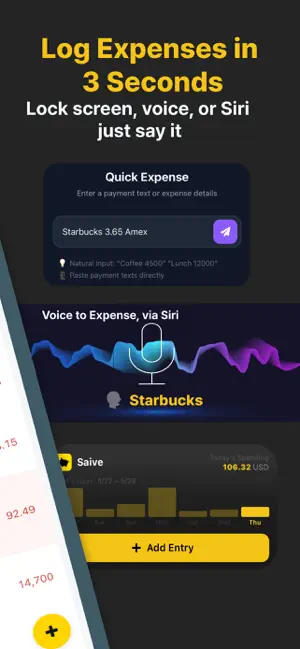
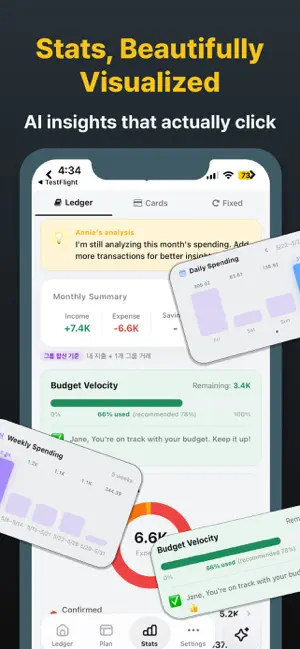
Stop restarting your budget every month. Saive logs your spending in 3 seconds — and its AI does the rest. You focus on building wealth, solo or with your partner. = WHY SAIVE? = [Log in 3 Seconds — 3 Ways] 1. Auto-log card alert texts & email receipts with Shortcuts 2. Log in plain language from your Lock Screen — "Lunch $8 on card" 3. Add by voice with a Siri preset Your spending adds up on its own — no manual typing. It gets smarter as you go. Fix an unfamiliar merchant name once, and Saive remembers — logging it under your name from then on. [Shared Budget for Couples & Family] Sync your budget with your partner, family, or roommate in real time. See who spent what, where. Annie gives savings tips for the whole group. [AI That Diagnoses Your Spending] Saive surfaces the signals you'd miss — overspending, creeping habits — and coaches you first. · Live insights on every transaction — food at 65% of its budget, a charge 1.5x your usual, your regular coffee shop. Budget %, high-spend alerts, and regulars sit right next to each line. · Daily 1-line insight — spending more than usual? Where is your money leaking? One line, every day. [Annie — Ask Your Money in Natural Language] "What's blowing my budget this month?" "Analyze my spending patterns" "Any spending red flags this month?" Annie answers from your actual transactions — not generic stats, but insights grounded in your own spending patterns. [Built Around Your Card's Billing Cycle] Every card closes on a different date. Most budget apps track by calendar month only — Saive aligns to each card's billing cycle, so your spending matches how you actually pay. [Subscriptions, Installments & Loans, Tracked Apart] Recurring subscriptions, installment plans, and loans are grouped on their own — so you always see the money you can really spend. = MADE FOR YOU IF... = · You've started a budget app and quit by week two — every time · You want a clean, glanceable screen, not a dense spreadsheet · You and your partner want one shared, honest view of money · You want subscriptions, installments, and card billing dates handled realistically · You're about to make a big purchase and want an objective check = HOW TO START = 1. Download Saive → Sign in with Apple in 30 seconds 2. Connect card alert texts & emails via Shortcuts (optional) 3. Logging stays free. Go Premium when you want the deeper analysis. = LANGUAGES = English, 한국어, 日本語 = FREE & PREMIUM = Logging and browsing are free. No limits on auto-logging, manual entry, or looking back at past months. AI analysis and coaching are Premium. Premium comes in two forms. • Lifetime Plan — a single payment. It does not auto-renew. • Subscription — auto-renews; you'll be charged 24 hours before each period ends. Cancel anytime in Settings > Apple ID > Subscriptions. Support: [email protected] Privacy Policy: https://saive.type3soft.com/legal/privacy?locale=en Terms of Use: https://saive.type3soft.com/legal/terms?locale=en Paid Service Terms: https://saive.type3soft.com/legal/paid-service?locale=en
What’s new
Version 1.2.1 · Updated October 7, 2026
[Correct once, remembered forever] Fix an unfamiliar merchant name once — from then on it's logged under the name you chose. Auto-corrected entries also show the original name from the SMS. [Also] · Fixed declined payments being recorded as expenses. · Fixed detailed receipts logging the pre-tax amount instead of the total. · Coaching notifications now have more specific titles. · Refreshed the welcome screens.
App privacy
The developer, Type3Soft, reported these privacy practices to Apple.
Data Linked to You
The following data, which may be collected and linked to your identity, may be used for the following purposes:
- Purchases: Purchase History
- Financial Info: Other Financial Info
- Contact Info: Email Address, Name
- User Content: Other User Content
- Identifiers: User ID
Used for: Analytics, Product Personalization, App Functionality
Data Not Linked to You
The following data, which may be collected but is not linked to your identity, may be used for the following purposes:
- Usage Data: Product Interaction
- Diagnostics: Crash Data
Used for: Analytics, App Functionality
Alternatives to Saive: AI Budget Coach
Looking for apps like Saive: AI Budget Coach? Here are 6 similar apps on the App Store.
-
 ExpenseMax: Budget Tracker
-
 Savvy — AI Expense Tracker
-
 지갑지켜 - 쉬운가계부 & 예산관리
-
 Qash: AI Budgeting via Chat
-
 Budget Planner+
-
 동그란 가계부 : 게으른 사람들을 위한 가계부
| App | Rating | Price | Last updated | Compare |
|---|---|---|---|---|
| Saive: AI Budget Coach | – | Free | October 7, 2026 | |
| ExpenseMax: Budget Tracker | – | Free | Aug 14, 2026 | Compare |
| Savvy — AI Expense Tracker | – | Free | Oct 14, 2026 | Compare |
| 지갑지켜 - 쉬운가계부 & 예산관리 | – | Free | Aug 5, 2026 | Compare |
| Qash: AI Budgeting via Chat | – | Free | May 8, 2026 | Compare |
| Budget Planner+ | – | Free | Oct 20, 2026 | Compare |
| 동그란 가계부 : 게으른 사람들을 위한 가계부 | – | Free | Mar 18, 2026 | Compare |