

DocAura: PDF Scanner & OCR
BHASKER CHAURASIA Productivity iPhoneiPadiPod touch
DocAura: PDF Scanner & OCR is a free Productivity app for iPhone and iPad by BHASKER CHAURASIA. Rated 5.0/5 from 6 ratings. Requires iOS 16.0.
- Rating
- 5.0
- 6 ratings
- Price
- Free
- on the App Store
- Size
- 4 MB
- Age 4+
- Updated
- Oct 20
- 2026 · v1.9
Screenshots


About DocAura: PDF Scanner & OCR
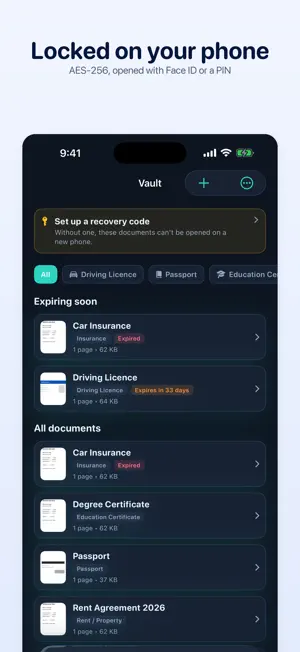
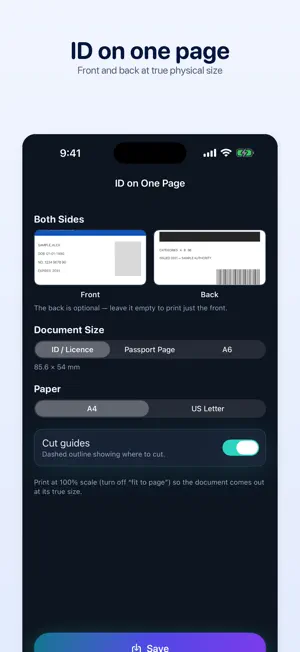
DocAura turns your iPhone into a private document scanner, PDF studio, and photo printing kit. Everything happens on your device — no accounts, no cloud, no tracking, no ads. SCAN ANYTHING Point your camera at a page and DocAura finds the edges, straightens the perspective, and cleans it up. One-tap filters make faded print sharp and readable. Reorder or remove pages before you save, and choose A4, US Letter, or the photo's own size. READ THE TEXT IN YOUR SCANS On-device text recognition makes every scan searchable, so you can find a document later by what's written inside it. Open Extract Text on any PDF to pull the words out, copy them, or share them as a plain text file — useful for receipts, notes, forms, and letters. Text is recognized in English, French, German, Spanish, Portuguese, Italian, Russian, Chinese, Japanese, Korean and more. ID AND PASSPORT PAGES ON ONE SHEET Print the front and back of a driving licence, ID card, or passport page together on a single page, at their true physical size. Sizes follow the published measurements — an ID card comes out 85.6 × 54 mm, exactly like the original. PASSPORT AND ID PHOTOS Lay out a sheet of correctly sized photos to print and cut, with presets for US 2×2 in, UK and EU 35×45 mm, India 35×45 mm, Brazil 3×4 cm, and China 33×48 mm. Or produce a single photo file at exact pixel dimensions with a file size limit, for application forms that only accept an upload under a certain size. DocAura warns you if a photo is too low-resolution to print sharply. KEEP YOUR IMPORTANT DOCUMENTS IN ONE PLACE The Document Vault holds the papers you need and can't easily replace — driving licence, passport, school and degree certificates, rent agreement, insurance, tax and bank records. File each one by type, add an expiry date, and find any of them with one search. Documents expiring within 60 days are pinned to the top, so a licence never lapses because you forgot. Everything in the vault is encrypted with AES-256 and unlocked with Face ID, Touch ID, or your passcode. The key is created on your iPhone and stays there: it is never synced to iCloud and never included in a backup, so nothing in the vault can be read on any other device — including by us. Because of that, the vault cannot move to a new iPhone. Use Export all before you switch phones. A FULL PDF TOOLKIT • Merge several PDFs into one • Split out pages or page ranges • Compress to shrink the file size, with an estimate before you commit • Fill and sign — type into a form, tick boxes, add the date, and sign • Protect a PDF with a password • Watermark across every page • Unlock a PDF when you already know its password YOUR FILES, YOUR DEVICE Saved documents live in the Files app, so you can move, back up, or share them however you like. Tap Share on a PDF or photo in Files, Mail, or any other app and choose DocAura to bring it straight into every tool. Documents DocAura creates carry a small footer. Files you merge, split, compress, sign, or watermark are never changed, and neither is a passport photo exported for an online form. COMPLETELY PRIVATE Your documents never leave your iPhone or iPad. There is no sign-in, no analytics, no advertising, and nothing is ever uploaded. DocAura makes exactly one network request: it asks the App Store whether a newer version exists, and it sends nothing about you or your files. Free, with no in-app purchases.
Ratings & reviews
5.0
6 ratings
What’s new
Version 1.9 · Updated October 20, 2026
A SCAN NO LONGER DISAPPEARS BEFORE IT BECOMES A PDF If DocAura was closed between scanning and tapping Create PDF — iOS ending it in the background, a phone call, a crash — the pages you had just scanned were gone without a word. Camera pages are now kept safe until the PDF is saved or you discard them, and the next time you open DocAura, Home offers them back so you can finish. Unfinished scans are kept for seven days. Photos you picked from your library aren't copied, because the originals are still in Photos. Pages still inside the scanner, before you tap Save there, can't be recovered. STILL ONLY ON YOUR DEVICE The unfinished scan is stored on this iPhone or iPad only, locked while the device is locked, and left out of backups. It is deleted as soon as the PDF is saved or you tap Discard.
App privacy
The developer, BHASKER CHAURASIA, reported these privacy practices to Apple.
Data Not Collected
The developer does not collect any data from this app.
Alternatives to DocAura: PDF Scanner & OCR
Looking for apps like DocAura: PDF Scanner & OCR? Here are 6 similar apps on the App Store. The highest rated is Scanniq - PDF & Doc Scanner (5.0/5), and all 6 are free to download.
-
 PhotoLab AI: Photo Resizer
-
 Scanniq - PDF & Doc Scanner
5.0
-
 Linkwise: AI Read-It-later app
-
 Scanr Lens — Document Scanner
1.0
-
 OnlyScans: PDF & Doc Scanner
-
 Prompto: Best AI prompts
5.0
| App | Rating | Price | Last updated | Compare |
|---|---|---|---|---|
| DocAura: PDF Scanner & OCR | 5.0 / 5 (6 ratings) | Free | October 20, 2026 | |
| PhotoLab AI: Photo Resizer | – | Free | Aug 5, 2026 | Compare |
| Scanniq - PDF & Doc Scanner | 5.0 / 5 (4) | Free | Jul 19, 2026 | Compare |
| Linkwise: AI Read-It-later app | – | Free | Aug 27, 2026 | Compare |
| Scanr Lens — Document Scanner | 1.0 / 5 (1) | Free | Aug 28, 2026 | Compare |
| OnlyScans: PDF & Doc Scanner | – | Free | Oct 19, 2026 | Compare |
| Prompto: Best AI prompts | 5.0 / 5 (1) | Free | Aug 23, 2026 | Compare |