

Scanniq - PDF & Doc Scanner
Rakib Joarder Productivity iPhoneiPadiPod touch
Scanniq - PDF & Doc Scanner is a free Productivity app for iPhone and iPad by Rakib Joarder. Rated 5.0/5 from 4 ratings. Requires iOS 17.0.
- Rating
- 5.0
- 4 ratings
- Price
- Free
- on the App Store
- Size
- 14 MB
- Age 4+
- Updated
- Jul 19
- 2026 · v1.1.0
Screenshots

About Scanniq - PDF & Doc Scanner
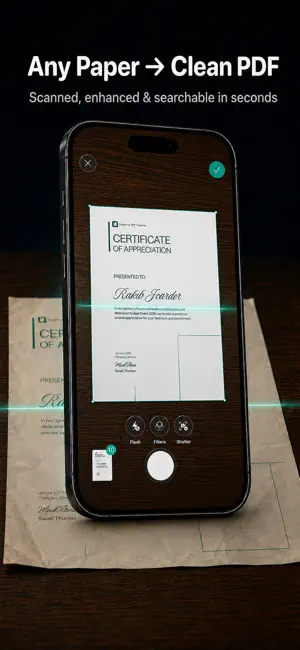
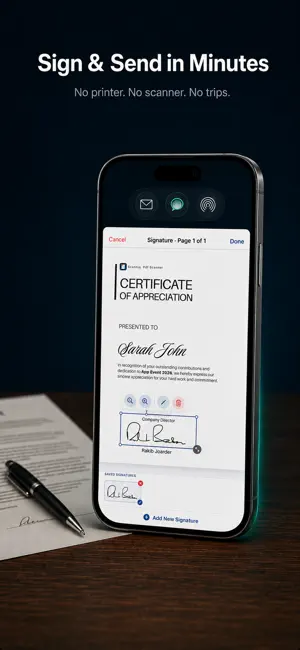
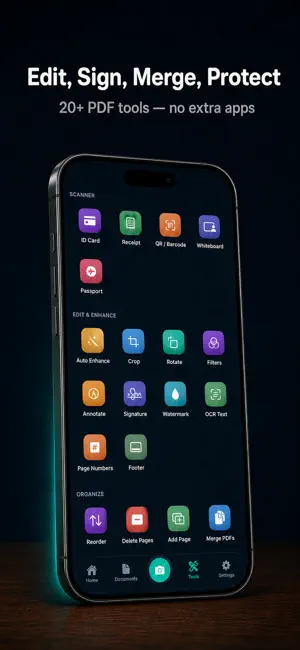
Scanniq is a powerful document scanner that turns your iPhone into a professional scanning tool. Scan receipts, contracts, notes, business cards and any paper document — then instantly convert them to high-quality PDFs. -- SMART DOCUMENT SCANNER -- • Automatic edge detection and perspective correction • Multi-page document scanning in seconds • Works as a receipt scanner with automatic enhancement • Scan any paper size or format -- OCR TEXT RECOGNITION -- • Extract text from scanned documents and photos • Copy, search and share recognized text • Works fully offline — no internet required -- SEAMLESS CLOUD SYNC -- • All scans sync automatically across iPhone and iPad via cloud sync • Access any document from any device instantly • Private and secure — your data stays in your cloud -- PDF TOOLS -- • Annotate, crop, rotate and reorder pages • Convert photos and images to PDF instantly • Merge and split PDF documents • Export to PDF or JPEG -- SHARE ANYWHERE -- • Share via Mail, Messages, AirDrop or Files • Save to the Files app or cloud storage • Open in any PDF-compatible app Scanniq is a fast document scanner built for simplicity. No clutter, no complicated menus — just reliable scanning that syncs across all your Apple devices. -- SUBSCRIPTION INFORMATION -- Scanniq offers optional Pro subscriptions (monthly, annual) or a one-time lifetime purchase for unlimited scans, advanced OCR features, and premium PDF tools. Free users can scan up to 3 documents and export up to 3 documents with a watermark. • Subscriptions auto-renew unless cancelled at least 24 hours before the end of the current period • Payment is charged to your Apple ID account at confirmation of purchase • Manage subscriptions and turn off auto-renewal in Account Settings after purchase Privacy Policy: https://scanniq.droidappbd.com/privacy Terms of Use: https://scanniq.droidappbd.com/terms
What’s new
Version 1.1.0 · Updated July 19, 2026
New personalized onboarding, faster iCloud sync, and bug fixes.
App privacy
The developer, Rakib Joarder, reported these privacy practices to Apple.
Data Linked to You
The following data, which may be collected and linked to your identity, may be used for the following purposes:
- Identifiers: User ID
Used for: App Functionality
Data Not Linked to You
The following data, which may be collected but is not linked to your identity, may be used for the following purposes:
- Identifiers: Device ID
- Usage Data: Product Interaction
- Purchases: Purchase History
Used for: Analytics, App Functionality
Alternatives to Scanniq - PDF & Doc Scanner
Looking for apps like Scanniq - PDF & Doc Scanner? Here are 6 similar apps on the App Store. The highest rated is Constructores Cultura Argos (5.0/5), and all 6 are free to download.
-
 PDF Scanner - PaperSnap
-
 ScanEx: Scan to PDF & Scanner
-
 SnapScan: PDF Scanner & OCR
-
 Document Scanner: Scan & Print
-
 Constructores Cultura Argos
5.0
-
 DocAura: PDF Scanner & OCR
5.0
| App | Rating | Price | Last updated | Compare |
|---|---|---|---|---|
| Scanniq - PDF & Doc Scanner | 5.0 / 5 (4 ratings) | Free | July 19, 2026 | |
| PDF Scanner - PaperSnap | – | Free | Jun 6, 2026 | Compare |
| ScanEx: Scan to PDF & Scanner | – | Free | Jun 11, 2026 | Compare |
| SnapScan: PDF Scanner & OCR | – | Free | Aug 26, 2026 | Compare |
| Document Scanner: Scan & Print | – | Free | Sep 23, 2026 | Compare |
| Constructores Cultura Argos | 5.0 / 5 (1) | Free | Apr 15, 2024 | Compare |
| DocAura: PDF Scanner & OCR | 5.0 / 5 (6) | Free | Oct 20, 2026 | Compare |