

Image and Video Compressor
Jonathan Ng Photo & Video iPhoneiPadiPod touchMac
Image and Video Compressor is a free Photo & Video app for iPhone and iPad by Jonathan Ng. Rated 5.0/5 from 1 ratings. Requires iOS 17.0.
- Rating
- 5.0
- 1 ratings
- Price
- Free
- on the App Store
- Size
- 7 MB
- Age 4+
- Updated
- Oct 15
- 2026 · v1.3
Screenshots


About Image and Video Compressor
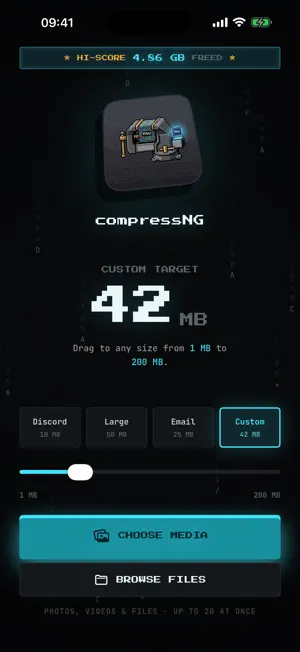
Choose a file-size target. Skip the bitrate math. CompressNG uses the MB target you choose to calculate compression for photos and videos. Select 10 MB, 25 MB, 50 MB, or a custom target from 1–200 MB. Add media from Photos or Files—or send it from another app's Share menu. Compress a mixed batch, inspect the result, then save or share the output where you need it. Built for email attachments, school or work forms, messaging, upload limits, and reclaiming storage. PRIVATE BY DESIGN • Photo and video processing happens on your device • No developer server, media uploads, account, ads, analytics, or tracking • Works offline with media already stored on your device VIDEO CONTROLS • H.264 for compatibility or HEVC for efficiency • Resolution caps: Original, 1080p, 720p, and 480p • Frame-rate controls from 15–60 fps • Audio quality from 64–192 kbps • A warning when a video already fits your target • If a result lands above target, Recompress adjusts the encoding budget for another pass PHOTO CONTROLS • Adjustable image quality • Resize by longest side or exact dimensions • Crop, rotate, and resize before export • Preserve transparency in PNG images BATCH PHOTOS AND VIDEOS Process up to 20 photos and videos in one queue. Follow progress in the app or, on supported iPhone and iPad devices, with a Live Activity. COMPARE BEFORE YOU SHARE Review photos with a before-and-after slider and videos with synchronized comparison playback. See output size, dimensions, codec, bitrate, and space saved before export. PRIVACY CONTROLS Strip EXIF metadata such as location and camera information. Anonymize exported filenames when you do not want the original name attached. TRACK YOUR SAVINGS See files compressed, average savings, recent sessions, monthly savings, and your biggest result. Aggregate lifetime stats can sync through your private iCloud account. Private, target-based compression with precise controls and a retro terminal look.
What’s new
Version 1.3 · Updated October 15, 2026
• Compress photos and videos directly from the Share menu. Choose 10, 25, or 50 MB, then share the smaller files without opening the app. • Improved private iCloud syncing for your lifetime compression stats and personal bests across iPhone, iPad, and Mac. • The stats screen now confirms when your latest totals have synced, while keeping them available offline.
App privacy
The developer, Jonathan Ng, reported these privacy practices to Apple.
Data Not Collected
The developer does not collect any data from this app.
Alternatives to Image and Video Compressor
Looking for apps like Image and Video Compressor? Here are 6 similar apps on the App Store. The highest rated is Slim: Photo & Video Compressor (5.0/5), and all 6 are free to download.
-
 Slim: Photo & Video Compressor
5.0
Slim: Photo & Video Compressor
5.0
-
 dspsbl
5.0
dspsbl
5.0
-
 Parex Video Converter
-
 Tiny Photo Compressor
5.0
Tiny Photo Compressor
5.0
-
 Studio Cut - Video Editor
-
 Photo Compressor: MB to KB
| App | Rating | Price | Last updated | Compare |
|---|---|---|---|---|
| Image and Video Compressor | 5.0 / 5 (1 rating) | Free | October 15, 2026 | |
| Slim: Photo & Video Compressor | 5.0 / 5 (1) | Free | Oct 1, 2026 | Compare |
| dspsbl | 5.0 / 5 (2) | Free | Sep 23, 2026 | Compare |
| Parex Video Converter | – | Free | Aug 6, 2026 | Compare |
| Tiny Photo Compressor | 5.0 / 5 (1) | Free | Jun 11, 2026 | Compare |
| Studio Cut - Video Editor | – | Free | Apr 29, 2026 | Compare |
| Photo Compressor: MB to KB | – | Free | Sep 26, 2026 | Compare |