

AiCadGen
Ali El Ali Productivity iPhoneiPadiPod touch
AiCadGen is a free Productivity app for iPhone and iPad by Ali El Ali. Requires iOS 15.0. Updated August 30, 2026.
- Price
- Free
- on the App Store
- Size
- 23 MB
- Age 4+
- Updated
- Aug 30
- 2026 · v1.0.17
Screenshots


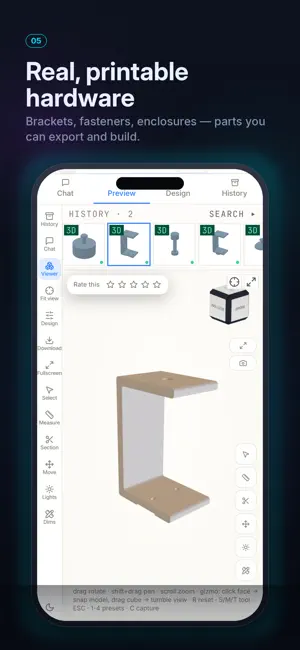
About AiCadGen
Transform ideas into manufacturing-ready CAD models using plain English. AiCADGen uses AI to generate 3D models, engineering drawings, and manufacturing files from simple text descriptions, sketches, technical drawings, or reference images. Whether you're prototyping a product, designing a mechanical part, or creating a custom component for 3D printing or fabrication, AiCADGen helps you move from concept to CAD in minutes instead of hours. Perfect for engineers, designers, makers, students, inventors, manufacturers, and anyone who needs professional CAD files without spending hours modelling. FEATURES • Generate 3D CAD models from text prompts • Convert sketches, photos, and technical drawings into editable CAD • Create dimensioned engineering drawings automatically • Export STL, STEP, DXF, PDF, SVG, OBJ and more • Interactive 3D model viewer with zoom, rotate and inspect controls • AI-assisted design refinement through natural conversation • Parametric geometry generation • Fast concept iteration and design exploration • Generate printable models for 3D printing • Produce files suitable for CNC machining, laser cutting and manufacturing workflows • Cloud-based projects available across your devices CREATE FROM NATURAL LANGUAGE Describe your design as you would explain it to another engineer. Specify dimensions, materials, wall thickness, tolerances, hole sizes, mounting points, threads, clearances, manufacturing processes, or design intent. The more detail you provide, the better the generated result. IMPORT REFERENCE IMAGES Upload hand sketches, whiteboard drawings, screenshots, existing technical drawings, product photos, or concept artwork. AiCADGen analyses your references and uses them together with your instructions to generate accurate CAD models and engineering drawings. EXPORT FOR YOUR WORKFLOW Generate the formats your workflow requires. • STL for 3D printing • STEP for professional CAD software • DXF for CNC machining and laser cutting • PDF engineering drawings • SVG vector files • OBJ and additional 3D formats BUILT FOR • Mechanical engineering • Product design • Industrial design • Manufacturing • 3D printing • CNC machining • Laser cutting • Sheet metal concepts • Prototype development • Education • DIY and maker projects WHY AICADGEN Traditional CAD modelling can take hours for even simple concepts. AiCADGen accelerates early-stage design by generating models and drawings from natural language, allowing you to explore ideas, iterate quickly, and prepare files for manufacturing workflows faster. Whether you're creating brackets, enclosures, adapters, fixtures, storage systems, machine components, workshop tools, furniture parts, or custom mechanical assemblies, AiCADGen helps turn concepts into CAD-ready designs. GET STARTED Every new account includes credits to explore the AiCADGen workflow. Generate your first designs, inspect the interactive 3D model, and review engineering drawings before choosing the option that best suits your projects. When you're ready, unlock exports through a subscription or a one-time design unlock. GOOD TO KNOW AiCADGen is a design and drafting accelerator, not a replacement for professional engineering review. Generated models and drawings should always be verified before manufacturing, fabrication, installation, or safety-critical use. SUBSCRIPTIONS Choose the plan that fits your workflow. Paid plans include commercial use and CAD file exports, while higher tiers provide faster generation, higher-quality results, priority processing, team features, and API access. Individual design export unlocks are also available, and purchased credits stay on your account until you use them. Subscriptions renew automatically each month unless canceled at least 24 hours before the period ends. Manage or cancel in your App Store settings. Terms of Use (EULA): https://www.apple.com/legal/internet-services/itunes/dev/stdeula/ Privacy Policy: https://aicadgen.com/privacy
What’s new
Version 1.0.17 · Updated August 30, 2026
General Improvement and fixes 7-day free trial Maker subscription
App privacy
The developer, Ali El Ali, reported these privacy practices to Apple.
Data Linked to You
The following data, which may be collected and linked to your identity, may be used for the following purposes:
- Financial Info: Payment Info
- Contact Info: Email Address, Name
- Identifiers: User ID
Used for: App Functionality
Data Not Linked to You
The following data, which may be collected but is not linked to your identity, may be used for the following purposes:
- Identifiers: Device ID
Used for: App Functionality
Alternatives to AiCadGen
Looking for apps like AiCadGen? Here are 6 similar apps on the App Store.




| App | Rating | Price | Last updated | Compare |
|---|---|---|---|---|
| AiCadGen | – | Free | August 30, 2026 | |
| OrbitCAD | – | Free | Aug 21, 2026 | Compare |
| Sevn: Simple weekly planner | – | Free | Apr 11, 2026 | Compare |
| PDF Flatten | – | 0.99 USD | Feb 24, 2026 | Compare |
| Emly: EML Viewer | – | Free | Sep 30, 2026 | Compare |
| AI CAD | – | Free | Sep 6, 2026 | Compare |
| stl-er | – | Free | Jun 27, 2026 | Compare |
Compare AiCadGen with the top alternatives: ratings, updates, ASO score and keyword gaps →