

AI CAD
Hubei Ai Qiang Artificial Intelligence Technology Co. Ltd Productivity iPhoneiPadiPod touch
AI CAD is a free Productivity app for iPhone and iPad by Hubei Ai Qiang Artificial Intelligence Technology Co. Ltd. Requires iOS 13.0.
- Price
- Free
- on the App Store
- Size
- 49 MB
- Age 4+
- Updated
- Sep 6
- 2026 · v1.1.7
Screenshots
About AI CAD
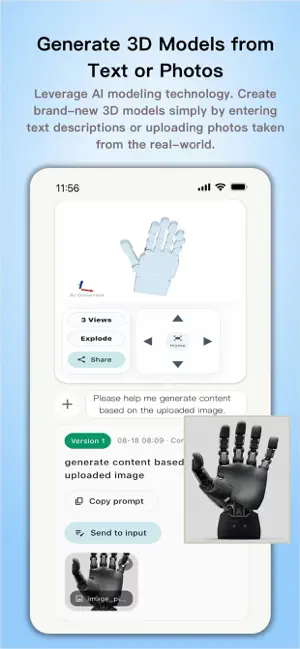
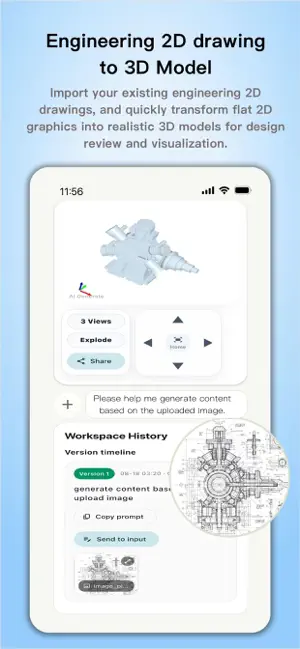
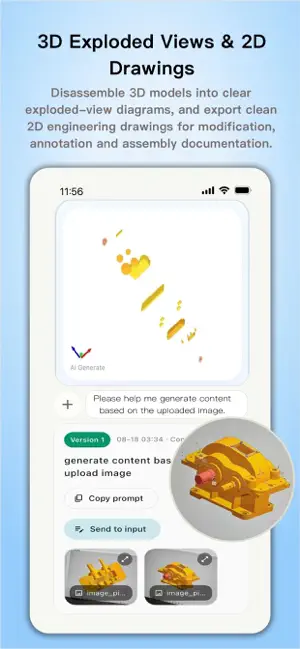
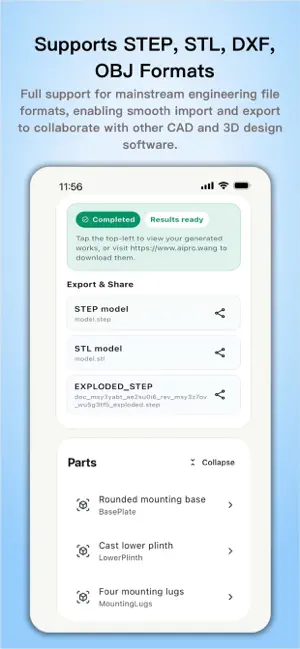
Turn an idea into an editable CAD model using the way you naturally work: take a photo, sketch a concept, or describe what you need in plain language. AI CAD helps transform your input into practical 3D geometry that you can inspect, refine, and share. DESIGN WITH AI • Start from text, a reference photo, or a hand-drawn sketch. • Refine dimensions, features, and shapes through natural-language instructions. • Continue iterating without rebuilding the model from scratch. INSPECT YOUR MODEL • Explore your design in an interactive 3D workspace. • Switch between front, top, and side views for clearer technical inspection. • Work comfortably across both iPhone and iPad. PREPARE FOR REAL WORK • Create designs for engineering concepts, prototyping, manufacturing, and 3D printing. • Share CAD files directly with teammates or move them into your existing workflow. • Use a multilingual interface designed for global engineering teams. From the first idea to the next revision, AI CAD makes computer-aided design more direct, visual, and conversational.
What’s new
Version 1.1.7 · Updated September 6, 2026
A more reliable, multilingual CAD workspace is here. Keep the 3D viewport stable through refreshes and when returning from the background. See part names translated more consistently across supported languages. Enjoy sharing and usability refinements for smoother work on iPhone and iPad.
App privacy
The developer, Hubei Ai Qiang Artificial Intelligence Technology Co. Ltd, reported these privacy practices to Apple.
Data Not Linked to You
The following data, which may be collected but is not linked to your identity, may be used for the following purposes:
- Location: Coarse Location
- Contact Info: Phone Number
- User Content: Photos or Videos, Customer Support
- Diagnostics: Crash Data, Performance Data
Used for: App Functionality
Alternatives to AI CAD
Looking for apps like AI CAD? Here are 6 similar apps on the App Store. The highest rated is OfflineChatbot - Private LLM (5.0/5), and all 6 are free to download.
-
 AiCadGen
-
 ReWriteMe: AI Writer
-
 ExploreFocus
-
 AI Keyboard・Writing Assistant
-
 OfflineChatbot - Private LLM
5.0
OfflineChatbot - Private LLM
5.0
-
 鹿用水印相机-时间地点经纬度水印拍照
| App | Rating | Price | Last updated | Compare |
|---|---|---|---|---|
| AI CAD | – | Free | September 6, 2026 | |
| AiCadGen | – | Free | Aug 30, 2026 | Compare |
| ReWriteMe: AI Writer | – | Free | May 30, 2026 | Compare |
| ExploreFocus | – | Free | Dec 13, 2025 | Compare |
| AI Keyboard・Writing Assistant | – | Free | Apr 17, 2026 | Compare |
| OfflineChatbot - Private LLM | 5.0 / 5 (1) | Free | Aug 19, 2026 | Compare |
| 鹿用水印相机-时间地点经纬度水印拍照 | – | Free | Jul 3, 2025 | Compare |
Compare AI CAD with the top alternatives: ratings, updates, ASO score and keyword gaps →