

Quick Kibo: Custom Keyboard
Weiyanda (Shanghai) Information Technology Co., Ltd. Utilities iPhoneiPadiPod touchMac
Quick Kibo: Custom Keyboard is a free Utilities app for iPhone and iPad by Weiyanda (Shanghai) Information Technology Co., Ltd. Rated 5.0/5 from 1 ratings.
- Rating
- 5.0
- 1 ratings
- Price
- Free
- on the App Store
- Size
- 275 MB
- Age 4+
- Updated
- Oct 19
- 2026 · v7.0.971
Screenshots



About Quick Kibo: Custom Keyboard
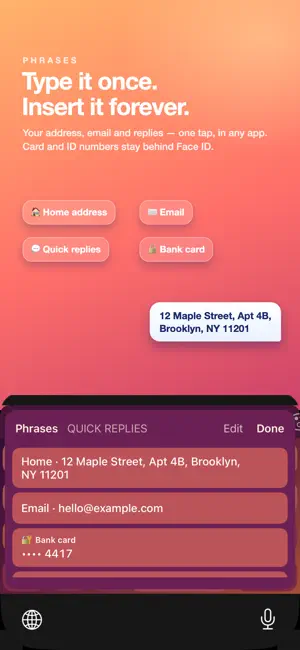
Quick Keys turns the plain iOS keyboard into something that is actually yours: real mechanical key sounds, RGB backlight that reacts to your fingers, themes for every mood, and typing help that gets out of your way. THEMES THAT FOLLOW YOU EVERYWHERE Pick a skin and it comes with you into every app - messages, notes, search, all of it. Minimal light keyboards done properly. Deep darks. Soft cute pastels. Glowing neon. Gradients that shift across the keys. Loud, colorful pop. Turn on Shuffle and it is a different keyboard every time you open it. KEY CAPS YOU DESIGN YOURSELF Most keyboards let you change the background. Quick Keys lets you change the keys. Pick a letterform - serif, mono, rounded, outlined, enclosed. Pick how the letters are inked - solid, outlined, shadowed, or a gradient running across the board. Then colour the caps themselves: the vowels, the home row, WASD, the function keys, or every key in a rainbow, in the color you choose. MECHANICAL AND MELODIC KEY SOUNDS Blue switches with the sharp click. Reds with the smooth press. Browns with the tactile bump. Deep thock. A real typewriter. A piano laid out across the keys, so typing left to right rises in pitch. Set the volume to taste, or turn it off entirely. RGB BACKLIGHT Light that answers your fingers: a glow under each press, a ripple that spreads, a trail that follows you across the keys, confetti, fire, rain, aurora. Or a calm breathing pulse. All drawn on the keyboard itself, all tunable. TYPING THAT ACTUALLY HELPS Word suggestions and corrections built on measured frequency, so the word you meant comes first and real typos get fixed. Next-word prediction that reads the sentence you are writing. Chinese pinyin with phrase and whole-sentence conversion, initial-only shorthand, and fuzzy spellings. Japanese kana to kanji. Korean Hangul assembly. Layouts for the languages people actually type in, and the globe key switches between the ones you turn on. EVERYTHING ELSE - Emoji, kaomoji and fancy text styles, latched so everything you type is transformed - Saved phrases you can paste in any app, and secure entries behind Face ID - Slide the space bar to move the cursor, press and hold for accents - A number row if you want one, and a punctuation set that matches your language - Insert the date, the time, or where you are, without leaving what you are writing - Your own photo as the keyboard background, with the keys tuned to let it through PRIVACY Quick Keys has no servers, no accounts and no analytics. Nothing you type is collected, logged or transmitted - with Full Access on or off. Full Access is off by default and optional; it is used only for the clipboard buttons and the location key. Location is read only when you press that key and goes straight into your own text. Free to type in, forever. Pro is optional - subscribe weekly or yearly, or pay once and keep it forever. Terms of Use (EULA): https://www.apple.com/legal/internet-services/itunes/dev/stdeula/
What’s new
Version 7.0.971 · Updated October 19, 2026
Bug fixes and performance improvements.
App privacy
The developer, Weiyanda (Shanghai) Information Technology Co., Ltd., reported these privacy practices to Apple.
Data Not Linked to You
The following data, which may be collected but is not linked to your identity, may be used for the following purposes:
- Location: Precise Location
Used for: App Functionality
Alternatives to Quick Kibo: Custom Keyboard
Looking for apps like Quick Kibo: Custom Keyboard? Here are 6 similar apps on the App Store. The highest rated is SweetKeyboard Pro (5.0/5), and all 6 are free to download.
-
 ARC Type Keyboard
4.6
ARC Type Keyboard
4.6
-
 Keyboard Plus: Themes & Emoji
4.0
Keyboard Plus: Themes & Emoji
4.0
-
 SweetKeyboard Pro
5.0
SweetKeyboard Pro
5.0
-
 KotoKey: Custom Keyboard
4.2
KotoKey: Custom Keyboard
4.2
-
 EFKey – Swipe & AI Keyboard
4.7
EFKey – Swipe & AI Keyboard
4.7
-
 Top Keyboard: Custom Themes
| App | Rating | Price | Last updated | Compare |
|---|---|---|---|---|
| Quick Kibo: Custom Keyboard | 5.0 / 5 (1 rating) | Free | October 19, 2026 | |
| ARC Type Keyboard | 4.6 / 5 (5) | Free | Oct 19, 2026 | Compare |
| Keyboard Plus: Themes & Emoji | 4.0 / 5 (3) | Free | Oct 21, 2026 | Compare |
| SweetKeyboard Pro | 5.0 / 5 (3) | Free | Oct 6, 2026 | Compare |
| KotoKey: Custom Keyboard | 4.3 / 5 (8) | Free | Oct 15, 2026 | Compare |
| EFKey – Swipe & AI Keyboard | 4.7 / 5 (36) | Free | Oct 21, 2026 | Compare |
| Top Keyboard: Custom Themes | – | Free | Oct 3, 2026 | Compare |