

Top Keyboard: Custom Themes
Sergei Lazarenko Utilities iPhoneiPadiPod touch
Top Keyboard: Custom Themes is a free Utilities app for iPhone and iPad by Sergei Lazarenko. Requires iOS 16.0. Updated October 3, 2026.
- Price
- Free
- on the App Store
- Size
- 39 MB
- Age 4+
- Updated
- Oct 3
- 2026 · v1.42
Screenshots


About Top Keyboard: Custom Themes
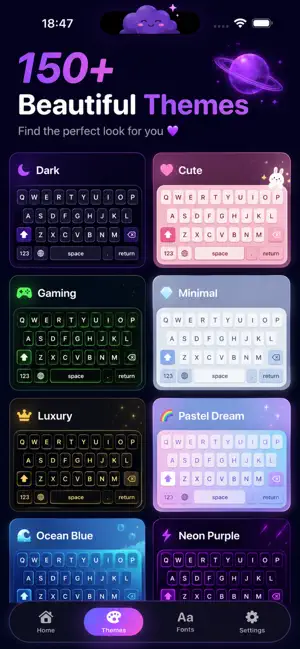
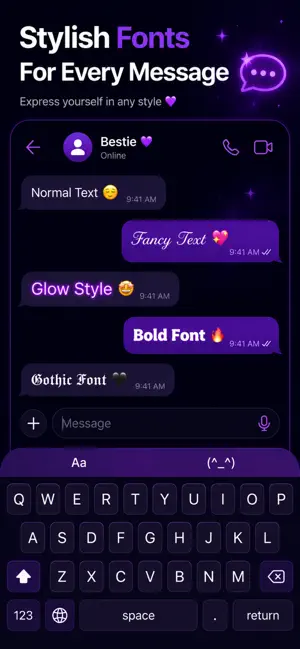
Customize your iPhone keyboard with beautiful themes, stylish fonts, symbols and kaomoji. Create a keyboard that matches your personality and make every message look unique. FEATURES • Custom keyboard themes • Stylish fonts • Kaomoji and text faces • Special symbols and characters • Color customization • Photo backgrounds • Cute and aesthetic themes • Fast and easy setup • Regular content updates PERSONALIZE YOUR KEYBOARD Choose from beautiful keyboard themes or create your own look using colors, backgrounds and unique styles. TYPE WITH STYLISH FONTS Make your messages stand out with decorative fonts and creative text styles. KAOMOJI & SYMBOLS Access hundreds of text faces, symbols and special characters directly from your keyboard. EASY TO SET UP Enable the keyboard, choose your favorite theme and start typing in seconds. Perfect for social media, messaging, profiles, bios, captions and everyday conversations. Download now and create your perfect keyboard. Privacy Policy: https://www.freeprivacypolicy.com/live/fa5fd58a-46eb-4321-b08e-c77692d12736 Terms of Use (EULA): https://www.apple.com/legal/internet-services/itunes/dev/stdeula/
What’s new
Version 1.42 · Updated October 3, 2026
Version 1.42 makes your keyboard more personal and more reliable. NEW • Adjust key size and spacing for each theme in the editor • Catalog themes can now come alive with animations as you tap keys or type certain words • A redesigned welcome tour gets your keyboard set up in a few steps IMPROVEMENTS • The subscription screen now fits every iPhone, including iPhone SE, and shows long local prices in full • Faster typing and smoother theme previews on the Home screen • Installed themes carry over without downloading again FIXES • Fixed a rare crash when the keyboard opens • Fixed category updates and endless scrolling in the catalog • Performance, memory, and stability improvements across the app and keyboard
App privacy
The developer, Sergei Lazarenko, reported these privacy practices to Apple.
Data Not Collected
The developer does not collect any data from this app.
Alternatives to Top Keyboard: Custom Themes
Looking for apps like Top Keyboard: Custom Themes? Here are 6 similar apps on the App Store. The highest rated is Quick Kibo: Custom Keyboard (5.0/5), and all 6 are free to download.
-
 Font Pop: Fun Fonts Keyboard
4.0
Font Pop: Fun Fonts Keyboard
4.0
-
 Keybord Themes & Fonts
2.0
Keybord Themes & Fonts
2.0
-
 Aesthetic Keyboard & Fonts
4.4
Aesthetic Keyboard & Fonts
4.4
-
 Keyboard Plus: Themes & Emoji
4.0
Keyboard Plus: Themes & Emoji
4.0
-
 iFonts: Fonts Keyboard & Emoji
4.4
iFonts: Fonts Keyboard & Emoji
4.4
-
 Quick Kibo: Custom Keyboard
5.0
Quick Kibo: Custom Keyboard
5.0
| App | Rating | Price | Last updated | Compare |
|---|---|---|---|---|
| Top Keyboard: Custom Themes | – | Free | October 3, 2026 | |
| Font Pop: Fun Fonts Keyboard | 4.0 / 5 (4) | Free | Jul 19, 2026 | Compare |
| Keybord Themes & Fonts | 2.0 / 5 (3) | Free | Apr 25, 2026 | Compare |
| Aesthetic Keyboard & Fonts | 4.4 / 5 (54) | Free | Oct 19, 2026 | Compare |
| Keyboard Plus: Themes & Emoji | 4.0 / 5 (3) | Free | Oct 21, 2026 | Compare |
| iFonts: Fonts Keyboard & Emoji | 4.4 / 5 (34) | Free | Feb 20, 2026 | Compare |
| Quick Kibo: Custom Keyboard | 5.0 / 5 (1) | Free | Oct 19, 2026 | Compare |