

EFKey – Swipe & AI Keyboard
Peter Feranc Utilities iPhoneiPadiPod touch
EFKey – Swipe & AI Keyboard is a free Utilities app for iPhone and iPad by Peter Feranc. Rated 4.6/5 from 32 ratings. Requires iOS 17.0.
- Rating
- 4.6
- 32 ratings
- Price
- Free
- on the App Store
- Size
- 98 MB
- Age 4+
- Updated
- Oct 12
- 2026 · v2.2
Screenshots


About EFKey – Swipe & AI Keyboard
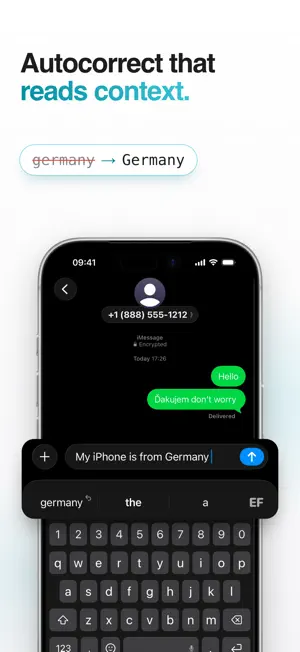
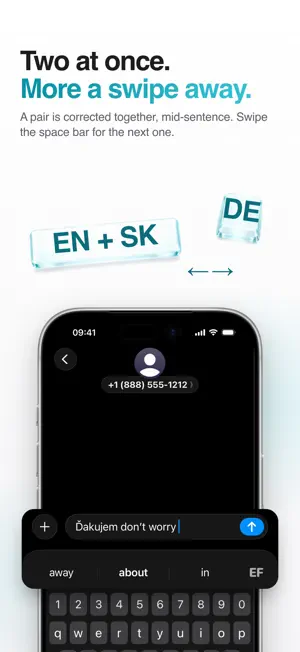
EFKey types like the keyboard you already use. It has the parts that one is missing. Typing runs on your phone, in 84 languages, and stays free. GESTURES INSTEAD OF PAGES Hold any key and its second character comes up. @ # % € sit in the corner of every key, so the numbers page stays where it is. Flick left on the delete key and it erases whole words. Hold the spacebar and the keyboard turns into a trackpad. Slide, and the cursor lands where you meant it. Glide over the letters and the word types itself, accents and apostrophes included. Pick another word once and the next identical swipe follows your pick. Double-space ends the sentence. 84 LANGUAGES, TWO AT A TIME Turn on two languages and write in both in one sentence: dakujem becomes ďakujem while dont gets its apostrophe. Nothing to switch. 26 languages are fully verified. 58 more are in beta: they work, a native speaker just hasn't checked them yet. New in 2.2: Chinese, Japanese, Korean, Tamil, Serbian in Cyrillic and Roman Urdu. The app itself speaks 26 languages. QWERTY, QWERTZ, AZERTY, Dvorak, Colemak. A number row that adds a row instead of shrinking your keys. CORRECTION THAT READS THE SENTENCE Autocorrect looks at up to three words of context. "i said hat" becomes "that"; "red hat" stays as it is. It fixes a word with three mistakes in it and leaves alone the one that was already right. Type germany or iphone and get Germany and iPhone. Names from your contacts show up in suggestions and in swipe. No contacts permission needed. Prediction learns how you write. Give it a few days. Fix a word once and press backspace: it never touches that word again. THE TOOLS. EFKEY PRO. Clipboard history with your own categories, pinning and search. Translator. Type in one language, insert the other, without leaving the keyboard. Dictation. Speak and it types, translated if you want, with a Live Activity in the Dynamic Island. AI edits. Rewrite, fix the grammar, change the tone. Or swipe down from the spacebar and the whole field gets rewritten. GIF search, a calculator that answers in the suggestion bar, text shortcuts, My info autofill, one-handed mode, typing stats. Shortcuts on the keys: hold C to copy, H for clipboard history, D for dictation. Remappable. Your own colours and saved themes, key press animations, more swipe trail effects. iCloud sync of learned words and settings. One purchase. No subscription. Seven days free when you start the trial yourself, no card and no account. Typing stays free either way. Translation, dictation and AI edits run on-device where iOS supports it. Or bring your own API key (Anthropic, Gemini, OpenAI, Groq, OpenRouter). It stays in your Keychain, and your text goes only to the provider you picked. MADE TO FEEL RIGHT Native down to the pixel, light and dark, and it follows the appearance of the app you are in. Multi-touch that keeps up at full speed. No dropped keys. Emoji with search, skin tones and suggestions as you type. Settings you can search. Type a word and it takes you to the switch. PRIVATE BY DESIGN No keystroke logging. No analytics or tracking SDKs. No server of ours anywhere. Typing, prediction and autocorrect work offline. iOS never lets a custom keyboard into a password field, and when a password is shown in plain text, EFKey stops correcting and learns nothing from it. The only things that leave your phone are the ones you switch on yourself: GIF search, your own AI key, iCloud sync (learned words end-to-end encrypted, settings through your private iCloud). efkey.app/privacy says what, where and when. Full Access is optional. The keyboard types at full strength without it. Only the tools that reach outside the keyboard need it. Your learned and blocked words export and import anytime. LIGHT ON STORAGE Every language except English downloads when you enable it. Nothing you don't type in sits in your phone. Set it up in a minute. Questions? [email protected] · efkey.app
Ratings & reviews
4.6
32 ratings
What’s new
Version 2.2 · Updated October 12, 2026
Version 2.2. Seven new languages, a new typing engine, and a keyboard that learns how you type. NEW LANGUAGES • Chinese, Simplified and Traditional: Pinyin, Zhuyin and Cangjie. • Japanese: kana or romaji, with kanji. • Korean: 2-set and 10-key. • Tamil (Tamil 99), Serbian in Cyrillic and Roman Urdu. • 84 languages in all. Punjabi and Persian layouts match iOS. Catalan, Slovenian, Maltese, Ukrainian and six more get the extra keys of iOS. NEW TYPING ENGINE • Autocorrect, prediction and swipe run on a new engine, on your iPhone. Names and foreign words are left alone more often. • It learns where you tap. After about 30 letters, corrections account for where your thumb lands. • Fix a typo once from the bar and it's fixed on its own next time. Backspace right after undoes it. • Phrases you type every day complete from the two words before. • The next word fixes the one before it: "there to he more" becomes "there to be more". • "ihave" becomes "I have", also in the middle of a sentence. • Spanish accents from context: "dime donde" becomes "dime dónde". • Each language you use downloads its data in the app. Until it's there, that language types as before. LANGUAGE PAIRS • As many pairs as you like, up to five languages: English with Spanish for work, German with Italian for family. Each pair is one row with its own page and switches with one tap. KEYS • Swipe down on a key to type the character in its corner. Off by default. • Select text with the space bar. • Put your own character on the comma or period key. • Symbols on long-press can be turned off; accents stay. • -- becomes an em dash, and 5--3 becomes 5–3. • Spanish ¿? and ¡! come in pairs. • Language code on the space bar: always, while typing, or never. SWIPE • Swipe several words in one stroke through the space bar. Off by default. • Deleting a swiped word unlearns it. Fewer names among the alternatives. IPHONE DUO AND IPAD • On the inner display the keyboard has the right size and adapts when you fold or unfold, even mid-typing. In landscape it splits into two halves. • iPad: a new Split keyboard option, off by default. TOOLS AND SETTINGS • Settings search finds 70 more settings and scrolls to the row. • Dictation capitalizes "I" and new sentences, and downloads a missing language model itself. • A GIF over the size limit is copied smaller instead of failing. • Importing an EFKey backup restores every word. • Turn off the space after punctuation. FIXES • Tapping a suggestion replaces only the word under the cursor. • Deleted word pairs stay deleted. • Typing fast after a number no longer splits the next word. • Key sounds follow the iOS sound setting.
App privacy
The developer, Peter Feranc, reported these privacy practices to Apple.
Data Not Collected
The developer does not collect any data from this app.
Alternatives to EFKey – Swipe & AI Keyboard
Looking for apps like EFKey – Swipe & AI Keyboard? Here are 6 similar apps on the App Store. The highest rated is SweetKeyboard Pro (5.0/5), and all 6 are free to download.
-
 ARC Type Keyboard
4.6
ARC Type Keyboard
4.6
-
 TypeFlow: Smart Keyboard
3.7
TypeFlow: Smart Keyboard
3.7
-
 SweetKeyboard Pro
5.0
SweetKeyboard Pro
5.0
-
 Clink: Custom Keyboards
3.8
Clink: Custom Keyboards
3.8
-
 Quick Kibo: Custom Keyboard
5.0
Quick Kibo: Custom Keyboard
5.0
-
 VersaKey: Custom iOS Keyboard
4.2
VersaKey: Custom iOS Keyboard
4.2
| App | Rating | Price | Last updated | Compare |
|---|---|---|---|---|
| EFKey – Swipe & AI Keyboard | 4.6 / 5 (32 ratings) | Free | October 12, 2026 | |
| ARC Type Keyboard | 4.6 / 5 (5) | Free | Oct 19, 2026 | Compare |
| TypeFlow: Smart Keyboard | 3.7 / 5 (3) | Free | Jul 21, 2026 | Compare |
| SweetKeyboard Pro | 5.0 / 5 (3) | Free | Oct 6, 2026 | Compare |
| Clink: Custom Keyboards | 3.8 / 5 (39) | Free | Oct 19, 2026 | Compare |
| Quick Kibo: Custom Keyboard | 5.0 / 5 (1) | Free | Oct 19, 2026 | Compare |
| VersaKey: Custom iOS Keyboard | 4.3 / 5 (4) | Free | Oct 17, 2026 | Compare |