

VersaKey
Chokhlei Utilities iPhoneiPadiPod touch
VersaKey is a free Utilities app for iPhone and iPad by Chokhlei. Rated 5.0/5 from 3 ratings. Requires iOS 18.0. Updated October 1, 2026.
- Rating
- 5.0
- 3 ratings
- Price
- Free
- on the App Store
- Size
- 45 MB
- Age 4+
- Updated
- Oct 1
- 2026 · v1.0.6
Screenshots

About VersaKey
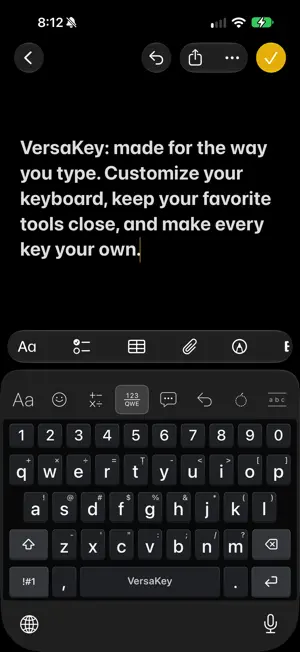
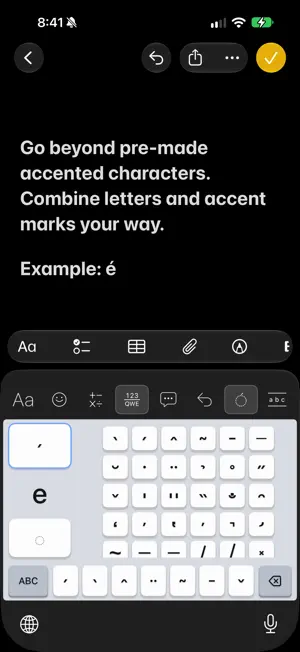
VersaKey is a customizable keyboard for iPhone and iPad, built to adapt to the way you type. Remap characters, assign long-press alternatives, add an optional number row, choose your toolbar tools, and personalize your keyboard’s layout and appearance. VersaKey also includes on-device typing assistance to make everyday writing faster and more comfortable, including autocorrect, word suggestions, next-word predictions, and adaptive touch handling. Make the keyboard yours • Remap characters to create your own keyboard layout • Assign custom characters and symbols to long presses • Add or remove the dedicated number row • Customize your toolbar with up to seven tools, or hide it entirely • Choose whether to show comma and period keys in portrait mode • Quickly access frequently used symbols without switching layouts • Choose from customizable themes and visual styles • Fine-tune keyboard behavior to suit how you type Smarter typing VersaKey provides on-device typing assistance to help reduce mistakes and keep you moving. • Autocorrect • Word completion and suggestions • Next-word predictions • Auto-capitalization • Emoji suggestions for English words and emoticons • Adaptive touch targets that help account for slightly misplaced taps Practice and improve Build accuracy and confidence with passage practice and word drills. Track your progress while getting comfortable with your keyboard. More ways to type Quickly insert saved responses, apply Unicode text styles, and move the cursor with a swipe on the space bar. VersaKey supports accented and combined characters, giving you more flexibility when writing languages and text that go beyond a standard English keyboard. Built with privacy in mind Core keyboard features work directly on your device. Normal typing and customization do not require Full Access. Optional learning and typing analysis require Full Access, and you can choose to sync personalization through your private iCloud account. Sync is off by default. Your keyboard should work the way you want it to. VersaKey gives you the tools to make it yours.
What’s new
Version 1.0.6 · Updated October 1, 2026
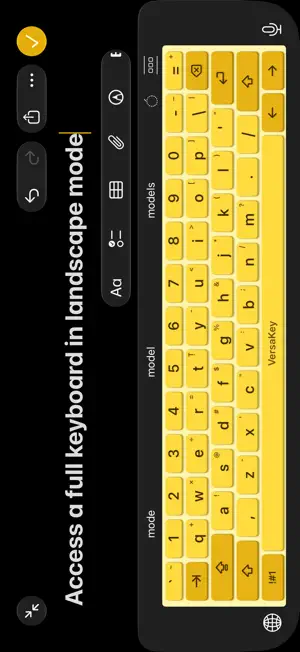
• Added iPad support with an expanded keyboard layout. • Customize your toolbar with up to seven tools, or hide it entirely. • Choose whether to show comma and period keys in portrait mode. • Get emoji suggestions for English words and emoticons. • Improved character styling and diacritic controls. • Fixed duplicated styled words when applying replacements. • Keyboard startup optimizations.
App privacy
The developer, Chokhlei, reported these privacy practices to Apple.
Data Not Collected
The developer does not collect any data from this app.
Alternatives to VersaKey
Looking for apps like VersaKey? Here are 6 similar apps on the App Store. The highest rated is Live Timers on Lock Screen (5.0/5), and 5 of the 6 are free to download.
-
 Track24: Work Time Tracker
-
 Live Timers on Lock Screen
5.0
Live Timers on Lock Screen
5.0
-
 QR Code Scanner: QRit
5.0
QR Code Scanner: QRit
5.0
-
 Mimi Calculator
-
 ClusterSwipe: free up space
5.0
ClusterSwipe: free up space
5.0
-
 EveryCord: Screen Recorder
4.2
EveryCord: Screen Recorder
4.2
| App | Rating | Price | Last updated | Compare |
|---|---|---|---|---|
| VersaKey | 5.0 / 5 (3 ratings) | Free | October 1, 2026 | |
| Track24: Work Time Tracker | – | Free | Oct 12, 2026 | Compare |
| Live Timers on Lock Screen | 5.0 / 5 (5) | Free | Oct 1, 2026 | Compare |
| QR Code Scanner: QRit | 5.0 / 5 (4) | Free | Oct 7, 2026 | Compare |
| Mimi Calculator | – | 0.99 USD | Oct 9, 2026 | Compare |
| ClusterSwipe: free up space | 5.0 / 5 (1) | Free | Sep 16, 2026 | Compare |
| EveryCord: Screen Recorder | 4.2 / 5 (2,331) | Free | Sep 29, 2026 | Compare |
Compare VersaKey with the top alternatives: ratings, updates, ASO score and keyword gaps →