

Live Timers on Lock Screen
CHAN SHUO WU Utilities iPhoneiPadiPod touchApple Watch
Live Timers on Lock Screen is a free Utilities app for iPhone and iPad by CHAN SHUO WU. Rated 5.0/5 from 5 ratings. Requires iOS 26.2.
- Rating
- 5.0
- 5 ratings
- Price
- Free
- on the App Store
- Size
- 18 MB
- Age 4+
- Updated
- Oct 1
- 2026 · v1.3.3
Screenshots


About Live Timers on Lock Screen
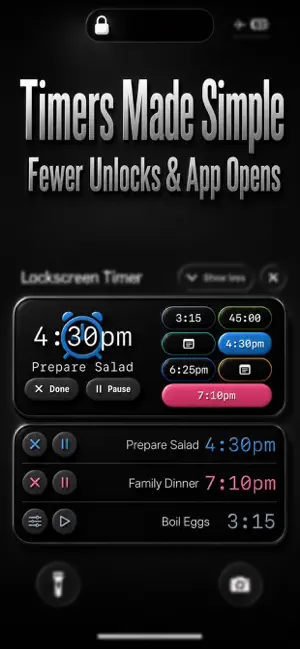
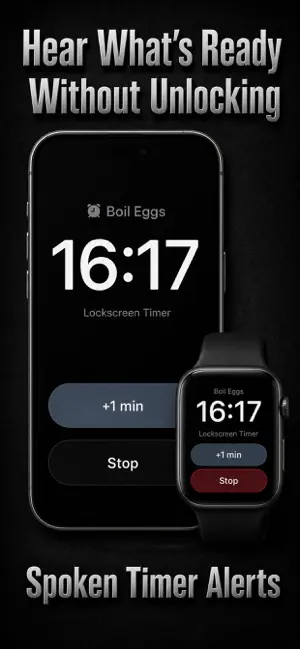
The app began with a simple problem: during busy, hands-full moments, I didn't have time to repeatedly unlock my iPhone and open an app just to check several timers. Apple's built-in Clock app works well for basic timing. The difficulty begins when several timers are running. Finding the right timer on the Lock Screen can require waking the screen, expanding the timer stack, and sorting through several similar-looking entries. Upcoming alarms are not shown there before they ring, so checking what is scheduled means opening Clock and switching to the Alarms tab. Lock Screen controls can also be triggered accidentally when an iPhone wakes as it is taken from a pocket, bag, or drawer. What began as a solution for busy, hands-full moments has since evolved into a complete timer board spanning the iPhone, Lock Screen, and Apple Watch. Why it's better Instead of sorting through a stack of similar-looking timers, you get: • One color-coded board containing countdowns, scheduled alarms, and notes • Lock Screen Snapshots showing names, colors, remaining time, and expected finish times • Spoken alerts that tell you what is ready without requiring you to look • Musical ringtones, recorded sounds, and custom alarms made from audio or video files • A native seven-slot Apple Watch board • Lock Screen controls protected by iPhone authentication, including Face ID, to help prevent accidental taps • Saved timer configurations and Markdown notes • Siri controls and Home Screen widgets Key features • Several timers, together on your Lock Screen See countdowns and upcoming scheduled alarms together, with names and colors that make them easy to tell apart. Know what is running, what finishes next, and what is scheduled without opening the app. Choose Standard for the full seven-slot board with a featured timer and its controls, or Three Rows for larger rows that prioritize the timers needing your attention most. • Check with little or no interaction Just wake your iPhone’s screen to check multiple timers at a glance, without unlocking it or opening the app. On supported iPhones, Always-On Display makes checking even easier: you can see your timers while the screen is dimmed. • Quick controls, protected while locked Start, pause, resume, stop, or add extra time directly from the Snapshot. iPhone authentication, including Face ID, helps prevent accidental actions while the phone is locked. You can also hide timer names and note text for privacy. • Talking alarms that tell you what is ready Hear "Time for your meeting" or "Your break is over" instead of wondering which timer rang. Write your own spoken message, choose from five speech speed levels and five volume levels, and preview it before saving. • Musical ringtones and custom alarm sounds Choose from quieter musical ringtones and louder alarms. Assign a different sound to each timer, record your own alert, or import an audio or video file from Files and use up to 29 seconds of its audio as a ringtone. • Set up once, use again Save everyday timer configurations so you don't have to recreate them. Keep notes beside your timers, with simple Markdown formatting to make important details stand out. • Your timer board on your wrist View all seven slots in the native Apple Watch app. Control timers, edit notes, and quickly load saved setups or configure new timers. Timer and note changes require a connection to the paired iPhone. • Hands-free controls and quick Home Screen checks Use Siri to start, pause, resume, stop, reset, restart, or extend timers by voice. Add Home Screen widgets to see your timers alongside your other everyday information. • Adjust when plans change Add fixed or automatically calculated extra time when a task needs longer. Switch iPhone alarms to a quieter sound when needed, including timers already running.
Ratings & reviews
5.0
5 ratings
What’s new
Version 1.3.3 · Updated October 1, 2026
• Added in-app offer code redemption.
App privacy
The developer, CHAN SHUO WU, reported these privacy practices to Apple.
Data Not Collected
The developer does not collect any data from this app.
Alternatives to Live Timers on Lock Screen
Looking for apps like Live Timers on Lock Screen? Here are 6 similar apps on the App Store. The highest rated is QR Code Scanner: QRit (5.0/5), and 5 of the 6 are free to download.
-
 QR Code Scanner: QRit
5.0
QR Code Scanner: QRit
5.0
-
 Pinlet
5.0
Pinlet
5.0
-
 Video To Live Photo
4.2
Video To Live Photo
4.2
-
 Track24: Work Time Tracker
-
 VersaKey: Custom iOS Keyboard
5.0
VersaKey: Custom iOS Keyboard
5.0
-
 Mimi Calculator
| App | Rating | Price | Last updated | Compare |
|---|---|---|---|---|
| Live Timers on Lock Screen | 5.0 / 5 (5 ratings) | Free | October 1, 2026 | |
| QR Code Scanner: QRit | 5.0 / 5 (4) | Free | Oct 7, 2026 | Compare |
| Pinlet | 5.0 / 5 (1) | Free | Oct 12, 2026 | Compare |
| Video To Live Photo | 4.2 / 5 (5) | Free | Oct 3, 2026 | Compare |
| Track24: Work Time Tracker | – | Free | Oct 12, 2026 | Compare |
| VersaKey: Custom iOS Keyboard | 5.0 / 5 (3) | Free | Oct 17, 2026 | Compare |
| Mimi Calculator | – | 0.99 USD | Oct 9, 2026 | Compare |