

PDF Squeeze: PDF Compressor
MOHAMMAD AHMADI SADR Utilities iPhoneiPadiPod touchMac
PDF Squeeze: PDF Compressor is a free Utilities app for iPhone and iPad by MOHAMMAD AHMADI SADR. Rated 5.0/5 from 1 ratings. Requires iOS 18.0.
- Rating
- 5.0
- 1 ratings
- Price
- Free
- on the App Store
- Size
- 22 MB
- Age 4+
- Updated
- Oct 15
- 2026 · v3.7
Screenshots



About PDF Squeeze: PDF Compressor
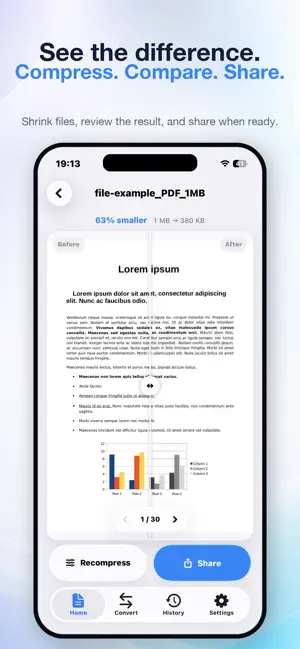
PDF Squeeze makes big PDFs small without making them ugly — and it also scans, reads, signs, converts and answers questions about them, without a single byte leaving your iPhone. SCAN PAPER INTO PDF Point the camera at a page and PDF Squeeze finds the edges, squares it up and cleans it: shadows lifted, paper turned white, ink made sharp. Choose Auto, Grayscale or Black & White, then save. Every scan is searchable — the words are read on device, so you can find, copy and ask about them. SEND TO ANY COMPUTER AirDrop doesn't reach a Windows laptop or a Chromebook. Send to Computer does: type the short address it shows into any browser on the same Wi-Fi and download. No cable, no account, nothing uploaded. Sharing stops when you close the screen. ASK YOUR PDF ANYTHING Open a contract, a lease, a manual or a research paper and just ask. "What's the cancellation policy?" "When does this renew?" "What did they agree to pay?" Answers come with page citations you can tap to jump to the source, so you can check the wording yourself. It all runs on your device: iPhones with Apple Intelligence use the system model, and other iPhones can add an optional on-device model. Scanned and photographed pages are read with on-device OCR in more than twenty languages. SIGN WITHOUT PRINTING Sign with your finger, or type your name and pick a handwriting style. Your signature is stored as strokes, never a photo, so it stays crisp at any zoom — and it's baked into the page, so it survives compression and email and nobody can drag it off. MARK UP LIKE PAPER Highlight, draw freehand and add text boxes you can stretch to any shape. Undo anything, all the way back. TEXT STAYS SHARP Most compressors re-encode every page and hand you a blurry file. PDF Squeeze tries a vector-preserving pass first, keeping text crisp and selectable. Pages are only re-rendered when that actually saves space, and your file never comes out larger than it went in. Filled-in forms keep their answers. HIT AN EXACT SIZE Email limit? Upload cap? Pick 1, 2, 5, 10 or 25 MB and PDF Squeeze finds the best quality that fits just under it — or tells you honestly when it can't. SEE THE DIFFERENCE Drag the Before & After slider across any page to compare the original with the compressed version. CONVERT WITHOUT LEAVING THE APP • PDF to Text, with OCR for scanned pages • PDF to Images, in PNG, JPEG, HEIC or TIFF • Images to PDF • Change Image Format between PNG, JPEG, HEIC and TIFF ALSO IN THE BOX • Compress a whole group of documents at once • Four presets: Light, Balanced, Strong, Extreme • Automatic grayscale detection for extra savings on scans • Rearrange, rotate and delete pages by dragging thumbnails • Extract pages into a new PDF, or merge several PDFs into one • Turn photos into a PDF • Full-text search • Compress from the Share sheet in any app • A library that stays where you left it, and a history of everything you've compressed • Built for iPad too: library on the left, document beside it, Apple Pencil for signing PRIVATE BY DESIGN Scanning, compression, conversion, OCR, signatures and AI answers all happen on your iPhone. Your documents are never uploaded to a server. No accounts, no tracking, no ads. PAY ONCE, KEEP FOREVER Your first compression and five questions are free, and scanning, signing, markup, merging, page editing and converting are free for good. One purchase unlocks everything else for life. No subscription, ever.
What’s new
Version 3.7 · Updated October 15, 2026
SCAN DOCUMENTS Scan paper with your iPhone or iPad camera and get a clean, searchable PDF. Choose Auto, Grayscale or Black & White before you save. SEND TO COMPUTER Send a PDF to any computer on your Wi-Fi — Windows, Chromebook or Linux included. Type the address shown into a browser and download. No cable, no account, nothing uploaded. YOUR LIBRARY STAYS Documents now stay in your library between launches, so a scan or a merged file is never lost. and fixed some bugs
App privacy
The developer, MOHAMMAD AHMADI SADR, reported these privacy practices to Apple.
Data Not Collected
The developer does not collect any data from this app.
Alternatives to PDF Squeeze: PDF Compressor
Looking for apps like PDF Squeeze: PDF Compressor? Here are 6 similar apps on the App Store. The highest rated is compress pdf, reduce pdf size (5.0/5), and all 6 are free to download.
-
 Smart PDF Compressor: Reduce
-
 PDF Compressor: Resize file
-
 compress pdf, reduce pdf size
5.0
compress pdf, reduce pdf size
5.0
-
 Prism Tape Calculator
5.0
Prism Tape Calculator
5.0
-
 PDF Under: PDF Compressor
-
 TargetKB Photo PDF Compress
5.0
TargetKB Photo PDF Compress
5.0
| App | Rating | Price | Last updated | Compare |
|---|---|---|---|---|
| PDF Squeeze: PDF Compressor | 5.0 / 5 (1 rating) | Free | October 15, 2026 | |
| Smart PDF Compressor: Reduce | – | Free | Oct 19, 2026 | Compare |
| PDF Compressor: Resize file | – | Free | Aug 24, 2026 | Compare |
| compress pdf, reduce pdf size | 5.0 / 5 (1) | Free | Jun 30, 2026 | Compare |
| Prism Tape Calculator | 5.0 / 5 (1) | Free | Sep 1, 2026 | Compare |
| PDF Under: PDF Compressor | – | Free | Sep 25, 2026 | Compare |
| TargetKB Photo PDF Compress | 5.0 / 5 (1) | Free | Sep 19, 2026 | Compare |