

Smart PDF Compressor: Reduce
Quan Dang Utilities iPhoneiPadiPod touch
Smart PDF Compressor: Reduce is a free Utilities app for iPhone and iPad by Quan Dang. Requires iOS 18.0. Updated October 19, 2026.
- Price
- Free
- on the App Store
- Size
- 4 MB
- Age 4+
- Updated
- Oct 19
- 2026 · v1.7
Screenshots

About Smart PDF Compressor: Reduce
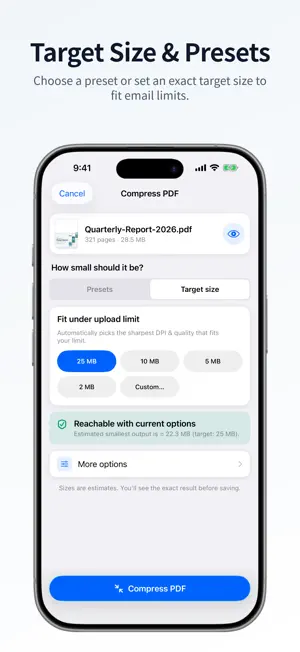
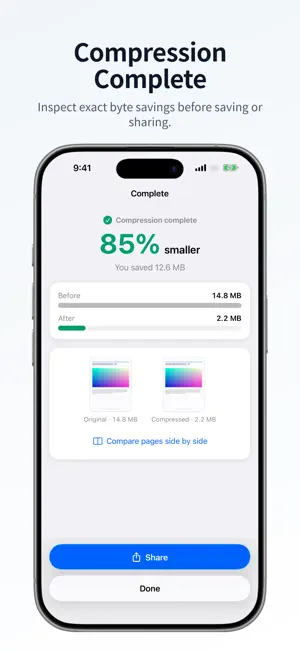
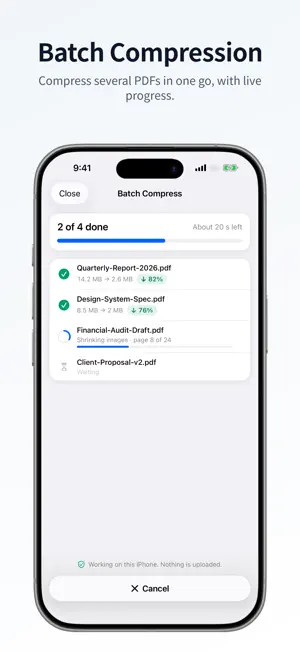
Smart PDF Compressor is a free, offline PDF compressor for iPhone and iPad that helps anyone emailing, uploading or storing a PDF dramatically reduce file size (for example, shrinking an 8-page scan from 5.6 MB to 669 KB, 88.1% smaller) — without the file ever leaving the device. ALL PROCESSING IS LOCAL Your documents never leave your device. No internet connection required, no cloud uploads, no data collection. Complete privacy guaranteed. KEY FEATURES - Target Size Mode: Pick an exact target file size (25 MB, 10 MB, 5 MB, 2 MB, or custom) to fit email and upload limits - Keep Text & Links Selectable: Preserves original text, hyperlinks, and document structure by default - Size Estimates First: See the estimated size for each option before you compress - Three Presets: Best quality, Balanced (recommended) and Smallest file - Advanced Options: 1-bit black & white mode, optional OCR text recognition, resolution override (72–300 DPI), and metadata removal - Smart Compression: Automatically detects scanned vs. digital pages and applies suitable settings - Batch Compression: Compress multiple PDFs at once with progress tracking - Share as ZIP: Bundle several compressed PDFs into one ZIP archive and name it before you share - Side-by-Side Preview: Compare original and compressed pages before saving - File History: Browse, preview, rename, and share all your compressed files - Appearance & Languages: Light/Dark mode and support for English, German, French, Japanese, and Korean - Works on iPhone and iPad HOW IT WORKS 1. Tap Choose PDF and pick a file from Files 2. Choose a preset or set a target size — see estimated results before compressing 3. Tap Compress PDF and see the exact before and after sizes 4. Share or save your compressed PDF, or send several as one ZIP PERFECT FOR - Reducing email attachment sizes - Fitting strict upload limits on portals and government forms - Saving storage space on your device - Compressing scanned receipts, contracts, and books - Preparing files for sharing via messaging apps Smart PDF Compressor uses advanced on-device image processing and structure-preserving optimization to deliver fast, reliable compression without sacrificing readability.
What’s new
Version 1.7 · Updated October 19, 2026
• Target Size Mode: Choose an exact target size (25 MB, 10 MB, 5 MB, 2 MB, or custom) to easily fit email attachment limits. • Selectable Text & Links: Text, links, and forms stay sharp and selectable by default with structure-preserving compression. • Black & White (1-bit): Convert documents to pure monochrome for maximum file size reduction on text scans. • Text Recognition (OCR): Optional on-device OCR makes scanned documents searchable. • Redesigned Options: Fine-tune resolution, color mode, and metadata stripping per document. • Multi-language Support: Now available in English, German, French, Japanese, and Korean. • Performance improvements and bug fixes.
App privacy
The developer, Quan Dang, reported these privacy practices to Apple.
Data Not Collected
The developer does not collect any data from this app.
Alternatives to Smart PDF Compressor: Reduce
Looking for apps like Smart PDF Compressor: Reduce? Here are 6 similar apps on the App Store. The highest rated is PDF Squeeze: PDF Compressor (5.0/5), and all 6 are free to download.
-
 PDF Compressor: Resize file
-
 PDF Squeeze: PDF Compressor
5.0
PDF Squeeze: PDF Compressor
5.0
-
 PDF Compressor | Reduce Size
-
 ExactPress: Compress to Size
-
 PDF Compressor: Reduce PDF
-
 PDF Compressor: Compress Photo
4.0
PDF Compressor: Compress Photo
4.0
| App | Rating | Price | Last updated | Compare |
|---|---|---|---|---|
| Smart PDF Compressor: Reduce | – | Free | October 19, 2026 | |
| PDF Compressor: Resize file | – | Free | Aug 24, 2026 | Compare |
| PDF Squeeze: PDF Compressor | 5.0 / 5 (1) | Free | Oct 15, 2026 | Compare |
| PDF Compressor | Reduce Size | – | Free | Sep 5, 2026 | Compare |
| ExactPress: Compress to Size | – | Free | Jun 10, 2026 | Compare |
| PDF Compressor: Reduce PDF | – | Free | Sep 26, 2026 | Compare |
| PDF Compressor: Compress Photo | 4.0 / 5 (1) | Free | Mar 21, 2026 | Compare |