

DICOM Viewer: MRI CT Studio
Murat Sait Dogan Medical iPhoneiPadiPod touch
DICOM Viewer: MRI CT Studio is a free Medical app for iPhone and iPad by Murat Sait Dogan. Rated 5.0/5 from 3 ratings. Requires iOS 15.0.
- Rating
- 5.0
- 3 ratings
- Price
- Free
- on the App Store
- Size
- 47 MB
- Age 4+
- Updated
- Sep 26
- 2026 · v2.3.5
Screenshots


About DICOM Viewer: MRI CT Studio
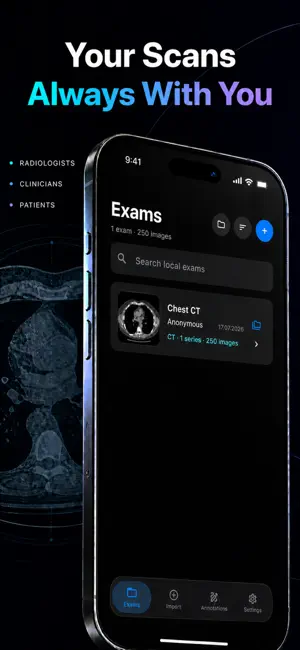
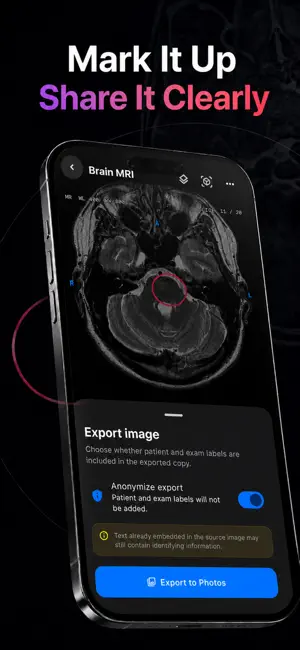
DICOM Studio is a private, local-first workspace for opening and organizing medical imaging on iPhone. Import radiology exams from folders, individual files, or ZIP archives. Browse series, review slices, adjust window level and width, add arrows, ellipses, text, freehand markups, and measurements, then export a marked-up image to Photos. Features: • Import DICOM exams from folders, files, and ZIP archives • Keep separate exams isolated by Study Instance UID • Open CT, MRI, and single-image X-ray series • Browse series and slices with touch-first controls and pinch zoom • Adjust WL/WW and apply review presets • Add arrows, ellipses, text, free drawing, and reference length measurements • Explore axial, sagittal, and coronal MPR for compatible multi-slice series • Organize exams into custom collections without duplicating files • Process imported exams locally with no account or developer cloud upload DICOM Studio is intended for education, organization, and non-diagnostic image review. It does not replace clinical systems, diagnostic workstations, healthcare professionals, or professional medical judgment. Compatibility varies by transfer syntax and dataset. Unsupported or unusually large studies are rejected with a visible error. Measurements use DICOM Pixel Spacing when available and are intended only as reference review tools; they are not clinically validated. SUBSCRIPTION INFORMATION DICOM Studio Pro is available through auto-renewable weekly and yearly subscription plans. Payment is charged to your Apple ID at confirmation of purchase. The subscription automatically renews unless auto-renew is turned off at least 24 hours before the end of the current period. You can manage or cancel your subscription in your App Store account settings. Subscription prices are shown in the app before purchase and may vary by country or region. Privacy Policy: https://muratssd.github.io/dicom-studio-legal/privacy.html Terms of Use: https://muratssd.github.io/dicom-studio-legal/terms.html Apple Standard EULA: https://www.apple.com/legal/internet-services/itunes/dev/stdeula/
What’s new
Version 2.3.5 · Updated September 26, 2026
Bug fixes and improvements.
App privacy
The developer, Murat Sait Dogan, reported these privacy practices to Apple.
Data Linked to You
The following data, which may be collected and linked to your identity, may be used for the following purposes:
- Purchases: Purchase History
- Identifiers: Device ID
- Usage Data: Product Interaction
Used for: Analytics, Product Personalization, App Functionality
Data Not Linked to You
The following data, which may be collected but is not linked to your identity, may be used for the following purposes:
- Diagnostics: Other Diagnostic Data
Used for: App Functionality
Alternatives to DICOM Viewer: MRI CT Studio
Looking for apps like DICOM Viewer: MRI CT Studio? Here are 6 similar apps on the App Store. The highest rated is LumaDICOM: CT & MRI Viewer (5.0/5), and all 6 are free to download.
-
 DICOM Viewer - MesDICOM
-
 LumaDICOM: CT & MRI Viewer
5.0
LumaDICOM: CT & MRI Viewer
5.0
-
 DICOM Viewer: Slicora
4.5
DICOM Viewer: Slicora
4.5
-
 DICOM Viewer : MRI CT XRAY & +
5.0
DICOM Viewer : MRI CT XRAY & +
5.0
-
 Dicom Viewer by The IT Crowd
-
 Voxelis: DICOM Viewer CT & MRI
| App | Rating | Price | Last updated | Compare |
|---|---|---|---|---|
| DICOM Viewer: MRI CT Studio | 5.0 / 5 (3 ratings) | Free | September 26, 2026 | |
| DICOM Viewer - MesDICOM | – | Free | Sep 30, 2026 | Compare |
| LumaDICOM: CT & MRI Viewer | 5.0 / 5 (1) | Free | Oct 8, 2026 | Compare |
| DICOM Viewer: Slicora | 4.5 / 5 (23) | Free | Oct 8, 2026 | Compare |
| DICOM Viewer : MRI CT XRAY & + | 5.0 / 5 (17) | Free | May 29, 2026 | Compare |
| Dicom Viewer by The IT Crowd | – | Free | Jul 1, 2026 | Compare |
| Voxelis: DICOM Viewer CT & MRI | – | Free | Oct 12, 2026 | Compare |