

Voxelis: DICOM Viewer CT & MRI
Ruslan Dautov Medical iPhoneiPadiPod touch
Voxelis: DICOM Viewer CT & MRI is a free Medical app for iPhone and iPad by Ruslan Dautov. Requires iOS 26.0. Updated October 15, 2026.
- Price
- Free
- on the App Store
- Size
- 79 MB
- Age 17+
- Updated
- Oct 15
- 2026 · v1.14.0
Screenshots

About Voxelis: DICOM Viewer CT & MRI
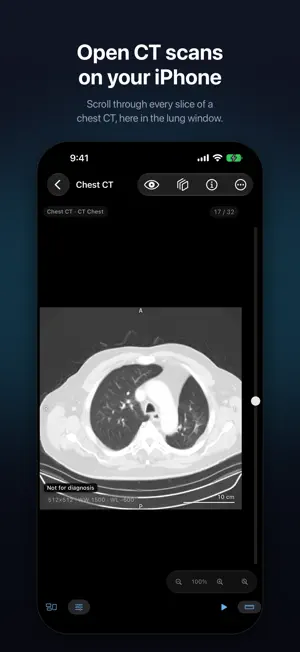
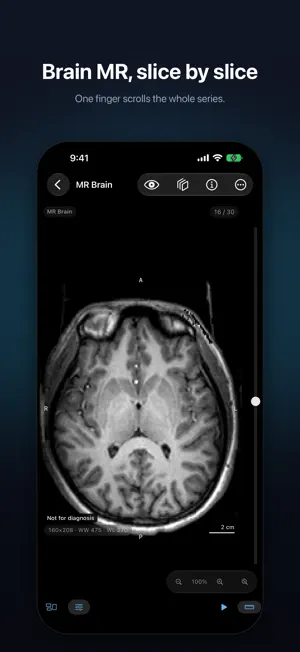
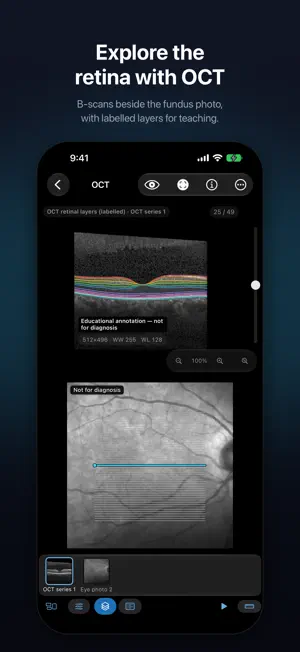
Educational and review use only: Voxelis is not FDA-cleared and must not be used for diagnosis. Voxelis opens CT, MR and OCT studies in DICOM format on your iPhone or iPad and keeps them there. There is no account, no cloud and no tracking, and your studies are never uploaded. It is made for students, educators and trainees learning cross-sectional anatomy, and for people who want to look through their own scans. BRING IN A STUDY • Import DICOM files, whole study folders or ZIP archives from the Files app, or drag them onto the window on iPad and Mac • Receive studies by AirDrop or open them from a Mail attachment • Built-in samples: a chest CT, a brain MR and ten OCT volumes, each with at least 10 slices; 20 more scans are optional downloads WORK DIRECTLY ON THE IMAGE • Drag one finger to scroll through the slices • Drag two fingers to adjust window and level: sideways for contrast, up for brightness • Pinch to zoom, double-tap to reset the view • 11 window presets for CT and MR, including brain, lung, bone, soft tissue, T1, T2, FLAIR and DWI • Anatomical orientation markers from the study's own data • A scale bar that rescales as you zoom and rotate, on files that record pixel spacing • Measure distances, angles and elliptical areas: in millimeters when pixel spacing is recorded, in pixels when it is not. An area also shows the mean and range of the pixel values inside it (HU on CT) • Play a series as a cine loop at the speed you choose STUDIES WITH SEVERAL SERIES • Switch series from thumbnails: a rail on iPad, a strip under the image on iPhone • See CT and MR series in other planes with multiplanar reformat, or in 3D: turn the volume, choose a look such as bone or vessels, and clip it open OCT (OPTICAL COHERENCE TOMOGRAPHY) • Open OCT studies in DICOM format, or eye-scanner exports directly: Heidelberg (.vol, .e2e), Topcon (.fds, .fda), Zeiss Cirrus (.img), Optopol (.opt) and Bioptigen (.oct), converted to DICOM on your device. Scroll through the B-scans • When the file records where each B-scan was taken, the fundus photo shows those scan positions; tap a line to jump to that scan • Retinal layer lines: stored in the file by the device (Heidelberg, Topcon, Optopol), supplied with the sample scans, or experimental lines computed on your device. An on-image caption marks them not for diagnosis • Thickness cursor: drag across a B-scan to read each layer's thickness at that point. Height caliper: measure vertically, with ends that snap to the layer lines • En-face views of the retina (full, inner, outer, below BM; mean, max or min) and an ETDRS grid that starts at a suggested centre you can move, with sector means (whole retina, RNFL or GCL+IPL) and macular volume when the file records its spacing, shared as a PDF and CSV • Compare two OCT scans on the ETDRS grid, sector by sector, with the difference • Eye images: µm or mm, angles and areas when the file records the pixel size, otherwise pixels; the eye (OD or OS) is shown when the file's own tags state it TEACHING AND SHARING • Hide the patient's name and ID before you share a frame • Share a single frame, or export up to 50 frames of a series as a PDF • Draw arrows, circles and labels on any image; they are included in shared frames and PDFs • Export a study as anonymised DICOM in a ZIP: names, dates, IDs and private data removed on your device • Keep private teaching notes on a study. Notes are stored on your device and never included in shares or exports. ACCESSIBLE • Supports larger text sizes; on iPad and Mac, a hardware keyboard moves through the slices • The window width and level sliders work with VoiceOver and Switch Control Voxelis is for education and personal review. It is not FDA-cleared and must not be used for diagnosis. If you have questions about your own scan, ask the professional who ordered it. Heidelberg, Topcon, Zeiss, Optopol and Bioptigen are trademarks of their owners; Voxelis is not affiliated with them.
What’s new
Version 1.14.0 · Updated October 15, 2026
New in Voxelis: • 20 sample scans to download one at a time, or all at once: 13 chest CTs; head, teeth and jaw, knee, leg and foot CTs; and two beating-heart MR movies you can play • Remove a download whenever you need the space • See every sample's source and license in Settings > Sample Data
App privacy
The developer, Ruslan Dautov, reported these privacy practices to Apple.
Data Not Collected
The developer does not collect any data from this app.
Alternatives to Voxelis: DICOM Viewer CT & MRI
Looking for apps like Voxelis: DICOM Viewer CT & MRI? Here are 6 similar apps on the App Store. The highest rated is LumaDICOM: CT & MRI Viewer (5.0/5), and all 6 are free to download.
-
 LumaDICOM: CT & MRI Viewer
5.0
LumaDICOM: CT & MRI Viewer
5.0
-
 DCM File Viewer: Medical DICOM
-
 DICOM Vault: X-Ray & MRI & CT
5.0
DICOM Vault: X-Ray & MRI & CT
5.0
-
 DICOM Viewer - MesDICOM
5.0
DICOM Viewer - MesDICOM
5.0
-
 DICOM Viewer: MRI CT Studio
5.0
DICOM Viewer: MRI CT Studio
5.0
-
 Ossidex: DICOM Viewer CT & MRI
4.8
Ossidex: DICOM Viewer CT & MRI
4.8
| App | Rating | Price | Last updated | Compare |
|---|---|---|---|---|
| Voxelis: DICOM Viewer CT & MRI | – | Free | October 15, 2026 | |
| LumaDICOM: CT & MRI Viewer | 5.0 / 5 (2) | Free | Oct 17, 2026 | Compare |
| DCM File Viewer: Medical DICOM | – | Free | Jun 16, 2026 | Compare |
| DICOM Vault: X-Ray & MRI & CT | 5.0 / 5 (1) | Free | Jul 1, 2026 | Compare |
| DICOM Viewer - MesDICOM | 5.0 / 5 (1) | Free | Oct 16, 2026 | Compare |
| DICOM Viewer: MRI CT Studio | 5.0 / 5 (3) | Free | Sep 26, 2026 | Compare |
| Ossidex: DICOM Viewer CT & MRI | 4.8 / 5 (4) | Free | Oct 6, 2026 | Compare |