

LumaDICOM: CT & MRI Viewer
Pavel DEMIANOV Medical iPhoneiPadiPod touch
LumaDICOM: CT & MRI Viewer is a free Medical app for iPhone and iPad by Pavel DEMIANOV. Rated 5.0/5 from 2 ratings. Requires iOS 17.0.
- Rating
- 5.0
- 2 ratings
- Price
- Free
- on the App Store
- Size
- 12 MB
- Age 12+
- Updated
- Oct 17
- 2026 · v1.9.0
Screenshots


About LumaDICOM: CT & MRI Viewer
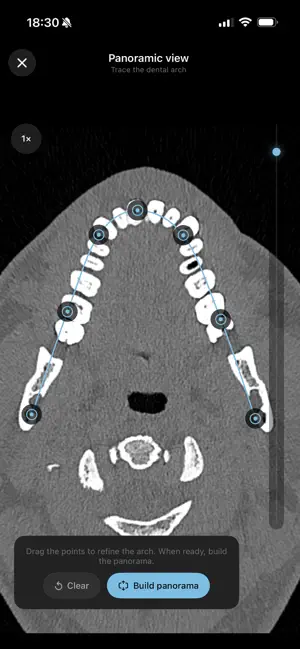
LumaDICOM — view your CT, MRI, and X-ray scans on iPhone and iPad. LumaDICOM opens the DICOM files your hospital, clinic, or imaging lab gave you (CD, USB, archive, or download link) and turns them into a fast, clear viewer right on your iPhone or iPad — no account, no cloud, nothing leaves your device. Explore any study as 2D slices, as a real interactive 3D volume you can rotate and cut through, or in full MPR with all three planes at once. WORKS WITH • CT (computed tomography) • MRI (magnetic resonance imaging) • X-ray, CBCT, PET, and other DICOM images • Folders, ZIP / RAR / 7z / TAR archives (incl. password-protected), disc images (ISO), links from your clinic's portal, or a shared cloud link (Google Drive, Dropbox, Yandex Disk) • Compressed DICOM out of the box: JPEG, JPEG 2000, JPEG-LS, RLE — nothing to convert 2D VIEWER • Scroll through every slice • Axial, coronal and sagittal planes • Ruler / distance measurement with a magnifier • Brightness & contrast (window/level) 3D VOLUME RENDERING • Smooth, real-time rotation and zoom • Volume and X-ray looks • One-tap tissue presets: bone, soft tissue, vessels • Clipping planes to cut inside the body • Adjustable lighting and shadows MPR — MULTI-PLANAR RECONSTRUCTION • All three planes at once with a linked crosshair • Oblique reformatting (tilt the planes) • Slab thickness (MIP / average) • Ruler on every plane • Anatomical orientation labels (R/L/A/P/H/F) MORE • Panoramic (OPG) reconstruction for dental CT • Export a 3D model as OBJ / STL for 3D printing • Organize studies into groups, sort your library • Share a study with one tap PRIVATE BY DESIGN Everything happens on your device. Your images are never uploaded and never leave your device. LumaDICOM is a viewer for your own medical images. It is not a medical device and is not intended for diagnosis. Always consult your doctor.
What’s new
Version 1.9.0 · Updated October 17, 2026
• Multi-frame DICOM files (dental CBCT, Enhanced CT/MR) now open in full — every slice, 3D and MPR — and are stored compactly in their original compressed form. • Colour images (ultrasound, Doppler, dermatoscopy), cine loops and rarer formats — 12-bit JPEG, HTJ2K, Deflate and more — now display correctly. • ZIP archives compressed with Windows' Deflate64 method now open. • New "Report a problem" menu item for a study that opens but doesn't look right. • Smoother catalogue scrolling. • Downloads from links on your local network — a computer or a clinic server.
App privacy
The developer, Pavel DEMIANOV, reported these privacy practices to Apple.
Data Not Collected
The developer does not collect any data from this app.
Alternatives to LumaDICOM: CT & MRI Viewer
Looking for apps like LumaDICOM: CT & MRI Viewer? Here are 6 similar apps on the App Store. The highest rated is DICOM Viewer - MesDICOM (5.0/5), and all 6 are free to download.
-
 Ossidex: DICOM Viewer CT & MRI
4.8
Ossidex: DICOM Viewer CT & MRI
4.8
-
 DICOM Viewer - MesDICOM
5.0
DICOM Viewer - MesDICOM
5.0
-
 DICOM Viewer: Slicora
4.5
DICOM Viewer: Slicora
4.5
-
 Voxelis: DICOM Viewer CT & MRI
-
 DICOM Viewer: MRI CT Studio
5.0
DICOM Viewer: MRI CT Studio
5.0
-
 DCM File Viewer: Medical DICOM
| App | Rating | Price | Last updated | Compare |
|---|---|---|---|---|
| LumaDICOM: CT & MRI Viewer | 5.0 / 5 (2 ratings) | Free | October 17, 2026 | |
| Ossidex: DICOM Viewer CT & MRI | 4.8 / 5 (4) | Free | Oct 6, 2026 | Compare |
| DICOM Viewer - MesDICOM | 5.0 / 5 (1) | Free | Oct 16, 2026 | Compare |
| DICOM Viewer: Slicora | 4.5 / 5 (23) | Free | Oct 8, 2026 | Compare |
| Voxelis: DICOM Viewer CT & MRI | – | Free | Oct 15, 2026 | Compare |
| DICOM Viewer: MRI CT Studio | 5.0 / 5 (3) | Free | Sep 26, 2026 | Compare |
| DCM File Viewer: Medical DICOM | – | Free | Jun 16, 2026 | Compare |