

REC: Screen Recorder & Capture
Yosef Jebara Photo & Video iPhoneiPadiPod touch
REC: Screen Recorder & Capture is a free Photo & Video app for iPhone and iPad by Yosef Jebara. Requires iOS 17.6. Updated August 11, 2026.
- Price
- Free
- on the App Store
- Size
- 4 MB
- Age 4+
- Updated
- Aug 11
- 2026 · v1.0
Screenshots


About REC: Screen Recorder & Capture
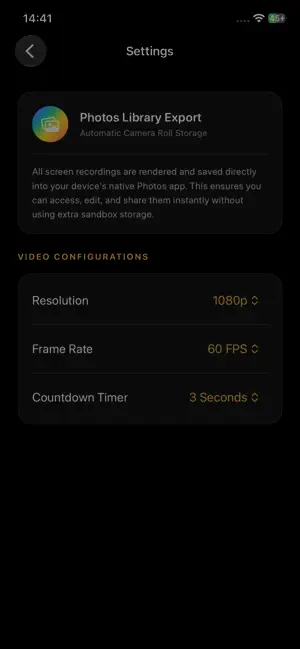
Record everything on your screen in high definition with just one tap! Whether you want to capture epic gaming moments, create clear step-by-step video tutorials, record online lectures, or save important video calls, our app makes it effortless and fast. PRIVACY FIRST DESIGN We value your privacy above all else. Unlike other screen recorders, this app operates with zero external servers. -100% On-Device Processing: Your screen recordings are processed entirely on your iPhone/iPad. -Direct-to-Photos Saving: Recorded videos are exported straight to your iOS Photos Library. -No Data Harvesting: We do not collect, store, transmit, or have access to any of your recordings. What happens on your screen stays on your device. KEY FEATURES: -One-Tap Recording: Quick-start system screen recording. -Custom Settings: Choose your preferred frame rate (FPS) and resolution settings. -Crystal Clear Audio: Record system sound and microphone audio simultaneously. -No Watermarks: Keep your videos clean and professional. -Premium Dark Theme: Sleek, modern interface designed to save battery and look stunning. HOW TO USE (INSTRUCTIONS): 1. Grant Permissions: When you first open the app, ensure you grant Microphone, Camera, and Photo Library access. 2. Configure Settings: Tap the Settings menu to adjust your desired video resolution and frame rate. 3. Start Recording: Tap the large gold Record button on the dashboard. 4. Output:all recordings are daved to Photos the system popup menu and tap "Start Broadcast". A 3-second countdown will begin. 5. Record Your Screen: Navigate to any app or game you wish to record. 6. Stop Recording: Tap the Red Clock Bubble in the top-left status bar of your iPhone and select Stop. Your video is instantly saved to your local Photos library!
App privacy
The developer, Yosef Jebara, reported these privacy practices to Apple.
Data Used to Track You
The following data may be used to track you across apps and websites owned by other companies:
- Identifiers: Device ID
Data Not Linked to You
The following data, which may be collected but is not linked to your identity, may be used for the following purposes:
- Identifiers: Device ID
- Usage Data: Advertising Data
- Diagnostics: Crash Data
Used for: Third-Party Advertising, Developer’s Advertising or Marketing, Product Personalization, App Functionality
Alternatives to REC: Screen Recorder & Capture
Looking for apps like REC: Screen Recorder & Capture? Here are 6 similar apps on the App Store. The highest rated is ZD Screen Recorder & Editor (3.7/5), and all 6 are free to download.
-
 ScreenDuo: Screen Recorder
-
 ZD Screen Recorder & Editor
3.7
-
 Screen Recorder: Video & Voice
-
 ProDual Recorder: Vlog Cam
-
 Recven - Screen Recorder
-
 HypeRecord Screen Recorder Pro
| App | Rating | Price | Last updated | Compare |
|---|---|---|---|---|
| REC: Screen Recorder & Capture | – | Free | August 11, 2026 | |
| ScreenDuo: Screen Recorder | – | Free | Oct 4, 2026 | Compare |
| ZD Screen Recorder & Editor | 3.7 / 5 (3) | Free | Aug 17, 2026 | Compare |
| Screen Recorder: Video & Voice | – | Free | Oct 1, 2026 | Compare |
| ProDual Recorder: Vlog Cam | – | Free | Apr 18, 2026 | Compare |
| Recven - Screen Recorder | – | Free | Sep 24, 2026 | Compare |
| HypeRecord Screen Recorder Pro | – | Free | Jun 12, 2025 | Compare |