

Tikku: To Do & Block Apps
Milestone One Productivity iPhoneiPadiPod touch
Tikku: To Do & Block Apps is a free Productivity app for iPhone and iPad by Milestone One. Rated 5.0/5 from 4 ratings. Requires iOS 16.4.
- Rating
- 5.0
- 4 ratings
- Price
- Free
- on the App Store
- Size
- 100 MB
- Age 4+
- Updated
- Oct 16
- 2026 · v1.2.0
Screenshots

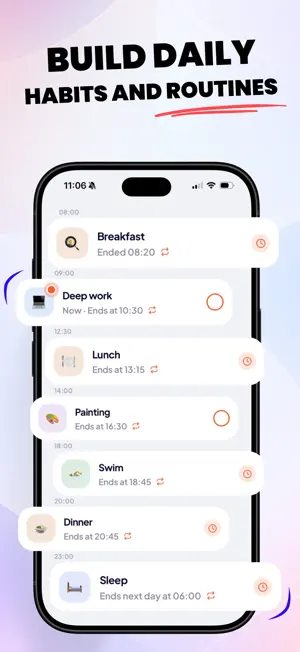
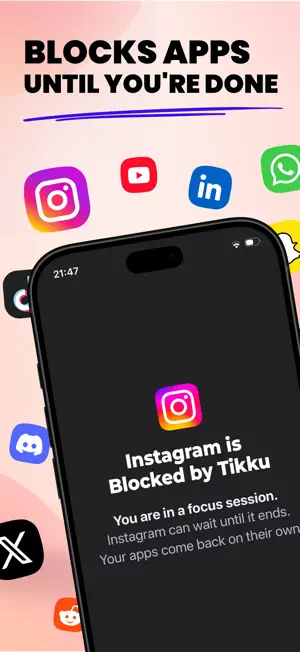

About Tikku: To Do & Block Apps
Tikku is a planner and focus app that helps you build routines, stay focused, and get back the time you lose to your phone. The big difference is that your tasks and focus sessions can block distracting apps on their own, so the time you set aside actually goes to what you planned. We built Tikku because app blockers give you time back but don't help you use it, and planners help you plan the day but can't keep you off your phone. We wanted one app that does both. PLAN YOUR DAY You can create tasks for a set time or for anytime that day, make them repeat (every day, on weekdays or weekends, every week, every month, or on your own schedule), and add reminders and sub-tasks. Tasks without a date get their own list, so you can keep them there until you're ready to plan them. Some tasks can end on their own at a set time, like meals, a commute, or winding down before bed. They run from start to finish and close by themselves, so there's nothing to check off. If you don't want to start from scratch, you can add a ready-made routine like Deep work or Wind down. It comes with its times, repeats and blocking already set up. BLOCKING Then comes blocking. Any task can block everything, everything except a few apps, or just the apps that distract you most. You can pick apps, whole categories and websites, and save your picks as presets to reuse on other tasks. When a task starts, blocking starts automatically, and when it ends, it stops. This all happens with Tikku closed, so there's nothing to turn on and nothing to remember. If you have ADHD, or a plan on its own has never been enough for you, this is the part that helps: once your day is planned, you don't have to hold yourself to it. If you need to, you can pause the block for a few minutes, or end it early up to 3 times a week. And with strict mode, you can't stop the block early. You get one 15-minute exception a week, and that's it. FOCUS The same system powers Focus. Pick a duration, choose what to block, and start. Your session shows up as a Live Activity on your Lock Screen and in the Dynamic Island, so you can follow it while your phone is locked or while you're using the apps you need. You can also join the Focus room and see how many people around the world are focusing with you, right on your Lock Screen. Only that number is shared, never your task. STREAKS AND REPORTS Finishing one task or one focus session is enough to keep your streak going, and there are dozens of badges to earn along the way, some of them secret. You can see your real screen time from iOS by day, week and month, and every Monday you get a weekly report that puts the time you got back next to the things you finished. We care a lot about how Tikku feels: polished screens, micro-interactions and haptics throughout, animated streaks and badges, and beautifully designed widgets for your Home Screen and Lock Screen. PRIVACY Blocking runs entirely on your phone, and your screen time is never uploaded. The apps you choose to block stay on your device too. You don't need an account to use Tikku. If you want your tasks backed up and synced between your devices, you can sign in. Tikku works offline, supports light and dark mode, and is available in English, French, Spanish, German, Italian, Japanese, Korean and Chinese. Blocking uses Apple's Screen Time, so you'll be asked to allow it once. Everything else in Tikku works without it. PRICING Tikku is free to use. Tikku Pro adds the Focus room, custom blocking lists and presets, blocking on every task, strict mode, sub-tasks, ready-made routines, and backup and sync, with a free trial. Subscriptions renew automatically and you can cancel anytime in your Apple settings. Terms of Use: https://thetikku.com/terms Privacy Policy: https://thetikku.com/privacy
What’s new
Version 1.2.0 · Updated October 16, 2026
• Tikku now speaks French, German, Spanish, Italian, Japanese, Korean and Chinese. • Add Tikku widgets to your Home Screen to see today's tasks, the focus you're in and your streak. • Focus alongside people around the world in the Focus room, and see how many are with you. • UI and UX enhancements. • Minor bug fixes.
App privacy
The developer, Milestone One, reported these privacy practices to Apple.
Data Linked to You
The following data, which may be collected and linked to your identity, may be used for the following purposes:
- Identifiers: Device ID, User ID
- Usage Data: Product Interaction
- Purchases: Purchase History
- Contact Info: Email Address, Name
- User Content: Other User Content
Used for: Analytics, App Functionality
Data Not Linked to You
The following data, which may be collected but is not linked to your identity, may be used for the following purposes:
- Location: Coarse Location
- Diagnostics: Crash Data
Used for: Analytics
Alternatives to Tikku: To Do & Block Apps
Looking for apps like Tikku: To Do & Block Apps? Here are 6 similar apps on the App Store. The highest rated is LockSticky: LockScreen & Watch (5.0/5), and all 6 are free to download.
-
 LemonLog
-
 AuthGuard - PA Records
-
 Meeting Alarms: Calerto
4.9
Meeting Alarms: Calerto
4.9
-
 Maskable: Redact & Annotate
4.0
Maskable: Redact & Annotate
4.0
-
 LockSticky: LockScreen & Watch
5.0
LockSticky: LockScreen & Watch
5.0
-
 PDF nano: PDF Editor & Reader
5.0
PDF nano: PDF Editor & Reader
5.0
| App | Rating | Price | Last updated | Compare |
|---|---|---|---|---|
| Tikku: To Do & Block Apps | 5.0 / 5 (4 ratings) | Free | October 16, 2026 | |
| LemonLog | – | Free | Oct 28, 2026 | Compare |
| AuthGuard - PA Records | – | Free | Sep 23, 2026 | Compare |
| Meeting Alarms: Calerto | 4.9 / 5 (8) | Free | Sep 26, 2026 | Compare |
| Maskable: Redact & Annotate | 4.0 / 5 (6) | Free | Oct 25, 2026 | Compare |
| LockSticky: LockScreen & Watch | 5.0 / 5 (10) | Free | Oct 30, 2026 | Compare |
| PDF nano: PDF Editor & Reader | 5.0 / 5 (1) | Free | Oct 27, 2026 | Compare |