

PDFnano: PDF Editor and Reader
Thamer Mohammed Productivity iPhoneiPadiPod touch
PDFnano: PDF Editor and Reader is a free Productivity app for iPhone and iPad by Thamer Mohammed. Rated 5.0/5 from 1 ratings. Requires iOS 18.6.
- Rating
- 5.0
- 1 ratings
- Price
- Free
- on the App Store
- Size
- 20 MB
- Age 4+
- Updated
- Sep 22
- 2026 · v2.4.3
Screenshots
About PDFnano: PDF Editor and Reader
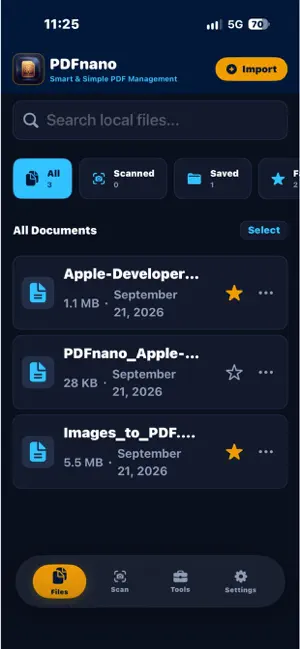
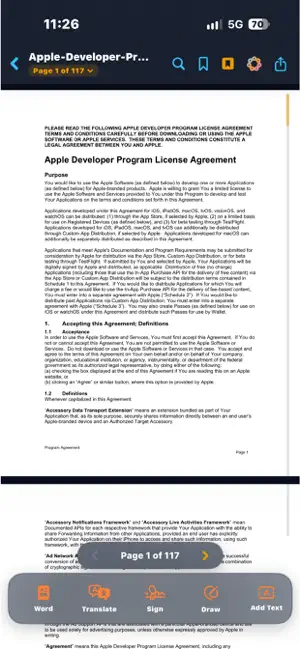
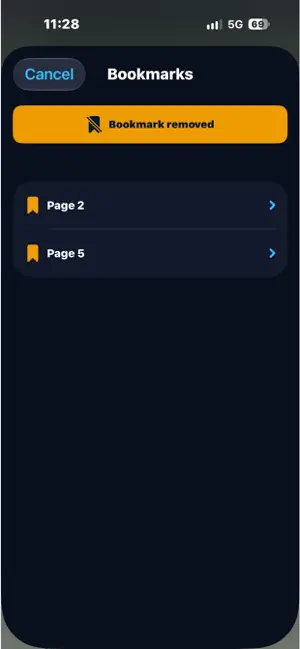
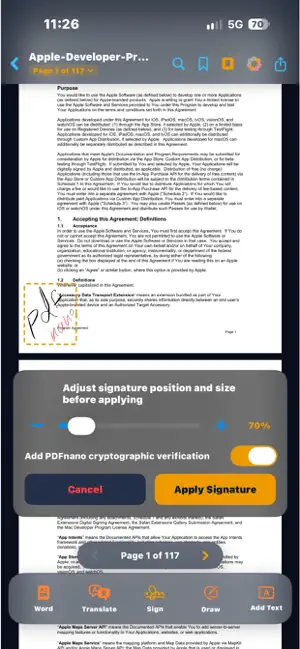
PDFnano is a comprehensive, privacy first PDF workstation engineered for iOS. It combines the power of fully offline document processing with the advanced analytical intelligence of Apple Private Cloud Compute PCC. Whether managing contracts, financial reports, academic research, or scanned archives, PDFnano delivers reliable productivity in one unified workspace. Core Capabilities: 1. Document AI Assistant (Beta): • Executive summaries for lengthy reports and dense documentation. • Instant extraction of decisions, next steps, and action items. • Detection and structured review of contractual obligations and legal risks. • Custom interactive inquiries grounded in verifiable verbatim citations. • Private and encrypted processing: Utilizes Apple Intelligence and Apple Private Cloud Compute PCC for complex reasoning, ensuring your document content is never stored, never logged, and inaccessible even to Apple. *Note: AI Assistant features require devices supporting Apple Intelligence and are currently in Beta. 2. Offline Document Translation (Beta): • Translate entire PDF files locally while strictly preserving fonts, layout, tables, and graphic elements. • One tap batch approval for documents up to 100 pages. • Granular paragraph level editing and translation review. *Note: Translation operates locally on device and is currently in Beta. Machine translation may contain errors. 3. High Performance Reading and Navigation: • Vertical fast page scrubber for instantaneous navigation across hundreds of pages with live page bubble indicator. • Seamless alignment with the Dynamic Island, status bar, and notch areas. • Instant viewport settling returning immediately to your exact reading location. • Double tap smart zoom and floating capsule for effortless navigation while zoomed in. • Visual OCR search on scanned documents and images with multi word phrase matching and typo tolerance. 4. Conversion and Document Scanning: • High fidelity PDF to Word docx conversion maintaining structure and typography. • Extract tables into Excel xlsx spreadsheets with automated data type recognition. • Integrated document scanner with perspective correction and edge detection. • Convert images to PDF and export PDF pages as high resolution images. 5. Editing, Signing, and Organization: • Create, place, and verify digital signatures on agreements and official forms. • Markup toolkit: pen, highlighter, sticky notes, and text annotations. • Reorder, rotate, delete, and extract individual pages. • Merge multiple PDF documents or split pages into independent files. • Smart file size compression for seamless sharing. 6. Uncompromising Privacy Architecture: • True local processing: Core reading, editing, translation, OCR, and file conversions execute entirely on device without an internet connection. • Cryptographically secure cloud intelligence: Any internet connectivity required by the AI assistant connects exclusively to Apple Private Cloud Compute PCC with cryptographic privacy guarantees. • Face blurring and visual redaction to shield confidential areas. • Metadata sanitization to strip author, GPS, and creation timestamps. • Document password encryption, AirPrint support, and interactive home screen widgets. Certain tools include daily usage limits in the free version. Unlimited access and pro features can be unlocked through an in app purchase. Standard Terms of Use: https://www.apple.com/legal/sla/
What’s new
Version 2.4.3 · Updated September 22, 2026
We continue advancing PDFnano to deliver the most capable, private document workstation for iPhone. What is new in this release: • Document AI Assistant (Beta): An executive assistant powered by Apple Intelligence and Apple Private Cloud Compute PCC, providing executive summaries, extracting action items and key decisions, identifying obligations and risks, and answering custom queries backed by verifiable citations with cryptographic privacy (requires devices supporting Apple Intelligence). • Offline Document Translation (Beta): Full document translation running locally on device with layout, typography, and table preservation, including fast batch approval for files up to 100 pages. • Automatic Visual OCR Search: Instant on device text recognition across scanned PDFs and images, enabling full document search with phrase support and typo tolerance. • Upgraded Reading Experience: High speed vertical scrubber with live page bubble indicator, smart double tap zoom, and a floating navigation capsule for navigating between pages while zoomed in. • System Interface Harmony: Complete alignment with Dynamic Island and status bar, paired with instant viewport settling and automatic restoration of your last read position. • Performance and Efficiency Gains: Substantially decreased CPU and memory overhead during scrolling for exceptional stability.
App privacy
The developer, Thamer Mohammed, reported these privacy practices to Apple.
Data Not Collected
The developer does not collect any data from this app.
Alternatives to PDFnano: PDF Editor and Reader
Looking for apps like PDFnano: PDF Editor and Reader? Here are 6 similar apps on the App Store. The highest rated is FaithKey: Bible App Blocker (5.0/5), and all 6 are free to download.
-
 FaithKey: Bible App Blocker
5.0
FaithKey: Bible App Blocker
5.0
-
 FacilityLog
-
 PinNote - Notes Always Visible
4.5
PinNote - Notes Always Visible
4.5
-
 Welljot
-
 YourKeep
5.0
YourKeep
5.0
-
 NeighborLog
| App | Rating | Price | Last updated | Compare |
|---|---|---|---|---|
| PDFnano: PDF Editor and Reader | 5.0 / 5 (1 rating) | Free | September 22, 2026 | |
| FaithKey: Bible App Blocker | 5.0 / 5 (2) | Free | Oct 7, 2026 | Compare |
| FacilityLog | – | Free | Sep 28, 2026 | Compare |
| PinNote - Notes Always Visible | 4.5 / 5 (4) | Free | Sep 29, 2026 | Compare |
| Welljot | – | Free | Sep 1, 2026 | Compare |
| YourKeep | 5.0 / 5 (3) | Free | Sep 30, 2026 | Compare |
| NeighborLog | – | Free | Sep 29, 2026 | Compare |