

VideoVault: Video Audio Editor
益平 姚 Photo & Video iPhoneiPadiPod touch
VideoVault: Video Audio Editor is a free Photo & Video app for iPhone and iPad by 益平 姚. Rated 5.0/5 from 1 ratings. Requires iOS 18.
- Rating
- 5.0
- 1 ratings
- Price
- Free
- on the App Store
- Size
- 12 MB
- Age 4+
- Updated
- Oct 13
- 2026 · v1.0.4
Screenshots

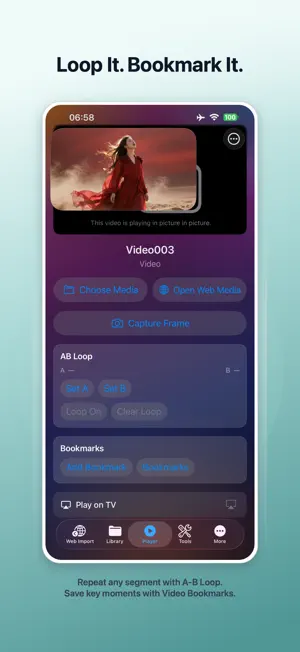


About VideoVault: Video Audio Editor
VideoVault is a powerful video and audio toolkit for playback, editing, learning, work, and everyday media organization. Import videos and audio from Photos or Files, organize everything in one place, and keep listening while using other apps or when your screen is locked. VIDEO STUDIO Edit and prepare videos directly on your device. • Trim and crop video clips • Create vertical and social-ready formats • Add text and logo overlays • Hide selected areas • Add background music • Adjust audio levels • Export optimized videos PLAYER TOOLS Get more control over playback and review. • Background video and audio playback • Capture Frame — save a frame from supported local videos • A-B Repeat — repeat any selected section • Video Bookmarks — save important playback moments • Play on TV with supported AirPlay devices WEB IMPORT Browse supported web media inside VideoVault and use compatible media sources without leaving the app. VideoVault is intended for media that you own or have permission to access and use. AUDIO TOOLS Extract audio from video, add background music, adjust volume, trim audio, and record narration or voiceovers directly inside VideoVault. ORGANIZE YOUR MEDIA Search your library, create Private Lists, play video and audio, share supported files, and save compatible videos to Photos. BACKUP & RESTORE Back up supported VideoVault library data and Private Lists, then restore them when needed. PRIVATE BY DESIGN Imported media is stored and processed on your device. VideoVault is designed for personal media that you own or have permission to use. START FREE — UPGRADE TO PRO Start with VideoVault for free. Upgrade to Pro for advanced playback, Web Import, A-B Repeat, Video Bookmarks, and advanced media exports. Choose Monthly Pro, Yearly Pro, or Lifetime Pro. Eligible new Monthly subscribers may receive a 7-day free trial. Subscriptions automatically renew unless canceled through your Apple Account settings. Trial eligibility and subscription management are handled by Apple. Privacy Policy: https://videovault.de5.net/privacy/ Terms of Use (EULA): https://www.apple.com/legal/internet-services/itunes/dev/stdeula/
What’s new
Version 1.0.4 · Updated October 13, 2026
• New Pro options: Monthly, Yearly, and Lifetime • Eligible new Monthly subscribers can try Pro free for 7 days • Added A-B Repeat and Video Bookmarks to the Player • Capture Frame makes it easy to save moments from supported videos • Pro now includes Web Import and advanced media exports • New Default brand theme, plus Rose Mist, Deep Blue, and Pearl White • Improved iPad layouts and full-screen theme consistency • Performance, StoreKit, and stability improvements
App privacy
The developer, 益平 姚, reported these privacy practices to Apple.
Data Not Collected
The developer does not collect any data from this app.
Alternatives to VideoVault: Video Audio Editor
Looking for apps like VideoVault: Video Audio Editor? Here are 6 similar apps on the App Store. The highest rated is Double Video Player Pro (3.7/5), and 5 of the 6 are free to download.
-
 ScreenOff Player
-
 Arcastash - Media Library
-
 VidBeam: Cast Web Videos to TV
-
 Video Player|Play Media
-
 Video Player Pro - All Formats
-
 Double Video Player Pro
3.7
| App | Rating | Price | Last updated | Compare |
|---|---|---|---|---|
| VideoVault: Video Audio Editor | 5.0 / 5 (1 rating) | Free | October 13, 2026 | |
| ScreenOff Player | – | Free | Oct 14, 2026 | Compare |
| Arcastash - Media Library | – | Free | Oct 21, 2026 | Compare |
| VidBeam: Cast Web Videos to TV | – | Free | Oct 10, 2026 | Compare |
| Video Player|Play Media | – | Free | Oct 9, 2026 | Compare |
| Video Player Pro - All Formats | – | Free | Jul 11, 2026 | Compare |
| Double Video Player Pro | 3.7 / 5 (3) | 1.99 USD | May 1, 2024 | Compare |