

Arcastash - Media Library
Masaki Naito Photo & Video iPhoneiPadiPod touch
Arcastash - Media Library is a free Photo & Video app for iPhone and iPad by Masaki Naito. Requires iOS 18.0. Updated October 21, 2026.
- Price
- Free
- on the App Store
- Size
- 2 MB
- Age 17+
- Updated
- Oct 21
- 2026 · v1.4
Screenshots
About Arcastash - Media Library
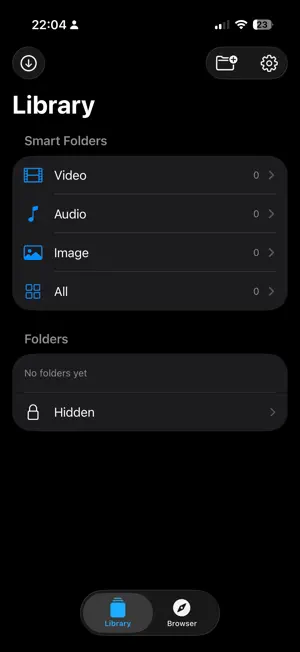
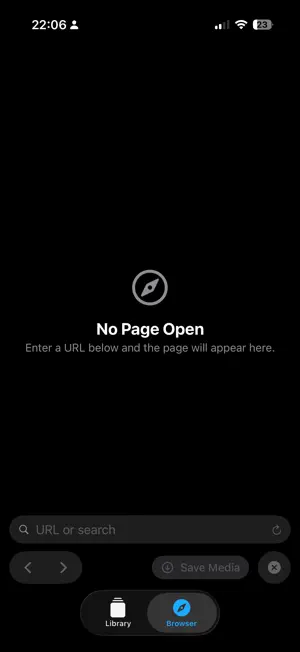
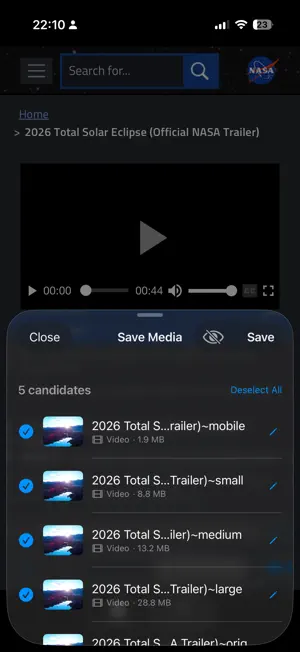
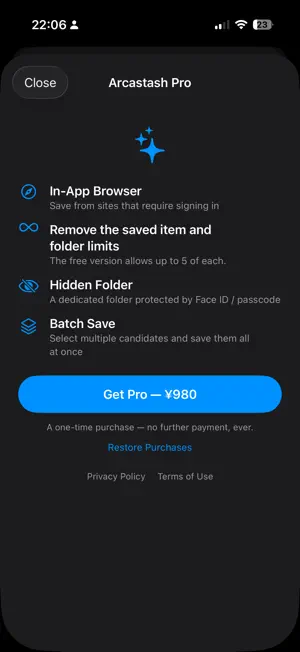
Arcastash is a privacy-first media manager for saving and organizing video, audio, and images. SAVE Open the share sheet on any page in Safari or another app and choose "Arcastash." The app scans the page, finds video, audio, and image candidates, and lets you pick what to save — including saving several items at once (Pro). REOPEN IN THE IN-APP BROWSER If nothing is found in the share sheet, or the page requires you to be logged in, tap "Open in In-App Browser" to continue inside Arcastash and save from there. The browser is free to use (the free version allows 5 saves in total from the browser). ORGANIZE Sort saved media into folders. Anything you'd rather keep private can go into the Hidden folder, protected by Face ID / Touch ID (Pro). PLAY Everything you save plays back anytime, with no network needed — video with a custom scrubber, images with pinch-to-zoom, and audio playback, all built in. EXPORT TO PHOTOS Save your videos and images straight to the iOS Photos app with one tap. (Audio files can't be exported, since Photos doesn't support standalone audio.) PRIVACY Arcastash contains no advertising SDK and no analytics SDK of any kind. Everything you save, your browsing history, and your Face ID / Touch ID authentication results stay on your device — none of it is ever sent anywhere. As the one exception: when on-device analysis alone can't find anything to save, you can tap "Analyze in the cloud" yourself to try cloud-assisted analysis. This is entirely optional and never runs automatically. Only the URL of the page you're viewing is sent, along with an anonymous device identifier used to track your free usage allowance — never your name, email, or any other information that identifies you. See the Privacy Policy for details. ARCASTASH PRO (one-time purchase, price varies by region) Unlimited saves from the in-app browser, plus the Hidden folder, multi-item batch saving, and no limits on saved items and folders. The free version allows 5 saved items, 5 folders, and 5 saves in total from the in-app browser. Arcastash is a general-purpose tool for saving media from pages you've chosen to open yourself. It does not work with DRM-protected or streaming-protected content, and should not be used in a way that violates a site's terms of service. You're responsible for checking the copyright and terms of anything you save.
What’s new
Version 1.4 · Updated October 21, 2026
• Open shared pages in the in-app browser After choosing Arcastash from the share sheet in Safari or another app, tap “Open in In-App Browser” to reopen that page inside Arcastash. Pages where nothing was found, or that require you to be logged in, can now be saved right from the browser. The in-app browser is free to use (the free version allows 5 saves in total from the browser).
App privacy
The developer, Masaki Naito, reported these privacy practices to Apple.
Data Not Linked to You
The following data, which may be collected but is not linked to your identity, may be used for the following purposes:
- Browsing History: Browsing History
- Identifiers: Device ID
Used for: App Functionality
Alternatives to Arcastash - Media Library
Looking for apps like Arcastash - Media Library? Here are 6 similar apps on the App Store. The highest rated is VideoVault: Video Audio Editor (5.0/5), and all 6 are free to download.
-
 ScreenOff Player
-
 ImageBrowser | 画像保存特化ブラウザ
-
 VideoVault: Video Audio Editor
5.0
VideoVault: Video Audio Editor
5.0
-
 Video Player Pro - All Formats
-
 Emoryx
-
 ArchiVe - Video Collector App
| App | Rating | Price | Last updated | Compare |
|---|---|---|---|---|
| Arcastash - Media Library | – | Free | October 21, 2026 | |
| ScreenOff Player | – | Free | Oct 14, 2026 | Compare |
| ImageBrowser | 画像保存特化ブラウザ | – | Free | Oct 21, 2026 | Compare |
| VideoVault: Video Audio Editor | 5.0 / 5 (1) | Free | Oct 13, 2026 | Compare |
| Video Player Pro - All Formats | – | Free | Jul 11, 2026 | Compare |
| Emoryx | – | Free | Oct 27, 2026 | Compare |
| ArchiVe - Video Collector App | – | Free | Oct 17, 2026 | Compare |