

VidBeam: Cast Web Videos to TV
Sang Cao Photo & Video iPhoneiPadiPod touch
VidBeam: Cast Web Videos to TV is a free Photo & Video app for iPhone and iPad by Sang Cao. Requires iOS 17.0. Updated October 29, 2026.
- Price
- Free
- on the App Store
- Size
- 13 MB
- Age 17+
- Updated
- Oct 29
- 2026 · v1.4
Screenshots


About VidBeam: Cast Web Videos to TV
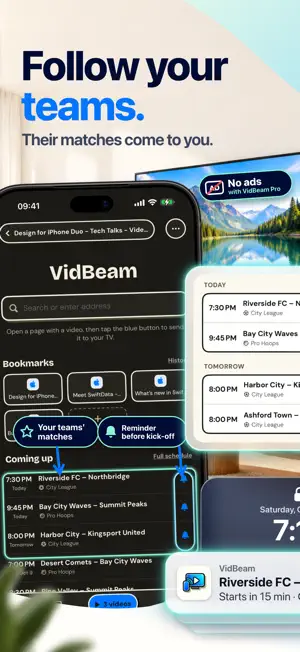
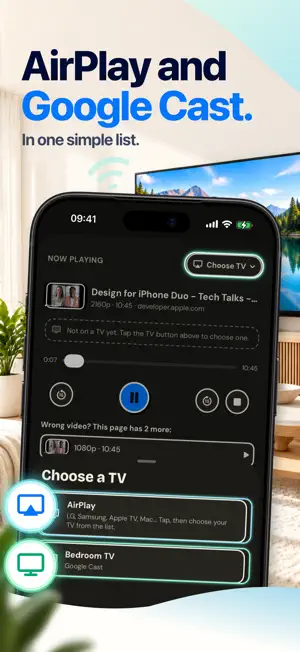
VidBeam is a web browser that finds the video in a page and plays it on your TV. Open a page with a video, tap the video, and it plays on the big screen in its own quality. It is not screen mirroring: your iPhone is free to browse, chat or lock while the TV keeps playing. HOW IT WORKS - Browse any site in VidBeam, just like Safari. - VidBeam finds the video streams in the page (HLS and MP4) and lists them, the main video first and short clips last. - Tap the video you want and it goes to the TV. One list of TVs: AirPlay 2 and Google Cast together, so you do not have to know which one your TV speaks. - Pick your TV before you start browsing, and it will be ready when the match is. MADE FOR LONG WATCHING - Keeps playing with the phone locked, with controls on the Lock Screen. - Live streams: one tap jumps back to live. - Switch tabs, open other pages, or close the page: the TV keeps playing. - If the link expires in the middle of a match, VidBeam quietly fetches a fresh one and carries on. - Sites that only answer your phone still reach the TV: VidBeam passes the video through your iPhone, and says so before it does. MATCH REMINDERS - Follow your teams or leagues: their next matches show on the start page. - Schedules for soccer, basketball, football, hockey and racing. - A reminder before kick-off, as early as you like. Add your own reminders for anything else. - Reminders are free, on every plan. A CLEAN BROWSER - Tabs, bookmarks and history. - Blocks pop-ups that pages open on their own. - Light and dark mode. NO ACCOUNT - No sign-up. Bookmarks, history and sign-ins stay on your iPhone. VIDBEAM PRO Your first week includes VidBeam Pro for free, with no subscription: no ads, and most ads hidden on web pages. After that, VidBeam is free with ads; VidBeam Pro removes them, hides most ads on the web pages you open, and includes every Pro feature added later. • Monthly — $2.99 per month • Yearly — $14.99 per year • Lifetime — $29.99, one-time purchase (not a subscription) Prices are in US dollars and vary by country; the app shows yours. Subscriptions renew automatically unless auto-renew is turned off at least 24 hours before the end of the current period. Payment is charged to your Apple Account at confirmation of purchase. Manage or cancel anytime in Settings > Apple Account > Subscriptions. Privacy Policy: https://sangcaolabs.com/apps/vidbeam/privacy/ Terms of Use (EULA): https://www.apple.com/legal/internet-services/itunes/dev/stdeula/ Your TV and iPhone must be on the same Wi-Fi network. Some sites protect their videos (DRM) or build them in ways only a browser can play, and those cannot be sent to a TV. VidBeam is not affiliated with any website. It does not host, provide or decrypt any content, and does not download or save videos. You are responsible for the content you watch.
What’s new
Version 1.4 · Updated October 29, 2026
Match reminders now show the kick-off time, so a reminder read late is still right. If a video stops on your TV while VidBeam is in the background, you get a notification, and coming back opens the TV list so it is one tap from the TV again. Ads are quieter: no ad when you return to the app, sound off while a video plays on the TV, and the match resumes on its own after an ad. Or watch one short ad for 3 hours without ads.
App privacy
The developer, Sang Cao, reported these privacy practices to Apple.
Data Used to Track You
The following data may be used to track you across apps and websites owned by other companies:
- Identifiers: Device ID
Data Linked to You
The following data, which may be collected and linked to your identity, may be used for the following purposes:
- Location: Coarse Location
- Identifiers: Device ID
- Usage Data: Product Interaction, Advertising Data
Used for: Third-Party Advertising, Developer’s Advertising or Marketing, Analytics, App Functionality
Data Not Linked to You
The following data, which may be collected but is not linked to your identity, may be used for the following purposes:
- Diagnostics: Performance Data, Other Diagnostic Data, Crash Data
- Purchases: Purchase History
Used for: Third-Party Advertising, Developer’s Advertising or Marketing, Analytics, App Functionality
Alternatives to VidBeam: Cast Web Videos to TV
Looking for apps like VidBeam: Cast Web Videos to TV? Here are 6 similar apps on the App Store. The highest rated is VideoVault: Video Audio Editor (5.0/5), and all 6 are free to download.
-
 VideoVault: Video Audio Editor
5.0
-
 Slow Fast Video Speed Editor
-
 LiteTV: Live Streaming & TV
4.2
-
 Loop Videos - Looper
-
 Mix Tuber: Video & Music
4.3
-
 Offline Player - Music Browser
4.4
| App | Rating | Price | Last updated | Compare |
|---|---|---|---|---|
| VidBeam: Cast Web Videos to TV | – | Free | October 29, 2026 | |
| VideoVault: Video Audio Editor | 5.0 / 5 (1) | Free | Oct 13, 2026 | Compare |
| Slow Fast Video Speed Editor | – | Free | Jun 15, 2026 | Compare |
| LiteTV: Live Streaming & TV | 4.2 / 5 (9) | Free | Dec 15, 2025 | Compare |
| Loop Videos - Looper | – | Free | Oct 7, 2024 | Compare |
| Mix Tuber: Video & Music | 4.3 / 5 (6) | Free | Jan 12, 2026 | Compare |
| Offline Player - Music Browser | 4.4 / 5 (5) | Free | Sep 9, 2026 | Compare |