

Opaque: Screen Time Control
Danny Nguyen Productivity iPhoneiPadiPod touch
Opaque: Screen Time Control is a free Productivity app for iPhone and iPad by Danny Nguyen. Requires iOS 18.0. Updated July 30, 2026.
- Price
- Free
- on the App Store
- Size
- 3 MB
- Age 4+
- Updated
- Jul 30
- 2026 · v1.2
Screenshots
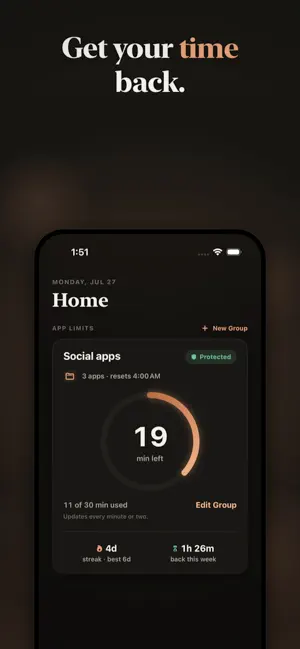


About Opaque: Screen Time Control
Opaque locks your most addictive apps behind a real shield, holds the line when the urge hits, and shows you the years you can gain back. Not a nag. A wall. HOW IT WORKS Pick the apps that eat your time and give them a daily budget. When it is spent, Apple's Screen Time shield comes down. Your first break of the day is one tap. The next needs a ten-second hold. The one after that, a sixty-second wait. Friction rises so the urge can pass. THE PRINTED QR CODE Print a code, put it somewhere far, and make scanning it the only way a group takes a break. The walk to the paper is the point. PLACES Save a spot like the office, and your picked apps stay blocked the whole time you are there, whatever the budget says. Your location is checked against your own saved circles on this phone and goes nowhere. THE HONEST MATH One hour a day is the equivalent of fifteen days a year. Most of us spend three or four hours. Opaque starts by showing you your own number, projected across your life, then helps you take it back a day at a time. EVERY HABIT, ITS OWN BUDGET Social apps at 30 minutes. Games at 45. Every group is its own limit with its own shield, streak, and ring. Apps in two groups stay protected by both. FOCUS HOURS Shield your work or school hours on the days you choose, or get gentle look-up nudges instead. Overnight windows work too, for protecting your sleep. PROGRESS YOU CAN FEEL Keep your limit, keep your streak. Every morning, one quiet recap of yesterday: time used, urges beaten, minutes gained back. See your full per-app screen time, drawn on-device inside Apple's sandbox, where not even Opaque can read it. PRIVATE BY DESIGN No account. No server. No analytics. Your answers, limits, streaks, and places live in your phone's local storage. We could not sell your data if we wanted to. We do not want to. SUBSCRIPTION Opaque Unlimited is required after setup: $47.99/year with a 7-day free trial, or $6.99/week. Payment is charged to your Apple Account at confirmation. Subscriptions renew automatically unless cancelled at least 24 hours before the period ends; manage or cancel in Settings. Emergency breaks are never sold, ever. Privacy: https://opaqueapp.com/privacy Terms: https://opaqueapp.com/terms
What’s new
Version 1.2 · Updated July 30, 2026
Opaque Rebrand. Lowered iOS Requirements to 18
App privacy
The developer, Danny Nguyen, reported these privacy practices to Apple.
Data Not Collected
The developer does not collect any data from this app.
Alternatives to Opaque: Screen Time Control
Looking for apps like Opaque: Screen Time Control? Here are 6 similar apps on the App Store. The highest rated is LightScroll: Limit Screen Time (5.0/5), and all 6 are free to download.
-
 LightScroll: Limit Screen Time
5.0
LightScroll: Limit Screen Time
5.0
-
 AppLimit: App Usage Hard Stop
1.0
AppLimit: App Usage Hard Stop
1.0
-
 Locked: Less Screen Time
5.0
Locked: Less Screen Time
5.0
-
 Did it: Habit Tracker
4.8
Did it: Habit Tracker
4.8
-
 App Blocker - Focus Pal
4.6
App Blocker - Focus Pal
4.6
-
 Limit – Control the Scroll
4.6
Limit – Control the Scroll
4.6
| App | Rating | Price | Last updated | Compare |
|---|---|---|---|---|
| Opaque: Screen Time Control | – | Free | July 30, 2026 | |
| LightScroll: Limit Screen Time | 5.0 / 5 (14) | Free | Oct 22, 2026 | Compare |
| AppLimit: App Usage Hard Stop | 1.0 / 5 (1) | Free | Feb 10, 2026 | Compare |
| Locked: Less Screen Time | 5.0 / 5 (3) | Free | Jul 27, 2026 | Compare |
| Did it: Habit Tracker | 4.8 / 5 (26) | Free | Jan 16, 2026 | Compare |
| App Blocker - Focus Pal | 4.6 / 5 (74) | Free | Oct 29, 2026 | Compare |
| Limit – Control the Scroll | 4.6 / 5 (269) | Free | May 28, 2026 | Compare |