

LightScroll: Limit Screen Time
thelightware Productivity iPhoneiPadiPod touch
LightScroll: Limit Screen Time is a free Productivity app for iPhone and iPad by thelightware. Rated 5.0/5 from 14 ratings. Requires iOS 26.0.
- Rating
- 5.0
- 14 ratings
- Price
- Free
- on the App Store
- Size
- 43 MB
- Age 4+
- Updated
- Oct 22
- 2026 · v1.0.5
Screenshots

About LightScroll: Limit Screen Time
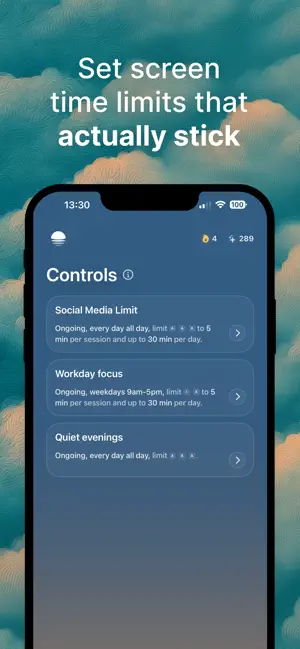
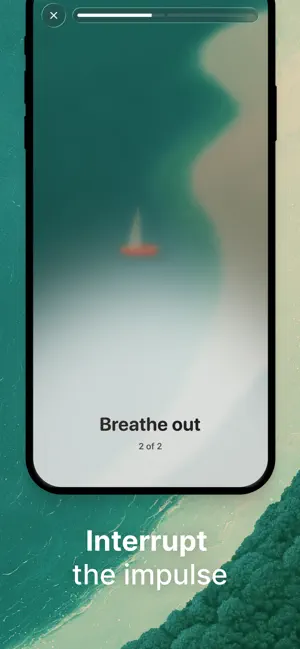
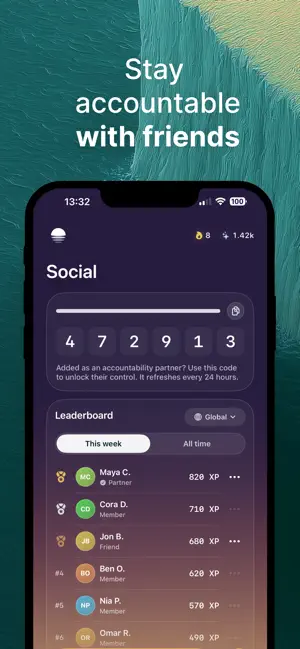
LightScroll helps you take control of your screen time, spend less time on distracting apps and websites, and build healthier digital habits you can actually stick to. Instead of relying on willpower alone, LightScroll lets you decide ahead of time how you want to use your attention. Set screen time limits, add friction before distracting apps open, and choose what it takes to stay on track, from waiting it out to asking an accountability partner for an unlock code. SET SCREEN TIME LIMITS THAT FIT YOUR LIFE Create flexible Controls for the apps and websites that pull you in. Choose when they apply, set daily or per-session limits, allow no time at all, or create an ongoing routine you can return to. Whether you want fewer social media distractions, more focus while working or studying, or simply less time spent scrolling, your Controls are built around the boundaries you choose. ADD FRICTION BEFORE YOU SCROLL Interrupt the impulse before a distracting app or website opens. Add a deliberate moment before an allowed session starts. Choose a short wait, a quick minigame, a mindful breath, inspiring facts and quotes, or randomized Friction to create space between impulse and action. The goal isn’t to make your phone unusable. It’s to give you enough time to remember what you meant to do, choose again, and continue when it really matters. CHOOSE WHAT HAPPENS AT YOUR LIMIT When you reach a screen time limit, you decide ahead of time what it should take to continue. Choose an Override such as: • Ask a trusted partner for a 6-digit code • Wait before an over-limit session can begin • Choose No Way Out when you don’t want an Override at all If you override a limit, your commitment for that Control ends for the day, adding a meaningful consequence without locking you out when life genuinely changes. BUILD BETTER HABITS WITH FRIENDS Add friends and family, share Controls as challenges, compare progress, and choose one person as your accountability partner. When Partner Code is your Override, only they can give you the code you need to continue. GO HARDCORE WHEN YOU NEED MORE Hardcore mode can require your chosen Override before editing or deleting a Control or quitting LightScroll, making impulsive changes harder while leaving room for real life. TRACK PROGRESS, NOT PERFECTION • Build your streak by following your Controls • Earn XP from your Daily Score • Compare progress with friends • Recover from missed days and keep moving forward MAKE ROOM FOR LIFE BEYOND THE SCREEN LightScroll is built for anyone who wants to reduce screen time, stop doomscrolling, block distracting apps and websites, focus while working or studying, set boundaries around social media, and use technology more intentionally. Your attention is finite. LightScroll helps you decide what deserves it before the impulse hits and gives you the limits, friction, accountability, and progress tracking to follow through. Make room for life beyond the screen. Some advanced features require a monthly or annual LightScroll Plus subscription. Available plans and localized prices are shown before purchase. Privacy Policy: https://www.lightscroll.app/privacy Terms of Use: https://www.lightscroll.app/terms Terms of Use (EULA): https://www.apple.com/legal/internet-services/itunes/dev/stdeula/
Ratings & reviews
5.0
14 ratings
What’s new
Version 1.0.5 · Updated October 22, 2026
We’ve refreshed our app listing in the App Store, adding new preview videos to show LightScroll in action.
App privacy
The developer, thelightware, reported these privacy practices to Apple.
Data Linked to You
The following data, which may be collected and linked to your identity, may be used for the following purposes:
- Purchases: Purchase History
- Identifiers: User ID, Device ID
- Usage Data: Other Usage Data
- Contact Info: Email Address, Name
Used for: Analytics, App Functionality
Alternatives to LightScroll: Limit Screen Time
Looking for apps like LightScroll: Limit Screen Time? Here are 6 similar apps on the App Store. The highest rated is Manaya: Stop Doomscrolling (5.0/5), and all 6 are free to download.
-
 Rest: stop scrolling for hours
-
 Opaque: Screen Time Control
-
 Blockr: Stop Scrolling
-
 Manaya: Stop Doomscrolling
5.0
Manaya: Stop Doomscrolling
5.0
-
 Pact: Focus & App Blocker
-
 Amigos - Keep in touch, easily
| App | Rating | Price | Last updated | Compare |
|---|---|---|---|---|
| LightScroll: Limit Screen Time | 5.0 / 5 (14 ratings) | Free | October 22, 2026 | |
| Rest: stop scrolling for hours | – | Free | Oct 7, 2026 | Compare |
| Opaque: Screen Time Control | – | Free | Jul 30, 2026 | Compare |
| Blockr: Stop Scrolling | – | Free | May 30, 2026 | Compare |
| Manaya: Stop Doomscrolling | 5.0 / 5 (1) | Free | Sep 1, 2026 | Compare |
| Pact: Focus & App Blocker | – | Free | Oct 5, 2026 | Compare |
| Amigos - Keep in touch, easily | – | Free | Jan 15, 2025 | Compare |