

EyePrompt Teleprompter Camera
Beonbrand Inc Photo & Video iPhoneiPadiPod touchMac
EyePrompt Teleprompter Camera is a free Photo & Video app for iPhone and iPad by Beonbrand Inc. Rated 4.6/5 from 9 ratings. Requires iOS 17.0.
- Rating
- 4.6
- 9 ratings
- Price
- Free
- on the App Store
- Size
- 8 MB
- Age 4+
- Updated
- Oct 12
- 2026 · v1.5.0
Screenshots



About EyePrompt Teleprompter Camera
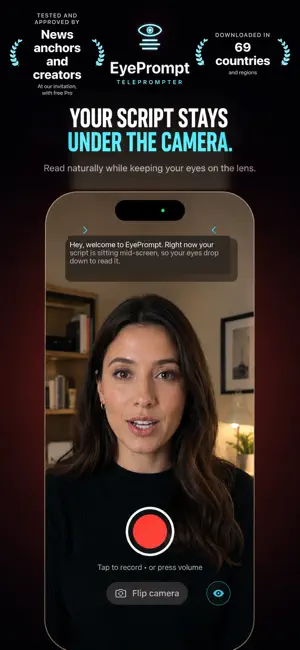
The teleprompter that keeps your eyes on the camera. EyePrompt puts your script in a narrow band right under the front camera, so you read every word and still look people in the eye. On iPhone, iPad and Mac. HOW IT WORKS • Write or paste your script, or import a PDF, TXT, RTF or Word file with Pro. Add a pause wherever you want to breathe. • Record. The script scrolls right under the lens with one line in focus, and Smart Follow moves it at your speaking pace. • Review. See your Eye Contact Score, then trim, export and keep the take you want. SMART FOLLOW The script follows your voice: it waits while you pause or ad-lib and catches up when you skip ahead. Recognition runs on your device, in the language your script is written in, and is never sent to a server. EYE CONTACT SCORE After each front-camera take in the default Eye contact style, see how steady your gaze stayed, with a timeline of when it moved away. It is an estimate, and it never edits your eyes or your video. ALSO IN THE APP • Eye Contact focus lights only the line at the lens. Lens Lock shows one line at a time, held still under the camera. • Rehearse with the prompter and camera, without recording. • Captions in your video, matched on your device to what you said: Clean is free; Bold, Highlight, Minimal and Box are part of Pro. You can also export captions (.srt) made from your script. • Siri, Shortcuts and Spotlight open, record or rehearse a script. Script Coach fits a script to 30, 60 or 90 seconds in your own words, with Apple Intelligence. • An optional weekly practice reminder that only comes in weeks you have not practiced. • Nine languages, down to the system permission dialogs. • Text follows the text size you set in Settings, including the larger accessibility sizes. iPad A native iPad app, in portrait or landscape. It asks which edge your camera is on and keeps the band narrow and centered under it. iPhone Duo The band sits at the camera on the outer display, where the camera is in a corner, and on the inner display, open or partly folded. With the phone open and the rear camera on, Outer screen shows the script on the outer display, facing the person in front of the camera. Mac The same purchase unlocks EyePrompt for Mac: a reading band under your Mac's camera, above Zoom, Google Meet, Microsoft Teams, FaceTime or Keynote, and hidden from screen sharing in supported apps. WHAT IS FREE • 3 saved scripts and takes up to 3 minutes • 1080p export, with no watermark for your first 30 days, then one small EyePrompt mark • The Eye Contact Score, Smart Follow, Smart Pause, captions and every prompter setting EYEPROMPT PRO • Unlimited scripts and take length • Exports without the watermark, up to 4K on supported devices • Script import from PDF, TXT, RTF and Word • $7.99 a month, $39.99 a year with a 7-day free trial, or $99.99 once PRIVATE BY DESIGN No account, and nothing is sent to us. Scripts and recordings are kept on this device, speech recognition runs on this device, not on a server, and the app works in Airplane Mode. SUBSCRIPTION DETAILS EyePrompt Pro. Monthly: 1 month, $7.99. Annual: 1 year, $39.99 with a 7-day free trial for new subscribers. Lifetime: one-time purchase, $99.99. One purchase covers iPhone, iPad and Mac. Prices are in US dollars; the App Store shows your local price. Payment is charged to your Apple Account at confirmation of purchase. Subscriptions renew automatically unless cancelled at least 24 hours before the end of the current period. Manage or cancel any time in Account Settings. Lifetime is a one-time purchase, not a subscription. Privacy Policy: https://eyeprompt.app/privacy Terms of Use (EULA): https://www.apple.com/legal/internet-services/itunes/dev/stdeula/
Ratings & reviews
4.6
9 ratings
What’s new
Version 1.5.0 · Updated October 12, 2026
Made for iPhone Duo: the band sits at the camera on the outer display, where the camera is in a corner, and on the inner display, open or partly folded. With the phone open and the rear camera on, Outer screen shows the script on the outer display, facing the person in front of the camera. Text in the app now follows the text size you set in Settings, including the larger accessibility sizes. After your first 30 days, free exports now carry one small EyePrompt mark just below your face, instead of a pattern across the video and a corner badge.
App privacy
The developer, Beonbrand Inc, reported these privacy practices to Apple.
Data Not Collected
The developer does not collect any data from this app.
Alternatives to EyePrompt Teleprompter Camera
Looking for apps like EyePrompt Teleprompter Camera? Here are 6 similar apps on the App Store. The highest rated is BitCam (4.7/5), and all 6 are free to download.
-
 Film(ish) photo editing
4.2
Film(ish) photo editing
4.2
-
 Teleo — Teleprompter
-
 SteadyEye Teleprompter
-
 LookUp: Eye Contact Prompter
-
 BitCam
4.7
BitCam
4.7
-
 Teleprompter Premium for Video
4.1
Teleprompter Premium for Video
4.1
| App | Rating | Price | Last updated | Compare |
|---|---|---|---|---|
| EyePrompt Teleprompter Camera | 4.6 / 5 (9 ratings) | Free | October 12, 2026 | |
| Film(ish) photo editing | 4.2 / 5 (19) | Free | Oct 1, 2026 | Compare |
| Teleo — Teleprompter | – | Free | Oct 5, 2026 | Compare |
| SteadyEye Teleprompter | – | Free | Oct 19, 2026 | Compare |
| LookUp: Eye Contact Prompter | – | Free | Oct 10, 2026 | Compare |
| BitCam | 4.7 / 5 (92) | Free | Sep 18, 2026 | Compare |
| Teleprompter Premium for Video | 4.1 / 5 (45) | Free | Oct 20, 2026 | Compare |