

SteadyEye Teleprompter
Kirill Vasilyev Photo & Video iPhoneiPadiPod touch
SteadyEye Teleprompter is a free Photo & Video app for iPhone and iPad by Kirill Vasilyev. Requires iOS 17.0. Updated October 19, 2026.
- Price
- Free
- on the App Store
- Size
- 16 MB
- Age 4+
- Updated
- Oct 19
- 2026 · v2.0
Screenshots


About SteadyEye Teleprompter
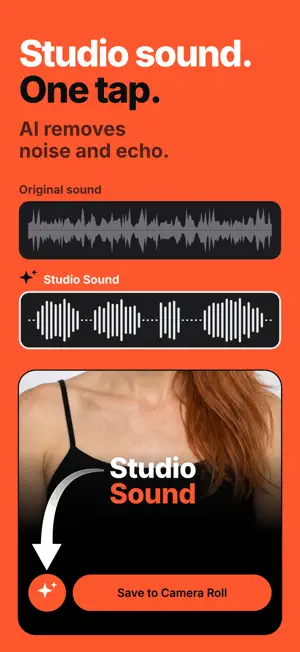
Stop looking away from the camera. SteadyEye shows your script one word at a time, right under the front camera lens. Your eyes stay locked. Your audience sees confidence, not reading. WHY YOUR VIDEOS FEEL OFF You write a script. You record. You watch it back. Your eyes are everywhere except the lens. Traditional teleprompters scroll a wall of text — your eyes scan left to right, top to bottom. Viewers notice. The eye contact illusion breaks. Memorizing means 10+ takes. Reading notes means looking down. Neither works. WORD-BY-WORD TELEPROMPTER SteadyEye displays one word at a time in a compact bar near the front camera. No scanning. No eye movement. Natural eye contact — like a real conversation. The only teleprompter built around the iPhone's front camera position. Not adapted. Made for it. LIVE EYE CONTACT (BETA) An eye on the prompter turns green while you're looking at the lens. Optionally, the script pauses when you look away and resumes from the same word. TWO READING MODES Word-by-word for maximum eye contact, or 3-line mode to see the previous and next word. Switch with one tap. STUDIO SOUND One tap removes background noise and echo from your recording. AI SCRIPTS Paste any messy script. AI rewrites it for speaking: numbers become words, sentences get shorter, pauses land where you'd breathe. No script yet? Type a topic and get a draft ready to read. BULK IMPORT Recording 30 videos this week? Paste all your scripts at once. AI splits and optimizes each one. RECORD ANYWHERE The compact display works in a cafe, on the street, anywhere. Your gaze stays steady because the script is right there. PRO RECORDING - Front camera recording with audio - External mics (AirPods, Bluetooth, wired, DJI) - 4K and custom FPS - Landscape mode (beta) - Full iPhone Duo support - Drag the script to align with any iPhone model - Works in any language with spaces — plus full Japanese, Chinese and Korean support START FREE Write scripts and try the AI optimizer for free. To record, pick a weekly, monthly or yearly plan. Cancel anytime in App Store settings. Stop re-recording. Start looking at the camera. Terms of Use: https://steadyeye.bazilier.com/terms Privacy Policy: https://steadyeye.bazilier.com/privacy
What’s new
Version 2.0 · Updated October 19, 2026
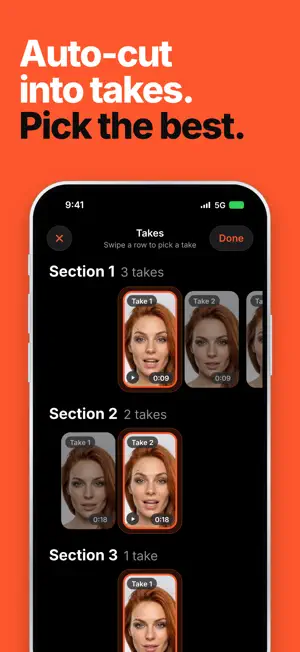
SteadyEye 2.0: from prompter to finished video. • Sections and takes. Split your script with ////. Read a section again as many times as you like, and the app keeps every take. • Pick the best take. A new Takes screen shows every take side by side. Swipe to choose, tap to play. • Automatic cut. Your chosen takes are joined into one video, and the silence before and after you speak is trimmed away. • Subtitles. Word-by-word captions in four styles, with Reels & TikTok safe zones. Edit any word, drag them where you want, and burn them into your video with Pro. • Studio Sound. One tap removes background noise and echo from your take, and on a cut it cleans exactly the takes you kept. • Three-line mode. See the words before and after, still right under the lens. • AI eye-contact tracking shows when you're looking at the camera. • Full support for iPhone Duo. • Import from Photos. Edited a video elsewhere? Bring it back, and SteadyEye recognizes it and puts its subtitles and sound back on. • Saving shows its progress, step by step.
App privacy
The developer, Kirill Vasilyev, reported these privacy practices to Apple.
Data Used to Track You
The following data may be used to track you across apps and websites owned by other companies:
- Identifiers: User ID, Device ID
- Usage Data: Product Interaction
Data Not Linked to You
The following data, which may be collected but is not linked to your identity, may be used for the following purposes:
- Identifiers: User ID, Device ID
- Usage Data: Product Interaction
- Purchases: Purchase History
- User Content: Audio Data, Customer Support
Used for: Third-Party Advertising, Developer’s Advertising or Marketing, Analytics, App Functionality
Alternatives to SteadyEye Teleprompter
Looking for apps like SteadyEye Teleprompter? Here are 6 similar apps on the App Store. The highest rated is Teleprompter App for Video (4.7/5), and all 6 are free to download.
-
 LookUp: Eye Contact Prompter
-
 EyePrompt Teleprompter Camera
4.6
EyePrompt Teleprompter Camera
4.6
-
 CueCam: AI Video Teleprompter
4.4
CueCam: AI Video Teleprompter
4.4
-
 PromptSmart+
4.5
PromptSmart+
4.5
-
 Teleprompter App for Video
4.7
Teleprompter App for Video
4.7
-
 Teleprompter Automatic
4.7
Teleprompter Automatic
4.7
| App | Rating | Price | Last updated | Compare |
|---|---|---|---|---|
| SteadyEye Teleprompter | – | Free | October 19, 2026 | |
| LookUp: Eye Contact Prompter | – | Free | Oct 10, 2026 | Compare |
| EyePrompt Teleprompter Camera | 4.6 / 5 (9) | Free | Oct 12, 2026 | Compare |
| CueCam: AI Video Teleprompter | 4.4 / 5 (38) | Free | Oct 18, 2026 | Compare |
| PromptSmart+ | 4.5 / 5 (568) | Free | Oct 14, 2026 | Compare |
| Teleprompter App for Video | 4.7 / 5 (115) | Free | Jul 17, 2026 | Compare |
| Teleprompter Automatic | 4.7 / 5 (283) | Free | Oct 15, 2026 | Compare |