

Teleprompter Premium for Video
Roadtrip Technologies Limited Photo & Video iPhoneiPadiPod touchMacApple Watch
Teleprompter Premium for Video is a free Photo & Video app for iPhone and iPad by Roadtrip Technologies Limited. Rated 4.2/5 from 44 ratings.
- Rating
- 4.2
- 44 ratings
- Price
- Free
- on the App Store
- Size
- 25 MB
- Age 4+
- Updated
- Oct 20
- 2026 · v1.9.181
Screenshots

About Teleprompter Premium for Video
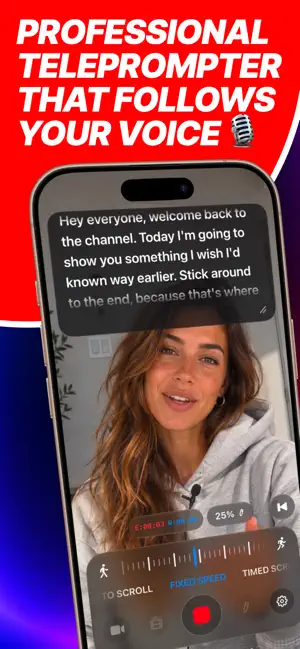
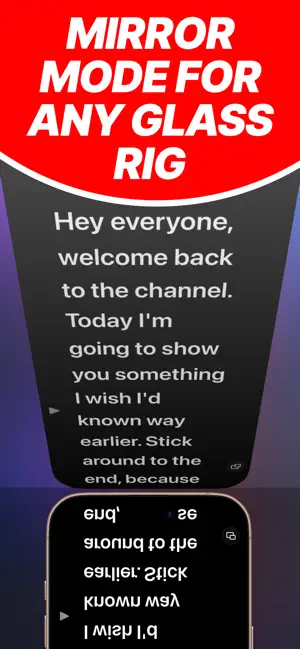
The Teleprompter Premium App for iPhone, iPad and Mac that follows your voice instead of a fixed speed. Read your script. Look straight into the lens. Nobody will know you are reading. Teleprompter Premium+ turns the devices you already own into a professional teleprompter. Large, smooth scrolling text sits right under your camera, so you keep eye contact with your audience instead of your notes. VOICE SCROLLING TELEPROMPTER Most teleprompter apps scroll at a fixed speed and make you keep up. This autocue listens. The script follows your natural pace, highlights each word as you say it, waits when you pause and skips stage directions in [brackets]. Say "go next" or "go back" to move hands free, in six languages. VIDEO TELEPROMPTER WITH THE SCRIPT AT THE LENS Record video with the teleprompter in a card right under the camera, so your eyes never leave the lens. Choose Auto Scroll, Fixed Speed or Timed Scroll, which ends right on the time you set, and switch mid-take. Pick your microphone and watch its level. Sideways, the script moves next to the camera. TELEPROMPTER TAKES, FILED WITH THEIR SCRIPT Every take stays in the app next to the script you read. Preview AI Captions over the video, choose a caption style, switch the watermark on or off and export only the takes you want. Audio mode records just your voice while the teleprompter scrolls, made for podcasts and voiceovers. ONE TELEPROMPTER APP FOR IPHONE, IPAD AND MAC iPhone, iPad, Mac and Apple Watch run the same teleprompter on one subscription. Write on the Mac, read on the iPhone. Scripts sync through your own iCloud. No account, no sign up: it is a free teleprompter app to start with, on every device you own. TELEPROMPTER REMOTE, PEDALS AND KEYBOARDS Your iPhone becomes a teleprompter remote that shows the live script and can switch scripts, paired once with a 4-digit code. Bluetooth foot pedals, page turners and keyboards drive it too, and Apple Watch plays, pauses and jumps from your wrist. BRING YOUR SCRIPTS IN Import PDF, Word, RTF, Markdown and plain text from Files, iCloud Drive, Dropbox or Google Drive. Send a clumsy paragraph to your AI assistant and get it back tightened for speech, straight into the teleprompter. BUILT FOR REAL TELEPROMPTER RIGS One tap mirroring for beam splitter teleprompter glass. The Follow Words cue lights up what you have read. Elapsed and remaining clocks tell you if you will make the sixty second cut before you start. Font, size, spacing, margins and colours are yours to set. MAC TELEPROMPTER APP: GHOST MODE On the Mac the teleprompter floats semi transparent on top of every other app. Read from it during a Zoom call, a webinar, a Keynote or a live stream, invisible to everyone else on the call. WHO USES THIS TELEPROMPTER APP YouTubers and short form creators. Actors filming self tape auditions. Course creators and educators. Public speakers. Podcasters. Sales teams recording pitches and demos. Anyone who has to talk to a camera and sound natural doing it. FREE AND PLUS Teleprompter Premium+ is a free teleprompter app for iPhone, iPad and Mac with up to 3 scripts, full playback, video mode and 3 watermarked takes a month. Teleprompter Plus unlocks unlimited scripts and takes, voice scrolling and voice commands, 4K takes with no watermark, AI Captions, audio recording, iCloud sync, text styling, mirroring, Ghost Mode, the iPhone teleprompter remote, pedals and Apple Watch control. Choose a weekly, monthly or annual subscription, or Lifetime: one payment, no subscription. Prices and any free trial are shown in the app before you buy. Subscriptions renew automatically unless cancelled at least 24 hours before the end of the current period. Manage or cancel anytime in your App Store account settings. Terms of Use (EULA): https://www.apple.com/legal/internet-services/itunes/dev/stdeula/
Ratings & reviews
4.2
44 ratings
What’s new
Version 1.9.181 · Updated October 20, 2026
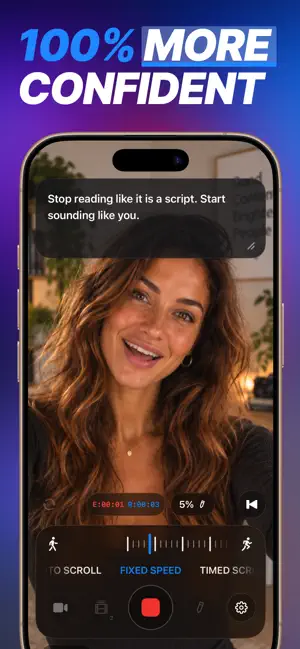
The biggest update yet to your teleprompter for video: record with the script right under the lens, keep every take with its script, and let your voice drive the scroll. NEW IN THIS VERSION • Steadier voice scrolling: the script only moves to words you actually said, so a stray "the" never jumps it ahead. • A short guided setup asks how you record, tunes the teleprompter to your videos and starts your 3-day one-take challenge. • Share Plus with up to 6 people through Family Sharing with the new Team plan. • Lifetime means Plus for good: once you own it, no more offers. • The Apple Watch remote fits every watch size, with every control in reach. VIDEO MODE • The teleprompter script sits in a card right under the camera, so your eyes stay on the lens. • Auto Scroll follows your voice, Fixed Speed keeps a steady pace, Timed Scroll finishes in exactly the time you set. Switch even mid-take. • Set speed or duration on the new ruler, pick your microphone and watch its level as you record. • Turn the phone sideways: the picture stays upright and the script moves next to the camera. TAKES • Every recording stays in the app, filed with the script you read, until you export it. • The new take editor previews AI Captions over the video, with caption style and watermark switches. Exports are copies, so the original is never touched. • Audio takes get a waveform player, and you can delete several takes at once. AUDIO RECORDING • New Audio mode records your voice while the teleprompter scrolls full screen, saved as m4a files in the Files app. VOICE SCROLLING • Stage directions in [brackets] are skipped, so the autocue never waits for words you won't say. • Voice commands: "go next", "go back", "go top", "go pause", "go resume". In English, Italian, Spanish, French, German and Portuguese. • Pick the spoken language or leave it on Automatic. Repeated words no longer pull the text back, and the app tells you when a language needs a connection. REMOTE, PEDALS AND KEYBOARDS • A second iPhone becomes a remote with the live script and the same controls, and can even switch scripts. • Pairing asks once with a 4-digit code, then reconnects by itself. • Bluetooth foot pedals, page turners and keyboards now control the teleprompter. A CLEANER PROMPTER • One glass dock for teleprompter, video and audio, with your script edge to edge. • New Follow Words cue: the words you've read light up and a caret marks your place. • The screen stays awake while you read, and Settings opens on the text controls. FIXES • Plan prices always come from the App Store, in your own currency, and upgrade buttons respond to every tap. • Opening Control Center or a notification no longer cuts a take short. • The microphone is released when you leave the app, and iPads with a 1080p front camera can now record. Video mode is free to try. Voice scrolling and commands, audio takes, remote and pedal control, AI Captions and 4K takes with no watermark come with Teleprompter Plus.
App privacy
The developer, Roadtrip Technologies Limited, reported these privacy practices to Apple.
Data Not Collected
The developer does not collect any data from this app.
Alternatives to Teleprompter Premium for Video
Looking for apps like Teleprompter Premium for Video? Here are 6 similar apps on the App Store. The highest rated is Teleprompter PIP - Any Camera (5.0/5), and all 6 are free to download.
-
 Teleprompter Premium
-
 EyePrompt Teleprompter Camera
4.6
-
 Teleprompter Pro
4.2
-
 Teleprompt Overlay
1.0
-
 Teleprompter PIP - Any Camera
5.0
-
 Teleprompter: Record and Share
5.0
| App | Rating | Price | Last updated | Compare |
|---|---|---|---|---|
| Teleprompter Premium for Video | 4.2 / 5 (44 ratings) | Free | October 20, 2026 | |
| Teleprompter Premium | – | Free | Sep 8, 2026 | Compare |
| EyePrompt Teleprompter Camera | 4.6 / 5 (9) | Free | Oct 12, 2026 | Compare |
| Teleprompter Pro | 4.2 / 5 (24) | Free | Oct 24, 2026 | Compare |
| Teleprompt Overlay | 1.0 / 5 (1) | Free | Jul 7, 2026 | Compare |
| Teleprompter PIP - Any Camera | 5.0 / 5 (1) | Free | Jun 18, 2026 | Compare |
| Teleprompter: Record and Share | 5.0 / 5 (14) | Free | Oct 8, 2026 | Compare |