

DoMosaic: Face & Photo Blur
爱华 刘 Utilities iPhoneiPadiPod touch
DoMosaic: Face & Photo Blur is a free Utilities app for iPhone and iPad by 爱华 刘. Requires iOS 17.0. Updated September 30, 2026.
- Price
- Free
- on the App Store
- Size
- 15 MB
- Age 17+
- Updated
- Sep 30
- 2026 · v2.0.0
Screenshots



About DoMosaic: Face & Photo Blur
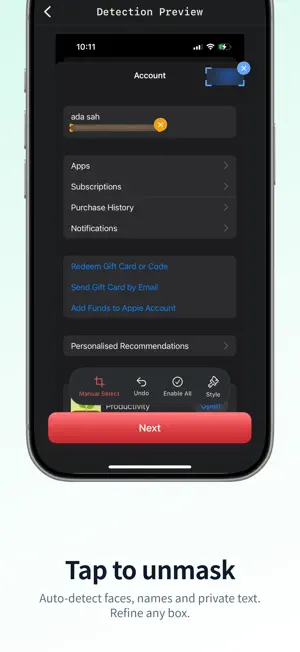
Auto-detect faces, phones, QR codes, barcodes and IDs—then tap any missed text to mask. Mosaic, blur or solid redaction, entirely on your iPhone. DoMosaic finds sensitive regions in screenshots and photos, then covers them in one pass. Missed a name or line of text? Tap it to mask the whole block—or drag a box for anything else. Nothing is uploaded. Your photos never leave the device. WHY PEOPLE USE DOMOSAIC • Hide faces and private text in social screenshots before posting • Redact IDs, contracts and documents for work or legal use • Mask emails, phone numbers, card numbers and other PII in one pass • Cover QR codes and barcodes so links and tracking don’t leak • Strip EXIF/GPS so location data doesn’t ride along with the export CORE FEATURES (FREE) • On-device detection: faces, text, PII patterns, QR & barcodes • Tap-to-mask for OCR text the auto pass missed • Drag boxes when you need pixel-perfect control • Styles: mosaic, Gaussian blur, solid color • Full flow: import → detect → adjust → export • 100% local processing—no photo cloud, no photo account PRO UNLOCKS • Batch up to 20 photos (free: 3 per batch) • Scene templates: IDs, social screenshots, street photos • Custom keywords & regex for recurring sensitive terms • Immersive blending that matches the background • Saved history & reusable mask templates PRIVACY FIRST Unlike cloud redaction tools, detection and masking run on-device—even offline. Fast, private, and built for people who care what leaves their phone. Download free. Upgrade to Pro when batch jobs, templates, or custom rules become daily work. Terms of Use (EULA): https://www.apple.com/legal/internet-services/itunes/dev/stdeula/ Privacy Policy: https://dotcn999.github.io/domosaic-legal/privacy.html
What’s new
Version 2.0.0 · Updated September 30, 2026
DoMosaic 2.0 — tap to mask what auto-detect misses. Still 100% on-device. • NEW Tap to Mask: tap any OCR text block to cover the whole line • Auto-detect faces, phones, emails, IDs, QR codes and barcodes in one pass • Smooth left-to-right mask reveal on tap (respects Reduce Motion) • Keep drag-to-box for icons, faces and irregular areas • Same local privacy: photos never leave your iPhone Free to try. Pro still unlocks batch (up to 20), templates and custom rules.
App privacy
The developer, 爱华 刘, reported these privacy practices to Apple.
Data Not Collected
The developer does not collect any data from this app.
Alternatives to DoMosaic: Face & Photo Blur
Looking for apps like DoMosaic: Face & Photo Blur? Here are 6 similar apps on the App Store.
-
 InstaFolder
-
 Decibel Meter: Noise Detector
-
 QR-Code Master
-
 Redacto - Redact & Blur Photos
-
 OCR Copy: Image to Text
-
 PageSnap: PDF Scanner & Editor
| App | Rating | Price | Last updated | Compare |
|---|---|---|---|---|
| DoMosaic: Face & Photo Blur | – | Free | September 30, 2026 | |
| InstaFolder | – | Free | Jul 10, 2026 | Compare |
| Decibel Meter: Noise Detector | – | Free | Aug 26, 2026 | Compare |
| QR-Code Master | – | Free | Jun 3, 2026 | Compare |
| Redacto - Redact & Blur Photos | – | Free | Jul 10, 2026 | Compare |
| OCR Copy: Image to Text | – | Free | Oct 21, 2026 | Compare |
| PageSnap: PDF Scanner & Editor | – | Free | Oct 12, 2026 | Compare |