

Redacto - Redact & Blur Photos
PH TECHNOLOGY SOLUTIONS LLC Utilities iPhoneiPadiPod touch
Redacto - Redact & Blur Photos is a free Utilities app for iPhone and iPad by PH TECHNOLOGY SOLUTIONS LLC. Requires iOS 26.0. Updated July 10, 2026.
- Price
- Free
- on the App Store
- Size
- 11 MB
- Age 4+
- Updated
- Jul 10
- 2026 · v1.1
Screenshots


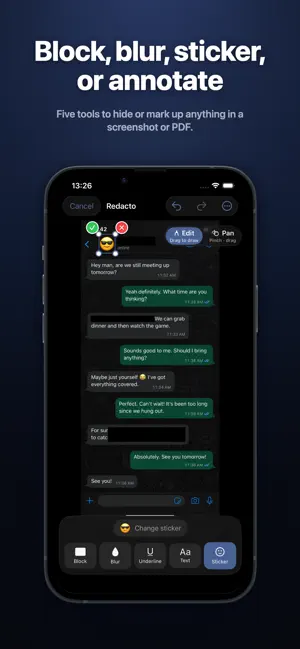
About Redacto - Redact & Blur Photos
Hide private details in screenshots and PDFs before you share them. Redactions are baked into the pixels — once exported, nobody can peel them back. FIVE TOOLS • Block — solid colour fill in black, white, red, or any custom colour • Blur — heavy gaussian blur that destroys text and faces beyond recovery • Sticker — emoji over faces, names, or anything you want covered • Underline — coloured bar beneath text for annotation • Text — bold stamp text with adjustable rotation for usage-limitation notes WORKS WITH ANY DOCUMENT • Screenshots from any app on your phone • Multi-page PDFs (up to 50 pages, batch redaction across the whole document) • Photos of IDs, receipts, contracts, medical reports • Direct import from Photos, Files, iCloud Drive, or the iOS Share Sheet • Export as JPEG, save to Photos, or share as multi-page PDF SMART AUTO-DETECT On import, Redacto's on-device Vision pass finds faces and text lines automatically. One tap redacts every detected face or every text line. Multi-page PDFs auto-detect per page as you navigate. FIND TEXT ACROSS PAGES Type a name, account number, address, or any phrase. Redacto OCRs every page of your document and applies your chosen tool to every match — across all pages in a single pass. Live progress display, one-tap cancel. Multi-language recognition handles Turkish, Greek, CJK, accented Latin, and more. PRIVATE BY DESIGN Everything happens on your device: • Nothing is uploaded anywhere • No accounts, no signup, no tracking, no cloud • Vision OCR runs locally on Apple's Neural Engine • Save creates a brand-new photo with no relationship to the source screenshot • EXIF, GPS, and thumbnails are stripped from every export WHY REDACTO Most blur tools draw an overlay on top of an image. The original pixels still exist underneath — recoverable by anyone with the right software. PDF redactions placed over selectable vector text are worse; the text layer sits underneath, readable by any viewer with a text-select tool. Redacto's renderer flattens edits into the bitmap, replacing the original pixel data. There is no recovery path because there is nothing to recover. PDFs are rasterised on import so even vector text is baked permanently into the redacted output. REDACTO PRO Every tool above is free — the free plan includes 3 exports per day. Redacto Pro removes the cap: • Unlimited exports, every day • Save to Photos and share as JPEG or PDF without limits • One subscription or a one-time Lifetime purchase — your choice PERFECT FOR • Sharing chat screenshots without revealing the other person's contact details • Sending bank statements with account numbers blocked • Showing receipts without exposing card numbers • Marking ID copies with usage-limitation stamps for telcos, banks, landlords • Redacting medical reports before forwarding to non-clinicians • Preparing documents for legal disclosure or FOIA requests • Journalists protecting sources before publication iOS 26 NATIVE Built for iOS 26 with the new Liquid Glass design language. Per-page undo (up to 100 steps), pinch-to-zoom up to 5×, two-finger pan, instant on-device Vision. Privacy Policy: https://www.phtechnologysolutions.com/apps/Redacto/Redacto_privacy_policy.html Terms of Use: https://www.apple.com/legal/internet-services/itunes/dev/stdeula/
What’s new
Version 1.1 · Updated July 10, 2026
Redacto now speaks 31 languages. Thanks for using Redacto — this update brings full localisation plus reliability polish.
App privacy
The developer, PH TECHNOLOGY SOLUTIONS LLC, reported these privacy practices to Apple.
Data Not Linked to You
The following data, which may be collected but is not linked to your identity, may be used for the following purposes:
- Purchases: Purchase History
- Identifiers: User ID, Device ID
Used for: App Functionality
Alternatives to Redacto - Redact & Blur Photos
Looking for apps like Redacto - Redact & Blur Photos? Here are 6 similar apps on the App Store. The highest rated is Redact Tap (5.0/5), and all 6 are free to download.
-
 DoMosaic: Face & Photo Blur
-
 Redact Tap
5.0
Redact Tap
5.0
-
 Trucker ETA Planner
4.8
Trucker ETA Planner
4.8
-
 Color Picker Detector
-
 Telsizim
-
 Mutick
| App | Rating | Price | Last updated | Compare |
|---|---|---|---|---|
| Redacto - Redact & Blur Photos | – | Free | July 10, 2026 | |
| DoMosaic: Face & Photo Blur | – | Free | Sep 30, 2026 | Compare |
| Redact Tap | 5.0 / 5 (1) | Free | Sep 16, 2025 | Compare |
| Trucker ETA Planner | 4.8 / 5 (4) | Free | May 5, 2026 | Compare |
| Color Picker Detector | – | Free | Aug 16, 2026 | Compare |
| Telsizim | – | Free | Apr 17, 2025 | Compare |
| Mutick | – | Free | Sep 26, 2025 | Compare |