

OCR Copy: Image to Text
ZEC Inc. Utilities iPhoneiPadiPod touch
OCR Copy: Image to Text is a free Utilities app for iPhone and iPad by ZEC Inc. Requires iOS 17.0. Updated October 21, 2026.
- Price
- Free
- on the App Store
- Size
- 8 MB
- Age 4+
- Updated
- Oct 21
- 2026 · v1.6.0
Screenshots

About OCR Copy: Image to Text
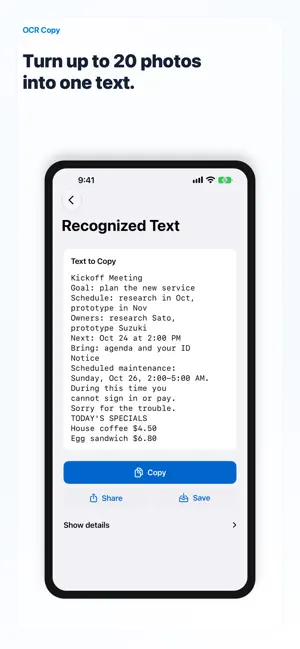
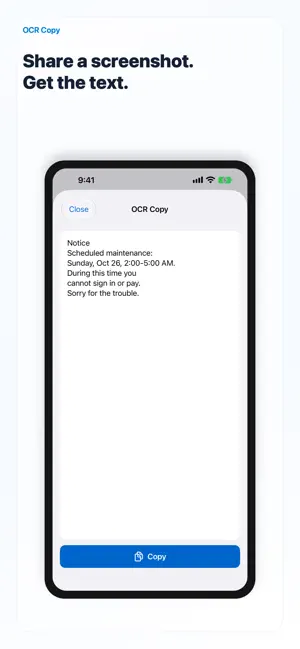
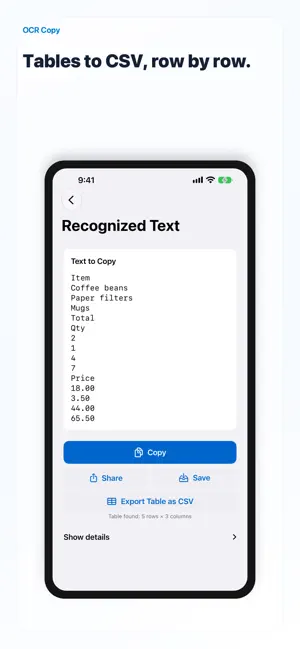
OCR Copy turns text in photos, screenshots, and the camera view into text you can copy. Select up to 20 photos or screenshots at once, and OCR Copy reads them in order and combines the text into one result. The text is copied to your clipboard as soon as it is read, so you can paste it straight into notes, messages, or search. What you can do: - Batch: select up to 20 photos or screenshots and get one combined text, in the order you picked them - Share to OCR Copy: in Photos or right after a screenshot, tap Share and get the text on the spot - Tables to CSV: when an image has a table, export it as a CSV file, row by row (iOS 26 or later) - Shortcuts: the "Read Text in Image" action gives you the text of images - Take a photo and copy its text - Scan Live: point the camera and copy the text you see - Fix or remove only the lines you need before copying - Keep your scanned text and copy it again later - Auto reads your device's language first. You can also choose the OCR language: Japanese, English, Korean, Chinese, European languages, Russian, Ukrainian, Thai and Vietnamese - The app is available in 25 languages Private by design: - Text recognition runs on your iPhone with Apple Vision - Works offline. No account, no tracking, no ads - Photos and text are never sent to a server Free and OCR Copy Pro: - Free: read text 5 times a day. One photo with text, one copy from Scan Live, or one shared image counts as one read. Copying, saving and CSV export never count, and the count starts over at midnight - If you used OCR Copy before version 1.5, reading stays unlimited - OCR Copy Pro removes the daily limit in the app, the share sheet and Shortcuts. Yearly (with a 1-week free trial) or monthly Payment is charged to your Apple Account. The subscription renews automatically unless it is canceled at least 24 hours before the end of the current period. You can manage or cancel it in your App Store account settings. Terms of Use: https://www.apple.com/legal/internet-services/itunes/dev/stdeula/ Privacy Policy: https://zec-inc.jp/privacy Note: vertical Japanese text and complex layouts may not be read correctly. Made by ZEC — simple tools for everyday life.
What’s new
Version 1.6.0 · Updated October 21, 2026
Photo won’t read? OCR Copy now notices when a smudged camera lens may be the reason and tells you to wipe it. It only speaks up when a read comes out poorly, so good photos stay quiet. Runs entirely on your iPhone (iOS 26 or later), and nothing is sent anywhere.
App privacy
The developer, ZEC Inc., reported these privacy practices to Apple.
Data Not Collected
The developer does not collect any data from this app.
Alternatives to OCR Copy: Image to Text
Looking for apps like OCR Copy: Image to Text? Here are 6 similar apps on the App Store. The highest rated is PeekAI (5.0/5), and all 6 are free to download.
-
 Text Snip : Scan and Copy Text
-
 QR-Code Master
-
 DoMosaic: Face & Photo Blur
-
 Image to Text: Photo OCR Scan
-
 PeekAI
5.0
PeekAI
5.0
-
 PageSnap: PDF Scanner & Editor
| App | Rating | Price | Last updated | Compare |
|---|---|---|---|---|
| OCR Copy: Image to Text | – | Free | October 21, 2026 | |
| Text Snip : Scan and Copy Text | – | Free | Oct 7, 2026 | Compare |
| QR-Code Master | – | Free | Jun 3, 2026 | Compare |
| DoMosaic: Face & Photo Blur | – | Free | Sep 30, 2026 | Compare |
| Image to Text: Photo OCR Scan | – | Free | Jun 29, 2026 | Compare |
| PeekAI | 5.0 / 5 (1) | Free | Jan 29, 2026 | Compare |
| PageSnap: PDF Scanner & Editor | – | Free | Oct 12, 2026 | Compare |