

Text Snip : Scan and Copy Text
Koichi Yamamoto Utilities iPhoneiPadiPod touch
Text Snip : Scan and Copy Text is a free Utilities app for iPhone and iPad by Koichi Yamamoto. Requires iOS 26.0. Updated October 7, 2026.
- Price
- Free
- on the App Store
- Size
- 7 MB
- Age 4+
- Updated
- Oct 7
- 2026 · v1.4.0
Screenshots


About Text Snip : Scan and Copy Text
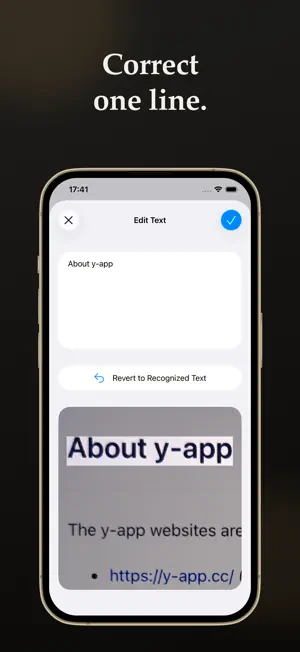
Snap the page. Paste it on your Mac. Scan paper and documents, and read the words (text recognition, OCR). Copy only the text you need. Spend less time retyping letters, invitations, lists, and estimates. Point your iPhone at the page. The words line up by type: titles, paragraphs, lists, tables, and barcodes. Paste them on a Mac or iPad. ■ What you can do Snap the paper. You can also read a photo, an image you copied, or an image shared from another app. From Control Center, you can start the camera or pick a photo. Choose the part to read. Text at the edge of the page, and text that is too short, can be left out for you. Copy only the lines you need. You can share them too. A setting can copy them the moment you snap. At a front desk, or when the papers keep coming, you move on sooner. A table stays a table. Paste it into a spreadsheet so the columns do not collapse into one line. Paste lists and tables into Notes in their own shape. Correct one line. Look at the original photo, fix a misread word, then copy. Phone numbers open the Phone app. Addresses open Maps. Web addresses open the browser. You can also add them to Contacts. History stays on the phone. Open several snaps later, compare them, and copy or share them together. ■ When it helps At a wedding or funeral reception, move a name or address from an invitation into Notes or Contacts. You do not have to ask the guest to repeat it, and you make fewer copying mistakes. On a day when many letters arrive, lift out only the address you need for a reply. You do not have to spread the pile across the desk again. At work, when a list or table would otherwise arrive as one crushed line, pass it on still shaped as a table. From a screenshot, pull out only the words on the screen. No paper required. The steps are the same. When a misread word worries you, put the photo and the text side by side and check one line at a time. You decide what is correct. ■ How to start 1. Snap the page. 2. Choose only the lines you need. 3. Copy, and paste on your Mac. If the area is too wide, choose it again. If one line is wrong, correct it, then copy. ■ Other details Works on iPhone with iOS 26 or later. Photos and the text you read stay on this iPhone. They are not sent to iCloud. To pass text to a Mac or iPad, the app uses Apple's Universal Clipboard. The devices need to be near each other and signed in to the same Apple Account. When you read an image you copied, iOS may ask you to allow the paste. In the Settings app, set Paste from Other Apps to Allow for Text Snip, and the question stops. The features are free. Only removing ads is a separate purchase.
What’s new
Version 1.4.0 · Updated October 7, 2026
- You can now read text from an image on the clipboard. - The app icon is new.
App privacy
The developer, Koichi Yamamoto, reported these privacy practices to Apple.
Data Used to Track You
The following data may be used to track you across apps and websites owned by other companies:
- Location: Coarse Location
- Identifiers: Device ID
- Usage Data: Product Interaction, Advertising Data
- Diagnostics: Crash Data, Performance Data
Data Linked to You
The following data, which may be collected and linked to your identity, may be used for the following purposes:
- Location: Coarse Location
- Identifiers: Device ID
- Usage Data: Product Interaction, Advertising Data
- Diagnostics: Crash Data, Performance Data
Used for: Third-Party Advertising, Analytics, App Functionality
Data Not Linked to You
The following data, which may be collected but is not linked to your identity, may be used for the following purposes:
- Location: Coarse Location
- Diagnostics: Crash Data
Used for: Analytics
Alternatives to Text Snip : Scan and Copy Text
Looking for apps like Text Snip : Scan and Copy Text? Here are 6 similar apps on the App Store. The highest rated is hbd: Birthday Countdown (4.8/5), and all 6 are free to download.
-
 OCR Copy: Image to Text
-
 Vegetable Identifier - Scanner
4.4
Vegetable Identifier - Scanner
4.4
-
 hbd: Birthday Countdown
4.8
hbd: Birthday Countdown
4.8
-
 Spirit Level: Pro
1.0
Spirit Level: Pro
1.0
-
 UN jobs
4.6
UN jobs
4.6
-
 Sena Cycling
2.0
Sena Cycling
2.0
| App | Rating | Price | Last updated | Compare |
|---|---|---|---|---|
| Text Snip : Scan and Copy Text | – | Free | October 7, 2026 | |
| OCR Copy: Image to Text | – | Free | Oct 23, 2026 | Compare |
| Vegetable Identifier - Scanner | 4.4 / 5 (27) | Free | Mar 14, 2025 | Compare |
| hbd: Birthday Countdown | 4.8 / 5 (152) | Free | Jul 3, 2026 | Compare |
| Spirit Level: Pro | 1.0 / 5 (1) | Free | Jan 10, 2026 | Compare |
| UN jobs | 4.6 / 5 (42) | Free | Apr 30, 2024 | Compare |
| Sena Cycling | 2.0 / 5 (45) | Free | Oct 7, 2026 | Compare |