

Folio Writer
Bin Chen Productivity iPhoneiPadiPod touchMac
Folio Writer is a free Productivity app for iPhone and iPad by Bin Chen. Rated 5.0/5 from 3 ratings. Requires iOS 17.0. Updated October 25, 2026.
- Rating
- 5.0
- 3 ratings
- Price
- Free
- on the App Store
- Size
- 14 MB
- Age 4+
- Updated
- Oct 25
- 2026 · v1.15
Screenshots

About Folio Writer
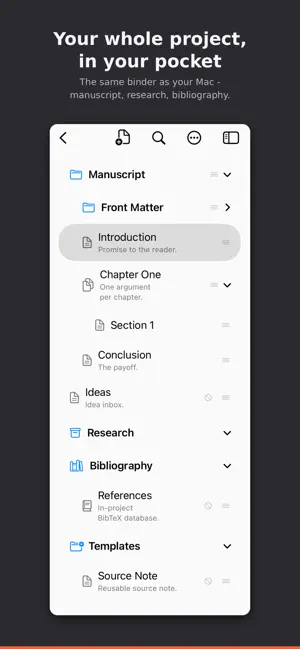
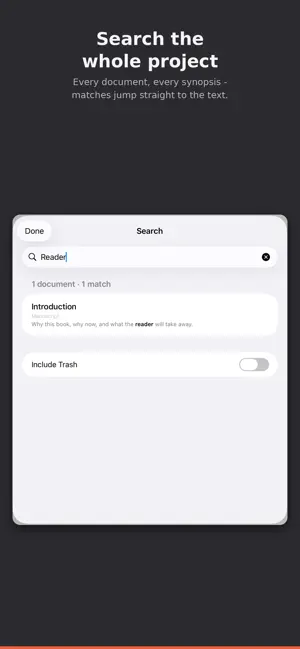
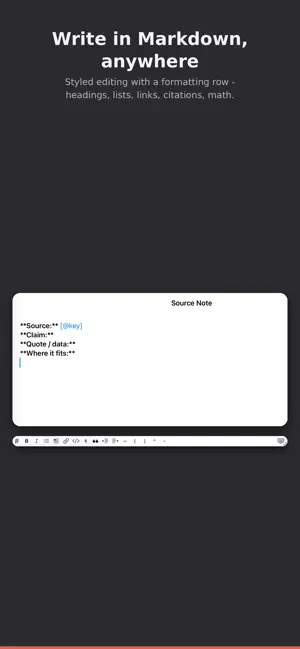
Folio Writer is a plain-text writing studio for long-form work — scholarly manuscripts, books, and novels. This is its iPhone and iPad edition: the same projects, the same files, in your pocket. Open a project from iCloud Drive, Dropbox, any Files location, or your Folio Cloud account, and pick up exactly where you left off on the Mac. Everything you write is a plain Markdown or Typst file you own — no lock-in. WRITE ANYWHERE — FREE A Markdown key bar puts #, *, links, code, and $math$ one tap away. Typewriter scrolling and sentence focus for drafting on the go. Live word count and writing targets for each document, the whole draft, and each session. Hardware-keyboard shortcuts on iPad. YOUR WHOLE PROJECT — FREE The full binder: browse, open, rename, reorder by dragging, indent and outdent, and create new documents. Project-wide search with filters — label:, status:, type:, tag: — and saved searches as Collections. Version history: every save is kept and restorable, so nothing you write is quietly lost. Comments, and the Review Inbox for suggestions from co-authors. CITATIONS & PREVIEW — FREE Insert citations from the project's BibTeX files by author, year, or key. Preview the rendered document — headings, tables, images, and LaTeX math — right on the device. SYNC WITH THE MAC AND FOLIO CLOUD — FREE Opens the exact same .folio projects as Folio Writer for Mac, byte-for-byte. Conflict-safe syncing: edits from two devices merge when they don't overlap, and a losing copy is always preserved. Sign in to Folio Cloud and every project your account owns is listed; create projects in the cloud, share by link, co-edit live, and protect encrypted projects with a recovery passphrase. FOLIO PRO — ONE PURCHASE FOR MAC, iPHONE, AND iPAD Pro adds the finishing tools: Preview Manuscript — the whole draft assembled in binder order with its title page. Suggesting — propose edits as tracked changes, then Accept or Reject each one from the review bar, and mark a document as reviewed. Snapshots — named copies to compare side by side and roll back, change by change. Insert Template, with starter snippets for figures, tables, equations, and more. Compile to PDF, Word, or Typst through Folio Cloud, right from the device. Pay once, unlock both platforms. Folio Pro is the same one-time purchase as in Folio Writer for Mac: buy it here and Pro unlocks on your Mac; buy it on the Mac and it unlocks here. It follows your Apple ID — tap Restore Purchases if it hasn't appeared. Every Pro feature is free to try for 7 days. Prefer to pay by the month or year? Pro ($1.99 a month) and Premium ($3.99) are also available as subscriptions, which unlock the tier here and on the Mac for as long as they run and come with complimentary Folio Cloud storage (1 GB or 3 GB), so your projects sync to every device and open in any browser. PRIVATE BY DESIGN No analytics, no trackers. Your manuscripts never leave your own devices except through the cloud service you choose, and Folio Cloud projects are end-to-end encrypted. In-App Purchases (display names) Folio Pro — one-time, universal purchase shared with Folio Writer for Mac Folio Pro Subscription — monthly / yearly (Pro here and on the Mac + 1 GB Folio Cloud storage) Folio Premium Subscription — monthly / yearly (Premium here and on the Mac + 3 GB Folio Cloud storage) Terms of Use (EULA): https://www.apple.com/legal/internet-services/itunes/dev/stdeula/ Privacy Policy: https://foliowriter.app/privacy/
What’s new
Version 1.15 · Updated October 25, 2026
LaTeX compiling with figures and cross-references, live equations, and a binder that's easier to reorganize. • LaTeX on iPhone and iPad (Pro). Choose LaTeX or Typst as the typesetter in Compile. @fig:, @tbl:, and equation references are numbered, citations get a References section, and Chinese, Japanese, and Korean text typesets correctly. • See it as you write. Equations ($…$ and $$…$$, with {#eq:label} tags), H~2~O-style subscripts and superscripts, and figure captions and labels now render in the editor. Turn each on or off in Settings ▸ Rendering. • Compile options. Insert binder titles as headings, skip a document's first heading when it repeats its title, and share the Markdown source from Compile. When a compile fails, the error now names the problem and the line. • Set as Draft Folder. Long-press a top-level folder to make it the folder Compile builds — it's marked with its own folder-and-pen-nib icon. Documents can now move above it. • Undo and ⌘R. Binder moves can be undone (⌘Z on a keyboard, or shake), and ⌘R renames the selected item on iPad. • Standard binder rows, a confirmation before leaving a project, and new Traditional Chinese, German, and Spanish translations. Thanks for using Folio Writer!
App privacy
The developer, Bin Chen, reported these privacy practices to Apple.
Data Not Collected
The developer does not collect any data from this app.
Alternatives to Folio Writer
Looking for apps like Folio Writer? Here are 6 similar apps on the App Store. The highest rated is Cairn — Markdown Tasks (5.0/5), and 5 of the 6 are free to download.
-
 Cairn — Markdown Tasks
5.0
Cairn — Markdown Tasks
5.0
-
 Ask Frank
5.0
Ask Frank
5.0
-
 Typtic Typst Editor
-
 IntelliNote — AI Notebook
5.0
IntelliNote — AI Notebook
5.0
-
 Paraspeech Voice Keyboard
-
 PST Viewer for Outlook
5.0
PST Viewer for Outlook
5.0
| App | Rating | Price | Last updated | Compare |
|---|---|---|---|---|
| Folio Writer | 5.0 / 5 (3 ratings) | Free | October 25, 2026 | |
| Cairn — Markdown Tasks | 5.0 / 5 (1) | Free | Oct 21, 2026 | Compare |
| Ask Frank | 5.0 / 5 (2) | Free | Dec 14, 2025 | Compare |
| Typtic Typst Editor | – | Free | Oct 3, 2026 | Compare |
| IntelliNote — AI Notebook | 5.0 / 5 (2) | Free | May 10, 2026 | Compare |
| Paraspeech Voice Keyboard | – | Free | Jul 1, 2026 | Compare |
| PST Viewer for Outlook | 5.0 / 5 (6) | 7.99 USD | Sep 17, 2026 | Compare |
Compare Folio Writer with the top alternatives: ratings, updates, ASO score and keyword gaps →