

Paraspeech Voice Keyboard
Burlis Management GmbH Productivity iPhoneiPadiPod touch
Paraspeech Voice Keyboard is a free Productivity app for iPhone and iPad by Burlis Management GmbH. Requires iOS 17.0. Updated July 1, 2026.
- Price
- Free
- on the App Store
- Size
- 45 MB
- Age 4+
- Updated
- Jul 1
- 2026 · v1.0.4
Screenshots


About Paraspeech Voice Keyboard
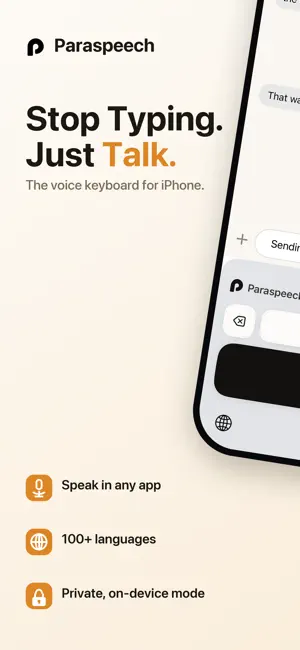
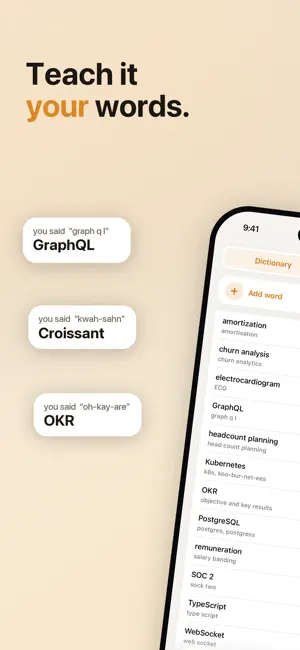
The fastest way to type on iPhone — just speak, and your words appear instantly in any app. Paraspeech is a custom voice keyboard that replaces tapping with talking. Whether you're firing off emails, capturing notes, or messaging in any app, Paraspeech transcribes your speech in real time — right from your keyboard, no app-switching required. WHY PARASPEECH? • Works everywhere - install once, dictate in Messages, Mail, Slack, WhatsApp, Notes, and every other app on your iPhone • On-device & private - local transcription mode keeps all audio and transcripts on your device; nothing is sent to the cloud • Instant, accurate transcription - speak naturally and watch text appear in real time • Custom Dictionary - add names, technical terms, and jargon so Paraspeech always gets them right • Word Replacements - set up shortcuts that auto-expand into full phrases as you dictate • Cloud option available - sign in to access cloud-backed features like AI rewriting when you want more power • Mac companion included - continue dictating on your Mac with the same privacy and even more workflow tools BUILT FOR YOUR FLOW Stop breaking your train of thought to peck at a tiny keyboard. Paraspeech keeps you writing - in emails, quick notes, long messages - at the speed of speech. Local models mean no internet connection is required for on-device dictation, so your words stay yours. Customize your experience with a personal dictionary and word replacement rules so Paraspeech understands your world: client names, medical terms, product names, abbreviations - whatever you need. PRIVACY BY DESIGN When using local transcription mode, no audio or transcripts ever leave your iPhone. Your voice stays on your device, period. We do have cloud processing if you value rewriting or want even better transcription quality. GET STARTED IN SECONDS Install Paraspeech, add it as a keyboard in Settings, and start speaking. It's that simple. Terms: https://paraspeech.com/terms Privacy: https://paraspeech.com/privacy
What’s new
Version 1.0.4 · Updated July 1, 2026
- Improved rewrite prompts and rules - Fixes and Improvements
App privacy
The developer, Burlis Management GmbH, reported these privacy practices to Apple.
Data Linked to You
The following data, which may be collected and linked to your identity, may be used for the following purposes:
- Contact Info: Email Address, Name
- Identifiers: User ID, Device ID
- Usage Data: Product Interaction, Other Usage Data
- Purchases: Purchase History
- Diagnostics: Crash Data, Performance Data, Other Diagnostic Data
- User Content: Audio Data, Customer Support, Other User Content
Used for: Developer’s Advertising or Marketing, Analytics, Product Personalization, App Functionality
Alternatives to Paraspeech Voice Keyboard
Looking for apps like Paraspeech Voice Keyboard? Here are 6 similar apps on the App Store. The highest rated is Monologue: Smart Dictation (4.8/5), and 5 of the 6 are free to download.
-
 Speakly: AI Voice Keyboard
3.6
Speakly: AI Voice Keyboard
3.6
-
 Spokenly: Audio to Text AI app
4.3
Spokenly: Audio to Text AI app
4.3
-
 Monologue: Smart Dictation
4.8
Monologue: Smart Dictation
4.8
-
 Parchment: Agenda & Daily Note
4.8
Parchment: Agenda & Daily Note
4.8
-
 Aqua Voice: AI Dictation
4.4
Aqua Voice: AI Dictation
4.4
-
 choclift: Workflow Sweetener
4.2
choclift: Workflow Sweetener
4.2
| App | Rating | Price | Last updated | Compare |
|---|---|---|---|---|
| Paraspeech Voice Keyboard | – | Free | July 1, 2026 | |
| Speakly: AI Voice Keyboard | 3.6 / 5 (16) | Free | Oct 16, 2026 | Compare |
| Spokenly: Audio to Text AI app | 4.3 / 5 (63) | Free | Oct 15, 2026 | Compare |
| Monologue: Smart Dictation | 4.8 / 5 (297) | Free | Oct 2, 2026 | Compare |
| Parchment: Agenda & Daily Note | 4.8 / 5 (297) | 4.99 USD | Sep 18, 2026 | Compare |
| Aqua Voice: AI Dictation | 4.4 / 5 (98) | Free | Oct 1, 2026 | Compare |
| choclift: Workflow Sweetener | 4.2 / 5 (10) | Free | Oct 15, 2026 | Compare |