

choclift: Workflow Sweetener
Trautmann & Dorre GbR Shaped Agency Productivity iPhoneiPadiPod touchMac
choclift: Workflow Sweetener is a free Productivity app for iPhone and iPad by Trautmann & Dorre GbR Shaped Agency. Rated 4.2/5 from 10 ratings.
- Rating
- 4.2
- 10 ratings
- Price
- Free
- on the App Store
- Size
- 132 MB
- Age 4+
- Updated
- Oct 15
- 2026 · v2.4
Screenshots



About choclift: Workflow Sweetener
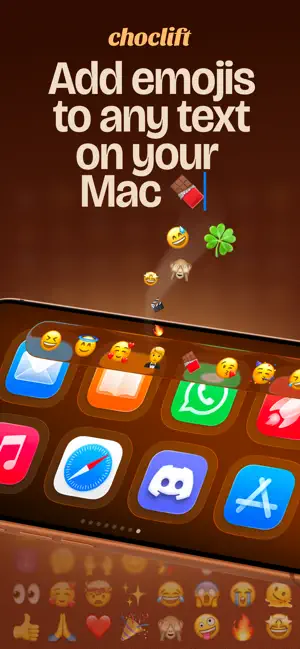
Access apps, Apple Shortcuts, websites and emojis on your Mac using your iPhone or iPad. choclift is the third input device you didn't know you needed in your Mac setup. It turns an iPhone or iPad into a touch (chocolate) bar that makes working with your Mac more intuitive, productive, accessible and, most of all, more fun. That last part is important, so it features a beautiful design, a satisfying user experience and plenty of chocolate references. Customize up to eight pages in your choclift bar with your favorite apps, Apple Shortcuts or website bookmarks you'd like to have just one tap away. See how tapping an app not only feels great, but also lets you perform actions like drag and drop faster and switch between apps in an instant. With "App Time Travel," you even get a new smart dock that shows you your recently opened apps, so it always adapts to your current workflow. Deliciously easy: Install choclift on both your iPhone/iPad and Mac, make sure both devices are on the same Wi-Fi network, and connect once. That’s it. With choclift’s incredibly sweet recipe, you can even connect multiple devices at the same time. Your taste, your layout: Choose the Mac apps, Shortcuts and websites your workflow can’t get enough of and arrange them in a layout that fits your needs. With the optional “Added Sugar” subscription or one-time purchase, you can unlock additional pages for your setup. Introducing Emoji Bar: Add emojis to any text on your Mac with a simple tap on your iPhone/iPad, and customize up to eight slides with your favorite emojis. Apple Shortcuts Support: Create simple to advanced Shortcuts with the Apple Shortcuts app, add them to your choclift bar, and top them with custom emojis. Add Website Bookmarks: Your favorite URLs are just one tap away. Finger Gestures: Minimize and maximize windows with two fingers or trigger actions like copy and paste in a fast and intuitive way. Gestures are executed locally through the Mac app. App Time Travel: Scroll through a timeline of your recently opened Mac apps and pin your favorites to quickly jump between workflows. Available with the optional “Added Sugar” upgrade. Pricing is shown in-app. Drag & Drop, sweetly upgraded: Use your mouse to drag files on your Mac and use choclift to quickly access the target app, no matter which desktop it’s on. Portrait or landscape: Use choclift the way you like. Rotate your iPhone/iPad and place it wherever it fits best into your setup. Every workflow is different, so we hope many people will discover new ways to lift their productivity to new heights with our little tasty treat. Important: choclift requires the companion Mac app to function. All actions are executed locally on your Mac. To unlock the full choclift experience, choclift offers an optional auto-renewing subscription or a one-time lifetime purchase. Added Sugar (choclift Premium) It includes: • Multiple pages for your choclift Bar (up to 8) • App Time Travel • 8 customizable slides in your Emoji Bar to pick from up to 64 emojis • Future premium features as they are released Payment will be charged to your Apple ID account at confirmation of purchase. Subscriptions renew automatically unless canceled at least 24 hours before the end of the current period. You can manage or cancel your subscription anytime in your App Store account settings. The lifetime purchase is a one-time payment that unlocks Premium permanently and does not renew. Privacy Policy: https://www.choclift.com/privacy-policy Terms of Use (EULA): https://www.apple.com/legal/internet-services/itunes/dev/stdeula/
Ratings & reviews
4.2
10 ratings
What’s new
Version 2.4 · Updated October 15, 2026
Completely reworked for iPhone Duo: Unfold for a larger control panel with App Time Travel and the Emoji Bar combined in one view, or place it on your desk for the new Clock Mode, complete with a clock and date display. Perfect for your desk setup or as a productivity companion on the go. Folded, it’s the full choclift experience you already know, with a few new tricks for the wider display. And because we couldn’t resist, there’s a little chocolate Easter egg specifically designed for iPhone Duo. We also made choclift sweeter with a new onboarding flow and small UI improvements throughout.
App privacy
The developer, Trautmann & Dorre GbR Shaped Agency, reported these privacy practices to Apple.
Data Not Collected
The developer does not collect any data from this app.
Alternatives to choclift: Workflow Sweetener
Looking for apps like choclift: Workflow Sweetener? Here are 6 similar apps on the App Store. The highest rated is DeckPilot - Workflow Control (5.0/5), and all 6 are free to download.
-
 OpenDisplay
4.6
OpenDisplay
4.6
-
 DeckPilot - Workflow Control
5.0
DeckPilot - Workflow Control
5.0
-
 Open Minis
4.9
Open Minis
4.9
-
 Raycast: AI, Notes and more
4.5
Raycast: AI, Notes and more
4.5
-
 OpenClaw
3.4
OpenClaw
3.4
-
 Did I Do? - ADHD & OCD Help
4.4
Did I Do? - ADHD & OCD Help
4.4
| App | Rating | Price | Last updated | Compare |
|---|---|---|---|---|
| choclift: Workflow Sweetener | 4.2 / 5 (10 ratings) | Free | October 15, 2026 | |
| OpenDisplay | 4.6 / 5 (17) | Free | Oct 2, 2026 | Compare |
| DeckPilot - Workflow Control | 5.0 / 5 (7) | Free | Sep 18, 2026 | Compare |
| Open Minis | 4.9 / 5 (93) | Free | Oct 11, 2026 | Compare |
| Raycast: AI, Notes and more | 4.5 / 5 (252) | Free | Oct 12, 2026 | Compare |
| OpenClaw | 3.4 / 5 (71) | Free | Oct 16, 2026 | Compare |
| Did I Do? - ADHD & OCD Help | 4.4 / 5 (87) | Free | Sep 9, 2026 | Compare |