

Cairn — Markdown Tasks
Young Hun JEONG Productivity iPhoneiPadiPod touch
Cairn — Markdown Tasks is a free Productivity app for iPhone and iPad by Young Hun JEONG. Rated 5.0/5 from 1 ratings. Requires iOS 17.0.
- Rating
- 5.0
- 1 ratings
- Price
- Free
- on the App Store
- Size
- 9 MB
- Age 4+
- Updated
- Oct 16
- 2026 · v1.3.7
Screenshots



About Cairn — Markdown Tasks
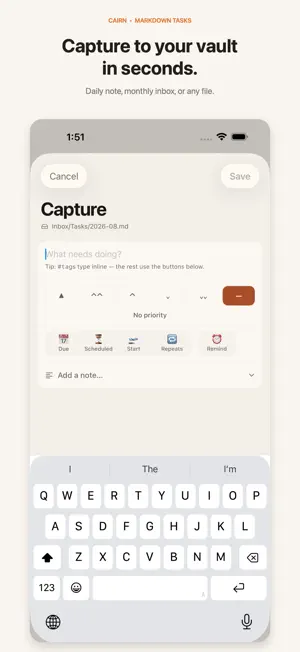
Cairn is a fast, native task and note companion that lives on top of the Markdown files you already own. Point it at your Obsidian vault — or any folder of Markdown notes — and your tasks and notes appear in clean, focused views. Everything you do in Cairn is written straight back to your files as plain text, in the Obsidian Tasks format. YOUR NOTES STAY YOURS • No account, no sign-up, no Cairn cloud database — your tasks live in your own files • Cairn does not send your notes or tasks to the developer • Careful, patch-based edits change only the content you touched, preserving the rest of your note • Works alongside Obsidian, iCloud Drive, Git, or any sync you already use CAPTURE, BROWSE, AND PLAN • Browse and edit Markdown notes directly in your vault • Quick capture into your daily note, with date, tag, and priority tokens parsed as you type • Choose where longer captures are saved • Today, Upcoming, Inbox, and Pool views, plus a global filter for folders, tags, dates, priority, and status • Full support for sub-tasks and task hierarchies • Recurring tasks in Obsidian Tasks format, with safe completion handling • Convert upcoming calendar events into tasks, or mirror your dated tasks into a calendar you choose (optional) STAY ON TRACK • Local reminders for due tasks — including sunrise-relative reminders computed entirely on your device • A Live Activity keeps today's progress on your Lock Screen and in the Dynamic Island • Home Screen widgets and a Control Center quick-capture control • Search across every task in your vault MADE FOR OBSIDIAN — NOT ONLY OBSIDIAN Cairn reads and writes the Obsidian Tasks plugin format (due, scheduled, start, and done dates, priorities, recurrence, tags), so your vault stays fully compatible with your desktop setup. Don't use Obsidian? Create a plain task folder in the Files app and Cairn works as a stand-alone Markdown to-do app. Cairn asks for access only to the folder you pick. Calendar access and location (used to compute local sunrise times) are optional and processed on your device. If you choose iCloud Drive or another Files or calendar provider, that provider's own sync and privacy terms apply.
What’s new
Version 1.3.7 · Updated October 16, 2026
A more organized Inbox, with less work to sort through. • Tasks are grouped by folder and file, with groups you can collapse and expand • Exclude a whole file or folder from its group menu, undo immediately, or restore it in Settings • A New badge highlights tasks created today or yesterday when their creation date is available • Exclusions leave your Markdown files unchanged and skip the selected sources during scans • Includes faster startup, habit history and note browsing, plus access to older notes beyond the former 100-note limit • Includes fixes for capture undo and file-change handling on iPhone
App privacy
The developer, Young Hun JEONG, reported these privacy practices to Apple.
Data Not Collected
The developer does not collect any data from this app.
Alternatives to Cairn — Markdown Tasks
Looking for apps like Cairn — Markdown Tasks? Here are 6 similar apps on the App Store.
-
 Shard - Notes for Obsidian
-
 WP Project Manager
-
 ZooMark
-
 Labyrinth: Tasks & Notes
-
 Profoto Team
-
 Benchpad — Scratchpad Notes
| App | Rating | Price | Last updated | Compare |
|---|---|---|---|---|
| Cairn — Markdown Tasks | 5.0 / 5 (1 rating) | Free | October 16, 2026 | |
| Shard - Notes for Obsidian | – | Free | Oct 18, 2026 | Compare |
| WP Project Manager | – | Free | Sep 30, 2026 | Compare |
| ZooMark | – | Free | Jul 4, 2026 | Compare |
| Labyrinth: Tasks & Notes | – | Free | Aug 10, 2026 | Compare |
| Profoto Team | – | Free | Jan 10, 2025 | Compare |
| Benchpad — Scratchpad Notes | – | Free | Aug 13, 2026 | Compare |