

Workly: AI Shift Tracker
Seyit Ahmet MINAZ Productivity iPhoneiPadiPod touch
Workly: AI Shift Tracker is a free Productivity app for iPhone and iPad by Seyit Ahmet MINAZ. Requires iOS 15.0. Updated August 11, 2026.
- Price
- Free
- on the App Store
- Size
- 156 MB
- Age 4+
- Updated
- Aug 11
- 2026 · v1.0.1
Screenshots


About Workly: AI Shift Tracker
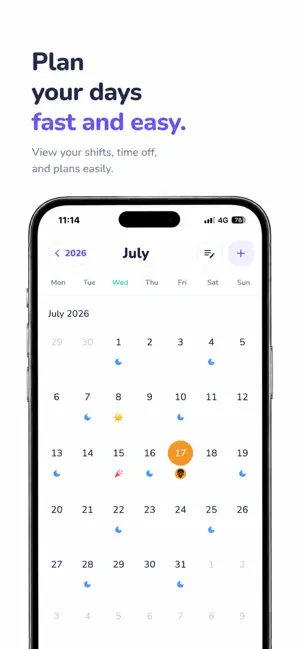
Workly is an AI-powered Shift Tracker, Work Hours Tracker, Timesheet, Time Clock, and Work Schedule app designed for shift workers, hourly employees, freelancers, healthcare professionals, and anyone who wants to manage work hours more efficiently. Track work hours, plan shifts, record overtime, monitor breaks, generate PDF reports, and analyze detailed work statistics in one simple app. Whether you work day shifts, night shifts, rotating schedules, fixed shifts, or flexible hours, Workly helps you organize your work schedule, improve time management, and keep every work record in one secure place. AI Assistant Chat with AI about your work history. Ask questions like "How many hours did I work this week?", "What's my overtime this month?", or "How many shifts did I complete?" AI instantly analyzes your work hours, shifts, breaks, overtime, and statistics to provide accurate answers, summaries, and insights that help you better understand your work habits. Shift Tracker Create and manage day shifts, night shifts, rotating shifts, custom schedules, and on-call duties. View your weekly, monthly, and yearly work schedule in an easy calendar and never miss another shift. Work Hours Tracker Clock in and clock out with one tap. Use the built-in timer to track work hours in real time. Record break times and let Workly automatically calculate your net working hours, daily hours, weekly hours, monthly hours, and overtime. Timesheet Maintain accurate digital timesheets without spreadsheets or paperwork. Store every work session, review previous records, and keep your work history organized and accessible. PDF Reports Generate professional PDF reports for work hours, shifts, overtime, and timesheets. Export daily, weekly, or monthly reports and easily share them with employers, clients, payroll departments, or keep them for personal records. Statistics Analyze total work hours, overtime, completed shifts, average working hours, break duration, and productivity with detailed statistics and visual charts. Work Schedule Manage your work calendar, organize upcoming shifts, review previous work sessions, and keep your entire schedule in one place. Home Screen Widgets View today's shift, work hours, and upcoming schedule directly from your home screen without opening the app. Break Tracker Track every break accurately. Break time is automatically deducted from total work hours for precise calculations. Simple & Fast A clean and modern interface makes work hour tracking easy. No unnecessary features or complicated setup. Start tracking shifts and work hours in seconds. Privacy First Your work records stay under your control. Access your data whenever you need it. Multi-Language Support Use Workly in multiple languages with the same fast and intuitive experience. Perfect For • Shift Workers • Nurses • Doctors • Healthcare Professionals • Security Guards • Factory Workers • Warehouse Workers • Retail Employees • Restaurant Staff • Hotel Staff • Drivers • Technicians • Freelancers • Contractors • Part-Time Employees • Hourly Workers Workly combines Shift Tracker, Shift Planner, Work Hours Tracker, Timesheet, Time Clock, Work Schedule, Overtime Tracker, Break Tracker, PDF Reports, Statistics, Calendar, and AI Assistant in one powerful app. Track work hours, manage shifts, calculate overtime, organize your work schedule, create PDF reports, review statistics, and use AI to make time tracking smarter, faster, and easier with Workly. Terms of Use (EULA): https://www.apple.com/legal/internet-services/itunes/dev/stdeula/
What’s new
Version 1.0.1 · Updated August 11, 2026
Fixed an issue that could prevent Workly PRO subscription plans from loading on iOS. Improved purchase account synchronization and subscription reliability.
App privacy
The developer, Seyit Ahmet MINAZ, reported these privacy practices to Apple.
Data Used to Track You
The following data may be used to track you across apps and websites owned by other companies:
- Purchases: Purchase History
- Usage Data: Product Interaction, Advertising Data, Other Usage Data
- Diagnostics: Performance Data
Data Linked to You
The following data, which may be collected and linked to your identity, may be used for the following purposes:
- Purchases: Purchase History
- Location: Coarse Location
- User Content: Other User Content
- Identifiers: User ID, Device ID
- Usage Data: Product Interaction, Advertising Data, Other Usage Data
- Diagnostics: Performance Data
- Financial Info: Other Financial Info
- Contact Info: Email Address, Name
Used for: Product Personalization, App Functionality
Data Not Linked to You
The following data, which may be collected but is not linked to your identity, may be used for the following purposes:
- Diagnostics: Other Diagnostic Data
Used for: Product Personalization
Alternatives to Workly: AI Shift Tracker
Looking for apps like Workly: AI Shift Tracker? Here are 6 similar apps on the App Store. The highest rated is Focus Sensei: Goal Planner (5.0/5), and all 6 are free to download.
-
 Cortex - Private AI Assistant
-
 Focus Sensei: Goal Planner
5.0
-
 Tempo: Focused Time Tracking
-
 Sonnical: AI Work Planner
-
 TaskTracker: Daily Planner
-
 Plan4U: AI Calendar Planner
| App | Rating | Price | Last updated | Compare |
|---|---|---|---|---|
| Workly: AI Shift Tracker | – | Free | August 11, 2026 | |
| Cortex - Private AI Assistant | – | Free | Mar 5, 2026 | Compare |
| Focus Sensei: Goal Planner | 5.0 / 5 (2) | Free | Mar 31, 2026 | Compare |
| Tempo: Focused Time Tracking | – | Free | Aug 18, 2026 | Compare |
| Sonnical: AI Work Planner | – | Free | Sep 23, 2026 | Compare |
| TaskTracker: Daily Planner | – | Free | Oct 10, 2026 | Compare |
| Plan4U: AI Calendar Planner | – | Free | Oct 22, 2026 | Compare |