

Tempo: Focused Time Tracking
Remi Herbiet Productivity iPhoneiPadiPod touch
Tempo: Focused Time Tracking is a free Productivity app for iPhone and iPad by Remi Herbiet. Requires iOS 18.0. Updated August 18, 2026.
- Price
- Free
- on the App Store
- Size
- 11 MB
- Age 4+
- Updated
- Aug 18
- 2026 · v26.0.2
Screenshots


About Tempo: Focused Time Tracking
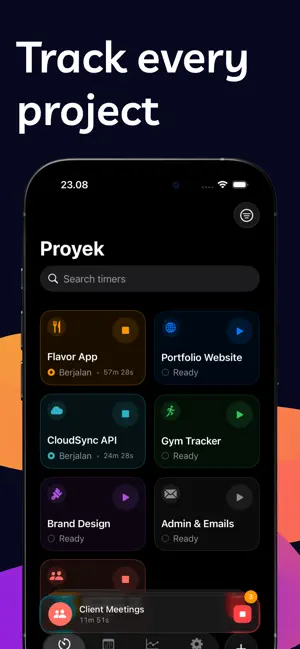
Tempo is the simple, beautiful time tracker built for freelancers, consultants, and anyone who needs to know where their hours go. Start a timer in one tap. Run multiple timers across different projects at the same time. See exactly how you spend your workday with clear reports and statistics - all in a privacy-first app with no subscriptions. TRACK TIME YOUR WAY - Start and stop project timers with a single tap - Run multiple timers simultaneously - one per project - See live elapsed time on your Lock Screen and Dynamic Island - Quick-start timers from Control Center without opening the app - Use Siri Shortcuts to start, stop, or toggle timers hands-free - Add notes and tags to every time entry for detailed logging ORGANIZE BY PROJECT - Create color-coded projects with custom icons - Tag entries for granular categorization - View your full time entry history grouped by day - Edit past entries to fix mistakes or add details UNDERSTAND YOUR TIME - Daily, weekly, and monthly time reports - See project breakdowns with interactive charts - Track total hours worked and identify patterns - Export-ready statistics to share with clients DESIGNED FOR FOCUS - Shortcuts-style project cards for instant access - Polished native interface with smooth animations - Haptic feedback on every interaction - Full iPad support with adaptive layouts - Works with VoiceOver, Dynamic Type, and Reduce Motion PRIVACY FIRST - No account required - your data stays on your device - No analytics, no ads, no invasive tracking FREE TO START, ONE PRICE TO UNLOCK EVERYTHING Tempo is free with one project. Unlock unlimited projects, tags, full history, and detailed statistics with a one-time purchase. No subscriptions. No recurring fees. Pay once, use it forever. Whether you're a freelance designer logging billable hours, a consultant tracking client work, or simply want to understand how you spend your day, Tempo gives you the clarity you need without the complexity you don't. Questions or feedback? We'd love to hear from you.
What’s new
Version 26.0.2 · Updated August 18, 2026
This update makes Tempo Pro clearer as a one-time unlock and improves App Store keywords and copy so Tempo is easier to find.
App privacy
The developer, Remi Herbiet, reported these privacy practices to Apple.
Data Not Collected
The developer does not collect any data from this app.
Alternatives to Tempo: Focused Time Tracking
Looking for apps like Tempo: Focused Time Tracking? Here are 6 similar apps on the App Store. The highest rated is Next - Meeting Alerts (5.0/5), and all 6 are free to download.
-
 Log - Thought Log
-
 Bullet Flow
-
 Holidaily
-
 Librixa: Reading Tracker
-
 Focusen: Time Tracker
-
 Next - Meeting Alerts
5.0
Next - Meeting Alerts
5.0
| App | Rating | Price | Last updated | Compare |
|---|---|---|---|---|
| Tempo: Focused Time Tracking | – | Free | August 18, 2026 | |
| Log - Thought Log | – | Free | Oct 5, 2026 | Compare |
| Bullet Flow | – | Free | Jul 10, 2026 | Compare |
| Holidaily | – | Free | Aug 13, 2026 | Compare |
| Librixa: Reading Tracker | – | Free | Oct 23, 2026 | Compare |
| Focusen: Time Tracker | – | Free | Mar 27, 2026 | Compare |
| Next - Meeting Alerts | 5.0 / 5 (1) | Free | Feb 1, 2026 | Compare |