

Blur Photo & Background Tool
Zeeron Studio Pvt. Ltd. Photo & Video iPhoneiPadiPod touch
Blur Photo & Background Tool is a free Photo & Video app for iPhone and iPad by Zeeron Studio Pvt. Ltd. Requires iOS 18.0. Updated October 15, 2026.
- Price
- Free
- on the App Store
- Size
- 14 MB
- Age 17+
- Updated
- Oct 15
- 2026 · v1.1
Screenshots



About Blur Photo & Background Tool
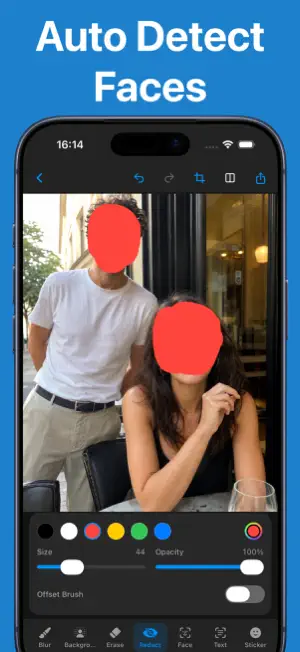
BlurPhoto makes it easy to blur photos, remove or blur backgrounds, and hide private details before sharing. Create polished edits in seconds with background removal, portrait-style background blur, mosaic blur, emoji blur, and precise manual tools. Protect your privacy by covering faces, license plates, addresses, screens, IDs, documents, bystanders, and anything else you do not want others to see. Open an image directly in BlurPhoto from the Photos app, make your edits, and share with confidence. BACKGROUND TOOLS - Remove a photo's background in just a few taps - Blur the background to keep attention on your subject - Create clean, professional-looking profile pictures and product photos BLUR & PRIVACY TOOLS - Paint blur exactly where you need it with a precise manual brush - Use soft blur, mosaic blur, pixelation, frosted blur, or black redaction - Cover faces and sensitive details with emoji blur - Adjust brush size, softness, strength, and offset - Zoom and pan for detailed edits - Erase mistakes, undo, redo, and preview before and after - Get on-device face and text detection suggestions QUICK IMPORT & EXPORT - Import from Photos, Camera, or Clipboard - Open photos in BlurPhoto directly from the iOS Photos share sheet - Export at full resolution - Save to Photos or Files, share to other apps, or copy the result - Automatically remove location metadata from exports by default - Autosave projects locally so you can continue editing later PRIVATE BY DESIGN Your photos are edited on your iPhone. No account is required, and your images are not uploaded to the cloud for editing. BlurPhoto is designed for fast, focused edits without the complexity of a traditional photo editor. Choose a photo, apply the effect you need, and share a finished image in moments. Some advanced features require BlurPhoto Pro. SUBSCRIPTION INFORMATION BlurPhoto Pro is an optional auto-renewing subscription. Payment is charged to your Apple Account when your purchase is confirmed. The subscription renews automatically unless canceled at least 24 hours before the end of the current period. You can manage or cancel your subscription at any time in your Apple Account settings. Privacy Policy: https://zeeronstudio.com/privacy/blurphoto.html Terms of Service: https://www.apple.com/legal/internet-services/itunes/dev/stdeula/
What’s new
Version 1.1 · Updated October 15, 2026
Bug fixes and improvements
App privacy
The developer, Zeeron Studio Pvt. Ltd., reported these privacy practices to Apple.
Data Not Linked to You
The following data, which may be collected but is not linked to your identity, may be used for the following purposes:
- Purchases: Purchase History
- Identifiers: User ID
Used for: Analytics, App Functionality
Alternatives to Blur Photo & Background Tool
Looking for apps like Blur Photo & Background Tool? Here are 6 similar apps on the App Store. The highest rated is Superblur: Mosaic & Blur Faces (5.0/5), and all 6 are free to download.


| App | Rating | Price | Last updated | Compare |
|---|---|---|---|---|
| Blur Photo & Background Tool | – | Free | October 15, 2026 | |
| TapMask | – | Free | Jul 28, 2026 | Compare |
| Superblur: Mosaic & Blur Faces | 5.0 / 5 (1) | Free | Oct 20, 2026 | Compare |
| BlurFold: Blur Photos & Video | – | Free | Oct 24, 2026 | Compare |
| FaceAway | – | Free | Mar 15, 2026 | Compare |
| MosaCam | – | Free | Sep 18, 2026 | Compare |
| mosaiccy | – | Free | Oct 15, 2026 | Compare |