

Color Blindness Camera
Peter Akkies Utilities iPhoneiPadiPod touch
Color Blindness Camera is a free Utilities app for iPhone and iPad by Peter Akkies. Requires iOS 26.0. Updated October 16, 2026.
- Price
- Free
- on the App Store
- Size
- 5 MB
- Age 4+
- Updated
- Oct 16
- 2026 · v1.2.0
Screenshots


About Color Blindness Camera
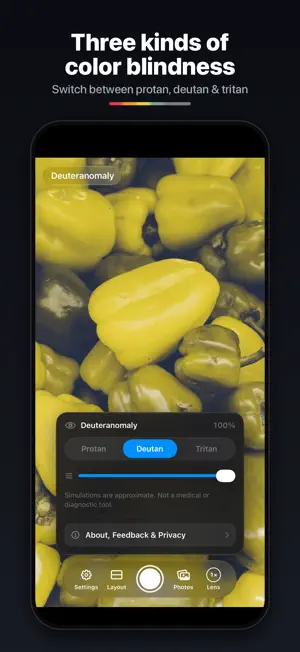
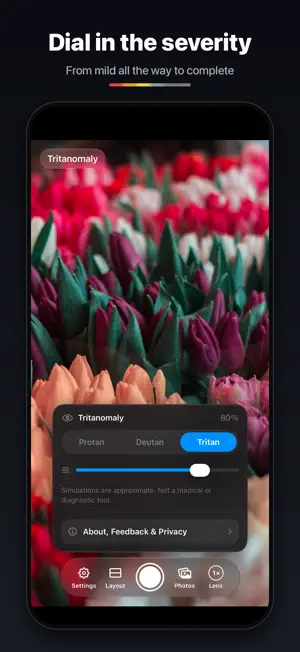
Ever tried to explain which colors you can’t tell apart — and gotten a blank look? Color Blindness Camera let you show people instead. Point the camera at anything and your phone shows people what you see. Or select an image from your photo library. SIMULATE THE THREE MOST COMMON TYPES OF COLOR BLINDNESS • Protanomaly (red-weak) • Deuteranomaly (green-weak) • Tritanomaly (blue–yellow) A severity slider runs from normal vision all the way to full dichromacy, so you can match the comparison to your own experience. ZOOM WITH EVERY LENS The Lens button switches between your iPhone’s cameras the way the Camera app does — ultra wide, main, telephoto — and both panes zoom together. WORKS WITH PHOTOS TOO Pick any photo, then pan and pinch-zoom both panes in sync to zero in on the colors you want to compare. CAPTURE, SAVE, SHARE Tap the shutter and the comparison becomes a side-by-side card. Save it straight to your photos or send it on — a simple way to show friends, family, designers, or teachers what you mean. PRIVATE BY DESIGN Everything happens on your device. No account, no analytics, no networking. The app only ever sees the single photo you pick, never your library, and saving uses add-only access: it can add a comparison to your photos but cannot read what’s already there. The simulation uses the physiologically-based model of Machado, Oliveira & Fernandes (2009). It is an educational approximation of color vision deficiency; everyone’s vision differs, and Color Blindness Camera is not a medical or diagnostic tool.
What’s new
Version 1.2.0 · Updated October 16, 2026
ZOOM WITH EVERY LENS Tap the new Lens button in the controls to zoom the way the Camera app does: .5×, 1×, 2×, 5× — whatever lenses your iPhone has. Both panes zoom together, so you can compare colors from across the room. The button shows your current zoom at a glance. TIDIER CONTROLS Switching between the rear and selfie cameras now lives in the same Lens tray, so the controls stay out of the way until you need them.
App privacy
The developer, Peter Akkies, reported these privacy practices to Apple.
Data Not Collected
The developer does not collect any data from this app.
Alternatives to Color Blindness Camera
Looking for apps like Color Blindness Camera? Here are 6 similar apps on the App Store. The highest rated is Color Blindness: Red & Green (5.0/5), and all 6 are free to download.
-
 Color Blindness: Red & Green
5.0
-
 HueScope: Color Blind Camera
-
 Charge Glance
-
 See as Me: Colorblind
-
 DepthCapture|LiDAR Point Cloud
-
 Chromatic Lens
| App | Rating | Price | Last updated | Compare |
|---|---|---|---|---|
| Color Blindness Camera | – | Free | October 16, 2026 | |
| Color Blindness: Red & Green | 5.0 / 5 (1) | Free | Oct 8, 2026 | Compare |
| HueScope: Color Blind Camera | – | Free | Apr 21, 2026 | Compare |
| Charge Glance | – | Free | Sep 25, 2026 | Compare |
| See as Me: Colorblind | – | Free | Sep 14, 2026 | Compare |
| DepthCapture|LiDAR Point Cloud | – | Free | Oct 12, 2026 | Compare |
| Chromatic Lens | – | Free | May 7, 2026 | Compare |