

See as Me: Colorblind
Javier Jimenez Tomas Utilities iPhoneiPadiPod touch
See as Me: Colorblind is a free Utilities app for iPhone and iPad by Javier Jimenez Tomas. Requires iOS 18.0. Updated September 14, 2026.
- Price
- Free
- on the App Store
- Size
- 9 MB
- Age 4+
- Updated
- Sep 14
- 2026 · v1.1
Screenshots

About See as Me: Colorblind
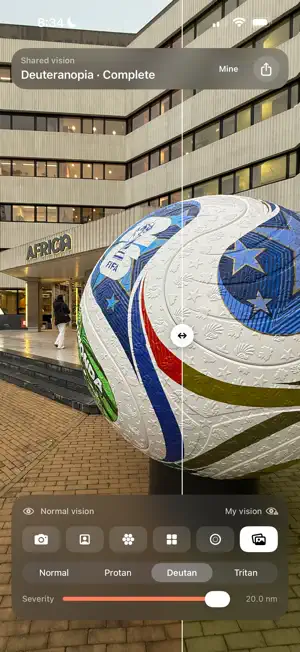
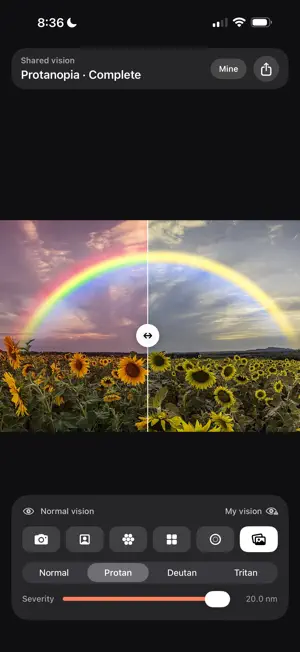
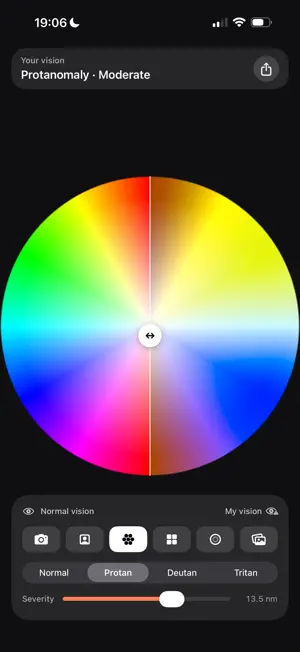
Most color vision tools begin with the same question: how does a color blind person see? See as Me begins with a different one: how do you see? You set how you see. Then you share it, so somebody else can look at the world through your eyes. WHAT IT DOES • Point the camera at anything and see it filtered through a color vision profile, live. • Drag anywhere to move the divider. Left is normal vision, right is yours: the same scene, at the same moment, both ways. • Take a photo with the filter in the pixels, captioned and ready to send. • Send a link that carries your profile inside it. Whoever opens it can point their own camera at anything, not only at whatever you photographed. • Look at a hue wheel, at pairs of colors that are the same to you and obviously different to everyone else, or at a generated test plate. • Rear camera, front camera, or any photo from your library. HOW THE SIMULATION WORKS The filter is the full Brettel, Viénot and Mollon model, carrying both half-planes and choosing between them for every pixel, rather than the single-matrix shortcut. Severity is expressed in nanometres, the scale each cone's peak sensitivity is measured on, and the slider runs from normal vision to the dichromatic end. All of it runs in linear light on the GPU, so a red darkens the way a red actually darkens. WHAT IT IS NOT This is not a test and not a diagnosis. You set your own type and severity; the app does not measure them. And no simulation can be exactly how somebody sees. Two people with the same diagnosis do not see alike, and a phone screen, the light in the room and your own eyes all sit in between. What it does show faithfully is which colors collapse together and which survive. PRIVACY Nothing is collected. No account, no analytics, no server. Camera frames go to the screen and are gone. Your profile lives on your phone, and when you share a link the profile travels inside the link itself.
What’s new
Version 1.1 · Updated September 14, 2026
A new info screen, behind the "i" button: how the app works, in four steps. And an optional tip jar. The app stays free, and nothing changes if you don't use it. Plus some visual polish: the normal vision and your vision labels now line up.
App privacy
The developer, Javier Jimenez Tomas, reported these privacy practices to Apple.
Data Not Collected
The developer does not collect any data from this app.
Alternatives to See as Me: Colorblind
Looking for apps like See as Me: Colorblind? Here are 6 similar apps on the App Store. The highest rated is In Their Eyes (5.0/5), and all 6 are free to download.
-
 Color Blindness Camera
-
 SeeClear: Color Blind Helper
-
 Juice: Fuel & EV Charge Log
4.0
Juice: Fuel & EV Charge Log
4.0
-
 Sealink Smeat
-
 Colorblind Style
4.0
Colorblind Style
4.0
-
 In Their Eyes
5.0
In Their Eyes
5.0
| App | Rating | Price | Last updated | Compare |
|---|---|---|---|---|
| See as Me: Colorblind | – | Free | September 14, 2026 | |
| Color Blindness Camera | – | Free | Oct 16, 2026 | Compare |
| SeeClear: Color Blind Helper | – | Free | Oct 17, 2026 | Compare |
| Juice: Fuel & EV Charge Log | 4.0 / 5 (1) | Free | Oct 25, 2026 | Compare |
| Sealink Smeat | – | Free | Nov 18, 2025 | Compare |
| Colorblind Style | 4.0 / 5 (3) | Free | Oct 26, 2026 | Compare |
| In Their Eyes | 5.0 / 5 (1) | Free | Sep 1, 2026 | Compare |