

yarikuri: Daily Budget App
Do. LLC Finance iPhoneiPadiPod touch
yarikuri: Daily Budget App is a free Finance app for iPhone and iPad by Do. LLC. Requires iOS 15.0. Updated October 12, 2026.
- Price
- Free
- on the App Store
- Size
- 32 MB
- Age 4+
- Updated
- Oct 12
- 2026 · v1.1.1
Screenshots

About yarikuri: Daily Budget App
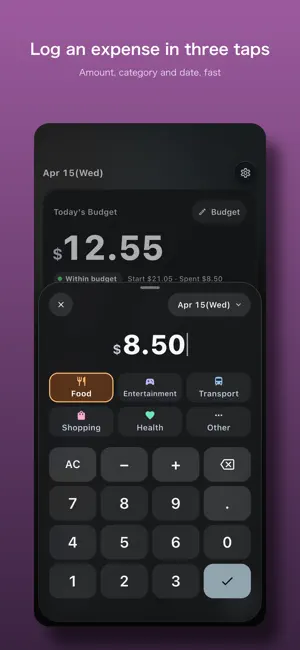
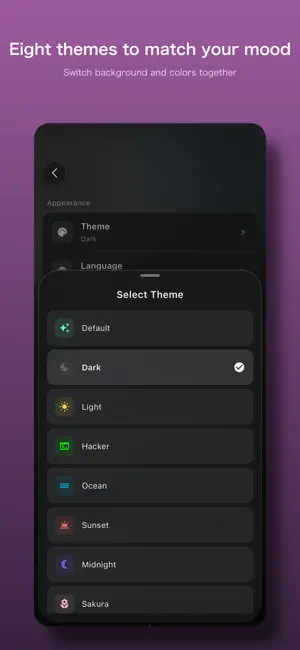
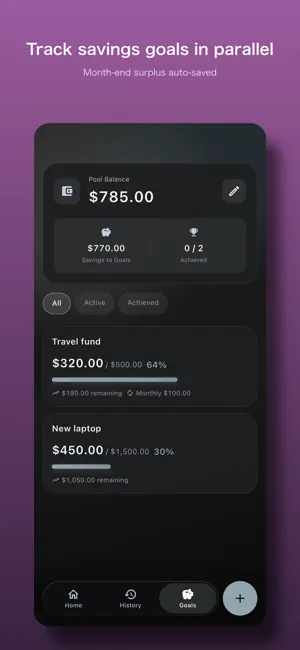
See how much you can spend today, at a glance. yarikuri is a simple spending tracker for people who live on a fixed allowance or monthly budget. It calculates how much money you can safely spend today from your monthly budget and current expenses, helping you avoid overspending without complicated rules. ■ Who it's for - People who manage a monthly allowance or fixed personal budget - People who quit other budgeting apps because they were too detailed - People who mainly want to know "how much can I spend today?" - People who want local storage without creating an account ■ Features - Today's Budget view: see today's spendable amount and the remaining monthly balance - Simple expense entry: save amount, category, and date quickly - Six fixed categories: Food, Entertainment, Transport, Shopping, Health, Other - Flexible daily budget: auto-adjust to the days left, or use the same amount every day - Savings goals: track multiple goals at the same time - Savings pool: month-end leftovers are automatically moved into your total savings pool - History: review expenses by month, year, and category - Backup / Restore: export and import your data as a file - Japanese and English support - 8 color themes ■ Privacy - All your budget and expense data stays on your device - No account or sign-in required - Google AdMob is used to serve ads ■ Pricing - Free to use - No subscriptions - No in-app purchases ■ Support - Contact: [email protected] - Support: https://www.do-tech.jp/services/yarikuri/support - Privacy policy: https://www.do-tech.jp/services/yarikuri/privacy.en - Terms of service: https://www.do-tech.jp/services/yarikuri/terms.en
What’s new
Version 1.1.1 · Updated October 12, 2026
A fresh new look: - Cards are easier to read. - Today's Budget on Home shows whether you're within budget or how much you're over. - A round button by the tab bar records an expense on Home and History, or adds a goal on Goals. - Tap the check key once to record. Sums like 1200+500 are calculated and recorded in the same tap. The Save button in the entry sheet is gone. - On tall phones, the record screen you see at launch has bigger keys and a bigger amount. - On Home, content fades out under the date row as you scroll. Other improvements: - In the savings pool History, you can filter by All, Pool or Goal moves. Money moved to or from a goal is marked with a flag and a band. - When you record or edit an expense in a month that's already closed, a note tells you the pool balance won't change. - On iPhones set to a language other than Japanese, the tracking permission prompt is now explained in English. Fixes: - If you had never picked a currency, changing the language could change the currency and shift your amounts. - Set Budget could open with "This month only" in a month with a pool transfer or a budget reduced by last month's deficit. - After a month with a pool transfer ended, Budget Remaining in History was lower by the transfer amount (fixed for months that close after this update). - Old settings could remain right after restoring a backup or resetting data. - If the ad for changing themes failed to load, it wouldn't load again until you restarted the app. - The check mark on the selected theme was hard to see. - Messages shown at the top of the screen could appear in a monospaced font with underlines.
App privacy
The developer, Do. LLC, reported these privacy practices to Apple.
Data Used to Track You
The following data may be used to track you across apps and websites owned by other companies:
- Location: Coarse Location
- Identifiers: Device ID
- Usage Data: Product Interaction, Advertising Data
Data Linked to You
The following data, which may be collected and linked to your identity, may be used for the following purposes:
- Location: Coarse Location
- Identifiers: Device ID
- Usage Data: Product Interaction, Advertising Data
Used for: Third-Party Advertising, Developer’s Advertising or Marketing, Analytics, App Functionality
Data Not Linked to You
The following data, which may be collected but is not linked to your identity, may be used for the following purposes:
- Diagnostics: Crash Data, Performance Data, Other Diagnostic Data
Used for: Analytics, App Functionality
Alternatives to yarikuri: Daily Budget App
Looking for apps like yarikuri: Daily Budget App? Here are 6 similar apps on the App Store.
-
 Steady: Daily Budget Planner
-
 手元帳
手元帳
-
 Atokura
-
 mirai plan 目的別貯金と特別費の管理
-
 CashForecast 残高管理
-
 MoneySense AI Budget Assistant
| App | Rating | Price | Last updated | Compare |
|---|---|---|---|---|
| yarikuri: Daily Budget App | – | Free | October 12, 2026 | |
| Steady: Daily Budget Planner | – | Free | Oct 19, 2026 | Compare |
| 手元帳 | – | Free | Sep 12, 2026 | Compare |
| Atokura | – | Free | Aug 22, 2026 | Compare |
| mirai plan 目的別貯金と特別費の管理 | – | Free | Oct 15, 2026 | Compare |
| CashForecast 残高管理 | – | Free | Jul 19, 2026 | Compare |
| MoneySense AI Budget Assistant | – | Free | Sep 11, 2026 | Compare |