

MoneySense AI Budget Assistant
洪坤 白 Finance iPhoneiPadiPod touchMac
MoneySense AI Budget Assistant is a free Finance app for iPhone and iPad by 洪坤 白. Requires iOS 16.0. Updated September 11, 2026.
- Price
- Free
- on the App Store
- Size
- 79 MB
- Age 4+
- Updated
- Sep 11
- 2026 · v2.0.2
Screenshots

About MoneySense AI Budget Assistant
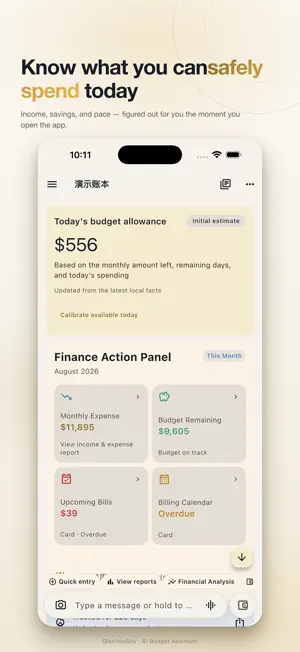
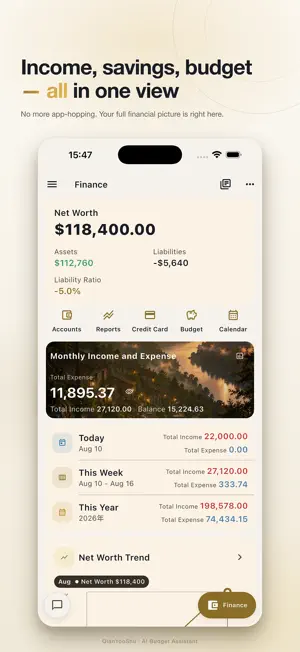
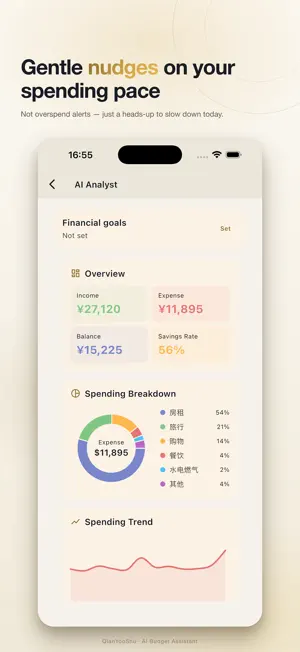
MoneySense is your AI personal finance assistant — it tells you how much you can safely spend today and helps you plan tomorrow's cash flow. [Today's Spendable] Open MoneySense and instantly see what you can spend today. Not just a balance check — it combines your available balance, pay cycle, essential expenses, and confirmed reserves to calculate your real daily spending headroom. Money isn't for restricting your life; it's for helping you live more confidently. [Balance Reconciliation] After updating your account balance, MoneySense explains where the difference came from. Reconciled entries won't change your balance again — no more manual matching. [AI Financial Insights] • 30-day cash flow forecast: See funding gaps before they happen • Anomaly alerts: Catch unusual spending automatically • Spending pace analysis: Are you burning faster than usual this week? • AI Financial Analyst Report: Full visual breakdown of income, expenses, assets, and risk [Powerful Expense Tracking] • Chat-based entry: Just type or speak naturally to record a transaction • Photo receipt scanning: Snap a photo and AI extracts the details • Voice input: Hold to speak, auto-transcribed for quick entry • Multi-book support: Separate work, family, and personal books [Bill Calendar] Switch between month and week views. Swipe horizontally to navigate months. All your daily cash flow at a glance. [Multi-Book & Budget] • Create multiple books with full data isolation • Flexible budgets: monthly, yearly, or custom periods • Customizable account home: only see the modules you care about [Life Awareness] • 10-second daily check-in: track mood, energy, and stress • Check-in data stays on your device and is never uploaded [Privacy First] • All core calculations run on-device • Sensitive data lives in a separate encrypted database, excluded from iCloud and standard backups • AI features require explicit consent before sending de-identified aggregate data • Widget privacy mode hides real amounts [System Integration] • Home screen Widget: Check today's spendable without opening the app • Siri Shortcuts: Ask how much you can spend today • iCloud Documents: Cross-device backup and restore MoneySense — Spend today with confidence.
What’s new
Version 2.0.2 · Updated September 11, 2026
MoneySense 2.0.2 — Know what you can spend today. [Improvements] • Simplified Today's Spendable cards with clearer hierarchy — see your number at a glance • Refined income calculation for more reliable spendable estimates • Faster chat startup [Fixes] • Fixed recurring bills (rent, subscriptions) not being counted toward fixed-expense reserves [Privacy] • Removed Apple Health, Calendar & Reminders integrations for a leaner footprint • Usage data stays on-device, with export support
App privacy
The developer, 洪坤 白, reported these privacy practices to Apple.
Data Not Collected
The developer does not collect any data from this app.
Alternatives to MoneySense AI Budget Assistant
Looking for apps like MoneySense AI Budget Assistant? Here are 6 similar apps on the App Store.
-
 Safe to Spend Budget: Yovari
-
 ヒワリ - 毎日の予算がわかる家計簿
-
 旺财 — 守财狗 GuardDog
-
 今日いくら使える?
-
 Cuzdanist: AI Budget Tracker
-
 还剩多少钱-AI 聊天记账-Pro
| App | Rating | Price | Last updated | Compare |
|---|---|---|---|---|
| MoneySense AI Budget Assistant | – | Free | September 11, 2026 | |
| Safe to Spend Budget: Yovari | – | Free | Jul 21, 2026 | Compare |
| ヒワリ - 毎日の予算がわかる家計簿 | – | Free | Oct 16, 2026 | Compare |
| 旺财 — 守财狗 GuardDog | – | 0.99 USD | Aug 20, 2026 | Compare |
| 今日いくら使える? | – | Free | Sep 25, 2026 | Compare |
| Cuzdanist: AI Budget Tracker | – | Free | Mar 19, 2026 | Compare |
| 还剩多少钱-AI 聊天记账-Pro | – | Free | Apr 27, 2026 | Compare |